
docker-android
Android in docker solution with noVNC supported, video recording, mcp server and AI-agent
 budtmo
- 评测生成时间(北京时间)
- 本报告引擎
- v3.10.0
- 当前引擎
- v3.16.0
本报告与当前引擎使用不同规则;原分数不会自动更新,不同版本的分数不宜直接对比。
进入后确认来源与额度,提交才会创建任务。
综合采用结论
核心能力可用,建议在受控范围内试用
- 基础评测完成+25/25确定性评分与静态安全扫描已完成
- README 有效证据+18/257,010 个去重后的有效字符
- 独立证据来源+16/204 类非重复证据,重复文件不叠加
- 仓库元数据+10/10已取得仓库状态与采用数据
- 活跃记录+5/5已取得最近提交时间
- AI 复核+15/15已完成结构化 AI 证据复核
Docker-Android容器启动与使用流程
README展示了从运行容器到访问VNC和检查状态的步骤,属于连续处理流程。
左右滑动查看完整图示
- • Quick Start步骤3运行容器
- • 步骤4打开http://localhost:6080
- • 步骤5使用docker exec cat device_status
- README列出Android 9-14镜像和多种设备
- Quick Start提供docker run命令和VNC访问
- Use-Cases链接到具体文档
- Persisting data章节说明挂载卷
- Pro版本表格列出功能差异
- 问题与用途描述
- 有效 README
- 安装或接入步骤
- 可执行示例
- 未发现已知高风险模式
- 缺少输入、参数或工具说明
- 缺少输出或结果说明
- 缺少错误处理或排障
- MCP服务器为beta,缺少具体使用说明
- 未提供环境变量和参数详细说明
Android应用开发和测试、UI自动化测试(Appium等)、CI/CD集成(Jenkins)、云部署场景
需要稳定MCP服务器的生产环境、非Ubuntu主机且无虚拟化支持的环境
也有自己的公开项目?先看完证据,再用当前规则生成独立报告。
评测我的项目 →静态扫描不是安全保证,生产接入前仍应人工复核权限和数据边界。
- 01补充输入、参数或工具说明
- 02补充输出或结果说明
- 03补充错误处理或排障
方法、证据与局限展开收起
GitHub Repository API
4 个文件 · 9,190 字符
v3.10.0 · AI 复核已启用(deepseek-chat)
- 静态评测不会安装或执行项目代码
- 安全扫描基于高信号文件与已知模式,不能替代人工审计
- 流行度只反映采用程度,不代表安全或工程质量
30 天热度趋势
README






Docker-Android is a docker image built to be used for everything related to Android. It can be used for Application development and testing (native, web and hybrid-app).
Advantages of using this project
- Emulator with different device profile and skins, such as Samsung Galaxy S6, LG Nexus 4, HTC Nexus One and more.
- Support vnc to be able to see what happen inside docker container
- Support log sharing feature where all logs can be accessed from web-UI
- Ability to control emulator from outside container by using adb connect
- Integrated with other cloud solutions, e.g. Genymotion Cloud
- It can be used to build Android project
- It can be used to run unit and UI-Test with different test-frameworks, e.g. Appium, Espresso, etc.
- It support mcp server (beta-version)
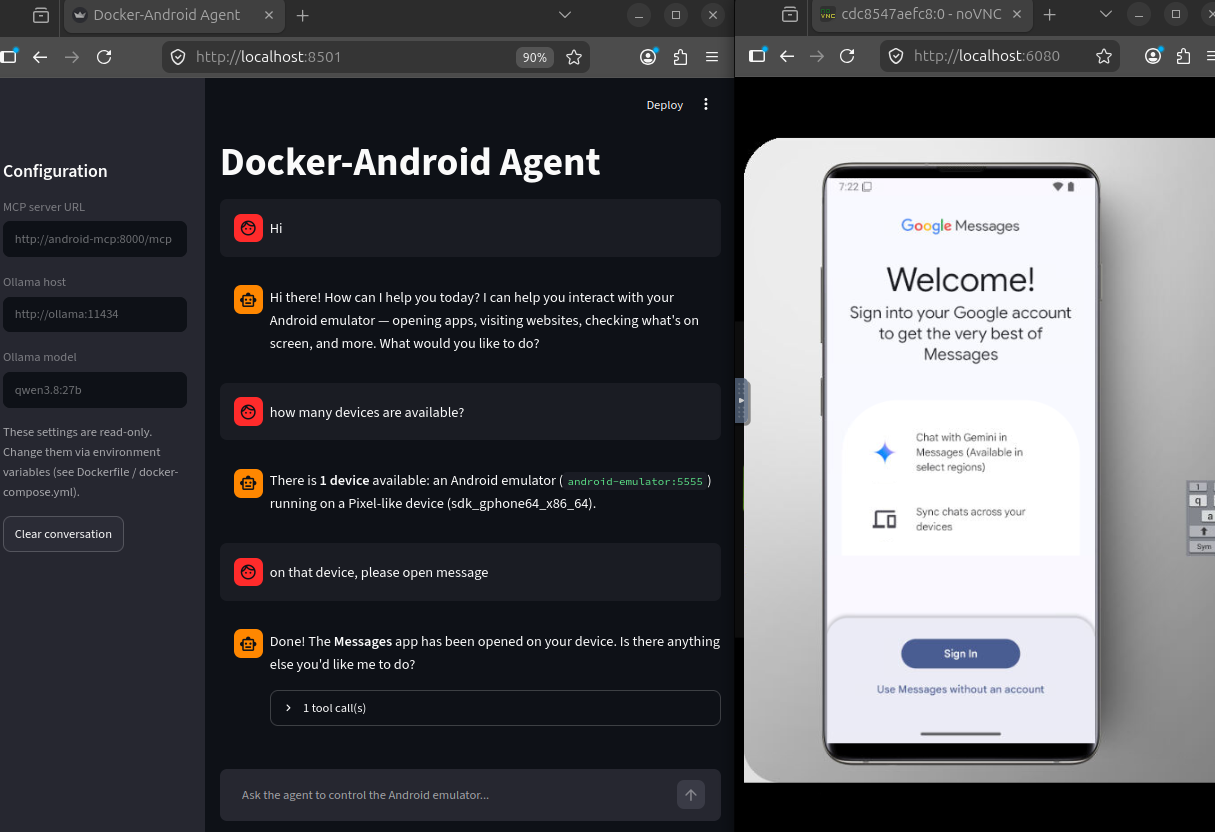
- It support ai-agent (beta-version)
List of Docker-Images
| Android | API | Image with latest release version | Image with specific release version |
|---|---|---|---|
| 9.0 | 28 | budtmo/docker-android:emulator_9.0 | budtmo/docker-android:emulator_9.0_<release_version> |
| 10.0 | 29 | budtmo/docker-android:emulator_10.0 | budtmo/docker-android:emulator_10.0_<release_version> |
| 11.0 | 30 | budtmo/docker-android:emulator_11.0 | budtmo/docker-android:emulator_11.0_<release_version> |
| 12.0 | 32 | budtmo/docker-android:emulator_12.0 | budtmo/docker-android:emulator_12.0_<release_version> |
| 13.0 | 33 | budtmo/docker-android:emulator_13.0 | budtmo/docker-android:emulator_13.0_<release_version> |
| 14.0 | 34 | budtmo/docker-android:emulator_14.0 | budtmo/docker-android:emulator_14.0_<release_version> |
| - | - | budtmo/docker-android:genymotion | budtmo/docker-android:genymotion_<release_version> |
| - | - | budtmo/docker-android:mcp | budtmo/docker-android:mcp_<release_version> |
List of Devices
| Type | Device Name |
|---|---|
| Phone | Samsung Galaxy S10 |
| Phone | Samsung Galaxy S9 |
| Phone | Samsung Galaxy S8 |
| Phone | Samsung Galaxy S7 Edge |
| Phone | Samsung Galaxy S7 |
| Phone | Samsung Galaxy S6 |
| Phone | Nexus 4 |
| Phone | Nexus 5 |
| Phone | Nexus One |
| Phone | Nexus S |
| Tablet | Nexus 7 |
| Tablet | Pixel C |
Requirements
- Docker is installed on your system.
Quick Start
-
If you use Ubuntu OS on your host machine, you can skip this step. For OSX and Windows OS user, you need to use Virtual Machine that support Virtualization with Ubuntu OS because the image can be run under Ubuntu OS only.
-
Your machine should support virtualization. To check if the virtualization is enabled is:
sudo apt install cpu-checker kvm-ok -
Run Docker-Android container
docker run -d -p 6080:6080 -e EMULATOR_DEVICE="Samsung Galaxy S10" -e WEB_VNC=true --device /dev/kvm --name android-container budtmo/docker-android:emulator_11.0 -
Open http://localhost:6080 to see inside running container.
-
To check the status of the emulator
docker exec -it android-container cat device_status
Persisting data
The default behaviour is to destroy the emulated device on container restart. To persist data, you need to mount a volume at /home/androidusr:
docker run -v data:/home/androidusr budtmo/docker-android:emulator_11.0
WSL2 Hardware acceleration (Windows 11 only)
Credit goes to Guillaume - The Parallel Interface blog
Microsoft - Advanced settings configuration in WSL
-
Add yourself to the
kvmusergroup.sudo usermod -a -G kvm ${USER} -
Add necessary flags to
/etc/wsl.confto their respective sections.[boot] command = /bin/bash -c 'chown -v root:kvm /dev/kvm && chmod 660 /dev/kvm'Then, using PowerShell, open a notepad on
notepad $env:USERPROFILE\.wslconfig. Inside, put these other flags:[wsl2] nestedVirtualization=true -
Restart WSL2 via CMD prompt or Powershell
wsl --shutdown
command = /bin/bash -c 'chown -v root:kvm /dev/kvm && chmod 660 /dev/kvm' sets /dev/kvm to kvm usergroup rather than the default root usergroup on WSL2 startup.
nestedVirtualization flag is only available to Windows 11.
If this setup does not work, you may have an old WSL version. In that case, ignore \.wslconfig and put everything on /etc/wsl.conf, including the [wsl2] flag.
Use-Cases
- Build Android project
- UI-Test with Appium
- Control Android emulator on host machine
- SMS Simulation
- Jenkins
- Deploying on cloud (Azure, AWS, GCP)
Custom-Configurations
This document contains information about configurations that can be used to enable some features, e.g. log-sharing, etc.
Genymotion

For you who do not have ressources to maintain the simulator or to buy machines or need different device profiles, you can give a try by using Genymotion SAAS. Docker-Android is integrated with Genymotion on different cloud services, e.g. Genymotion SAAS, AWS, GCP, Alibaba Cloud. Please follow this document for more detail.
Emulator Skins
The Emulator skins are taken from Android Studio IDE and Samsung Developer Website
USERS
PRO VERSION
Due to high requests for help and to be able to actively maintain the projects, the creator has decided to create docker-android-pro. Docker-Android-Pro is a sponsor based project which mean that the docker image of pro-version can be pulled only by active sponsor.
The differences between normal version and pro version are:
| Feature | Normal | Pro | Comment |
|---|---|---|---|
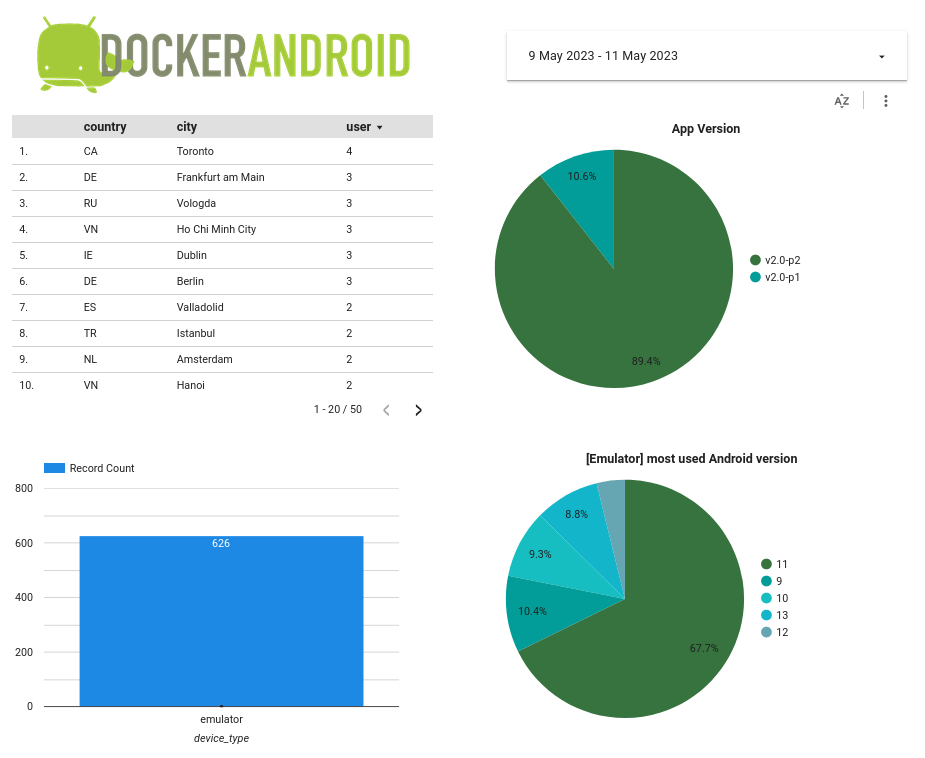
| user-behavior-analytics | Yes | No | - |
| ai-agent | No | Yes | Currently supported local AI-host/AI-provider: Ollama |
| proxy | No | Yes | Set up company proxy on Android emulator on fly |
| language | No | Yes | Set up language on Android emulator on fly |
| Newer Android version | No | Yes | Support other newer Android version e.g. Android 15, Android 16, Android 17, etc |
| root-privileged | No | Yes | Able to run command with security privileged |
| headless-mode | No | Yes | Save resources by using headless mode |
| Selenium 4.x integration | No | Yes | Running Appium UI-Tests againt one (Selenium Hub) endpoint for Android- and iOS emulator(s) / device(s) |
| multiple Android-Simulators | No | Yes (soon) | Save resources by having multiple Android-Simulators on one docker-container |
| Google Play Store | No | Yes (soon) | - |
| Video Recording | No | Yes (soon) | Helpful for debugging |
List pro-version images:
| Android | API | Type | Image with latest release version | Image with specific release version |
|---|---|---|---|---|
| 9.0 | 28 | Normal | budtmo2/docker-android-pro:emulator_9.0 | budtmo2/docker-android-pro:emulator_9.0_<release_version> |
| 10.0 | 29 | Normal | budtmo2/docker-android-pro:emulator_10.0 | budtmo2/docker-android-pro:emulator_10.0_<release_version> |
| 11.0 | 30 | Normal | budtmo2/docker-android-pro:emulator_11.0 | budtmo2/docker-android-pro:emulator_11.0_<release_version> |
| 12.0 | 32 | Normal | budtmo2/docker-android-pro:emulator_12.0 | budtmo2/docker-android-pro:emulator_12.0_<release_version> |
| 13.0 | 33 | Normal | budtmo2/docker-android-pro:emulator_13.0 | budtmo2/docker-android-pro:emulator_13.0_<release_version> |
| 14.0 | 34 | Normal | budtmo2/docker-android-pro:emulator_14.0 | budtmo2/docker-android-pro:emulator_14.0_<release_version> |
| 15.0 | 35 | Normal | budtmo2/docker-android-pro:emulator_15.0 | budtmo2/docker-android-pro:emulator_15.0_<release_version> |
| 16.0 | 36 | Normal | budtmo2/docker-android-pro:emulator_16.0 | budtmo2/docker-android-pro:emulator_16.0_<release_version> |
| 17.0 | 37 | Normal | budtmo2/docker-android-pro:emulator_17.0 | budtmo2/docker-android-pro:emulator_17.0_<release_version> |
| 9.0 | 28 | Headless | budtmo2/docker-android-pro:emulator_headless_9.0 | budtmo2/docker-android-pro:emulator_headless_9.0_<release_version> |
| 10.0 | 29 | Headless | budtmo2/docker-android-pro:emulator_headless_10.0 | budtmo2/docker-android-pro:emulator_headless_10.0_<release_version> |
| 11.0 | 30 | Headless | budtmo2/docker-android-pro:emulator_headless_11.0 | budtmo2/docker-android-pro:emulator_headless_11.0_<release_version> |
| 12.0 | 32 | Headless | budtmo2/docker-android-pro:emulator_headless_12.0 | budtmo2/docker-android-pro:emulator_headless_12.0_<release_version> |
| 13.0 | 33 | Headless | budtmo2/docker-android-pro:emulator_headless_13.0 | budtmo2/docker-android-pro:emulator_headless_13.0_<release_version> |
| 14.0 | 34 | Headless | budtmo2/docker-android-pro:emulator_headless_14.0 | budtmo2/docker-android-pro:emulator_headless_14.0_<release_version> |
| 15.0 | 35 | Headless | budtmo2/docker-android-pro:emulator_headless_15.0 | budtmo2/docker-android-pro:emulator_headless_15.0_<release_version> |
| 16.0 | 36 | Headless | budtmo2/docker-android-pro:emulator_headless_16.0 | budtmo2/docker-android-pro:emulator_headless_16.0_<release_version> |
| 17.0 | 37 | Headless | budtmo2/docker-android-pro:emulator_headless_17.0 | budtmo2/docker-android-pro:emulator_headless_17.0_<release_version> |
| - | - | AI-Agent | budtmo2/docker-android-pro:agent | budtmo2/docker-android-pro:agent_<release_version> |
| - | - | Selenium | budtmo2/docker-android-pro:selenium | budtmo2/docker-android-pro:selenium_<release_version> |
This document contains detail information about how to use docker-android-pro.
SPONSORS

Swiftproxy — Swiftproxy provides high-quality residential proxies for Android testing, automation, and location-based workflows. With 90M+ residential IPs, HTTP(S)/SOCKS5 support, flexible targeting, and non-expiring traffic, Swiftproxy helps users test apps and online services from different locations. Try Swiftproxy for free today and get 10% off with code PROXY90.

RapidProxy — RapidProxy is a high-performance proxy provider built for automation and multi-account operations, offering clean residential proxies and native static ISP IPs. Access 90 million+ residential IPs worldwide, with intelligent rotation, sticky sessions, and support for high-concurrency requests. Ideal for web scraping, browser automation, social media account management, e-commerce, and bulk account registration. Residential proxies start at just $0.55/GB, with bandwidth that never expires. Use code RAPID10 for 10% off.
LICENSE
See License