
svg-diagram
Agent skill that draws architecture, flowchart, sequence, data-flow and lifecycle diagrams as hand-placed SVG, to one linted house style.
 bybit-exchange
- 评测生成时间(北京时间)
- 本报告引擎
- v3.14.0
- 当前引擎
- v3.16.0
本报告与当前引擎使用不同规则;原分数不会自动更新,不同版本的分数不宜直接对比。
进入后确认来源与额度,提交才会创建任务。
综合采用结论
证据充分,整体质量与安全表现优秀
- 基础评测完成+25/25确定性评分与静态安全扫描已完成
- README 有效证据+24/259,606 个去重后的有效字符
- 独立证据来源+12/203 类非重复证据,重复文件不叠加
- 仓库元数据+10/10已取得仓库状态与采用数据
- 活跃记录+5/5已取得最近提交时间
- AI 复核+15/15已完成结构化 AI 证据复核
svg-diagram 出图与 lint 校验流程
README 描述从请求到出图再到 lint 修复的连续步骤,属单一任务顺序处理
左右滑动查看完整图示
- • Install 章节:安装后新会话请求图表,agent 应声明使用 svg-diagram
- • The lint gate 章节:linter 读取成品 SVG,失败输出 found→should 修复行
- • The lint gate 章节:`0 errors, 0 warnings` 是唯一通过,warning 也算失败
- Install 章节给出 `npx skills add bybit-exchange/svg-diagram -g` 及各 agent 路径表
- The lint gate 章节:`node tools/svg-lint/bin/svg-lint.mjs diagram.svg` 与 `--json`,示例报 3 errors/7 warnings 并 exit 1
- What the skill pins down 表列出 viewBox 20–25px、box 高 font-size×3、箭头 5px/11px 间距等具体数值
- Contributing 章节:`npm run lint:svg:all` 与 `npm test`(984 tests),fixtures 中 fail/ 14 个被排除
- License 章节标注 MIT,并链接 LICENSE
- 问题与用途描述
- 有效 README
- 安装或接入步骤
- 可执行示例
- 未发现已知高风险模式
- 缺少限制、权限或边界
- README 未声明权限、数据边界或安全默认值
- linter 为手动维护工具,无自动调用或 CI 集成说明
- Claude.ai 场景明确不支持 svg-lint,能力受限未展开
- 限制与不支持事项仅零散出现,无集中边界章节
需要 agent 产出可评审纯 SVG 图的文档/README 作者、要求多图风格统一、可 diff 的工程团队、希望用 linter 在交付前自检图表的维护者
需要自动布局引擎或运行时渲染的场景、无法运行本地 Node 的纯云端使用场景
也有自己的公开项目?先看完证据,再用当前规则生成独立报告。
评测我的项目 →静态扫描不是安全保证,生产接入前仍应人工复核权限和数据边界。
- 01补充限制、权限或边界
方法、证据与局限展开收起
GitHub Repository API
3 个文件 · 38,111 字符
v3.14.0 · AI 复核已启用(deepseek-flash)
- 静态评测不会安装或执行项目代码
- 安全扫描基于高信号文件与已知模式,不能替代人工审计
- 流行度只反映采用程度,不代表安全或工程质量
30 天热度趋势
README
svg-diagram
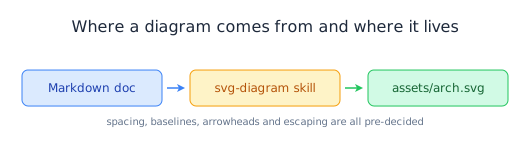
A house style for hand-written SVG diagrams your agent can follow — the layout arithmetic, the colour system, and a zero-dependency linter that proves it did.



Install
Paste this to your coding agent:
Install the svg-diagram skill from https://github.com/bybit-exchange/svg-diagram
for me by running: npx skills add bybit-exchange/svg-diagram -g
Or run it yourself:
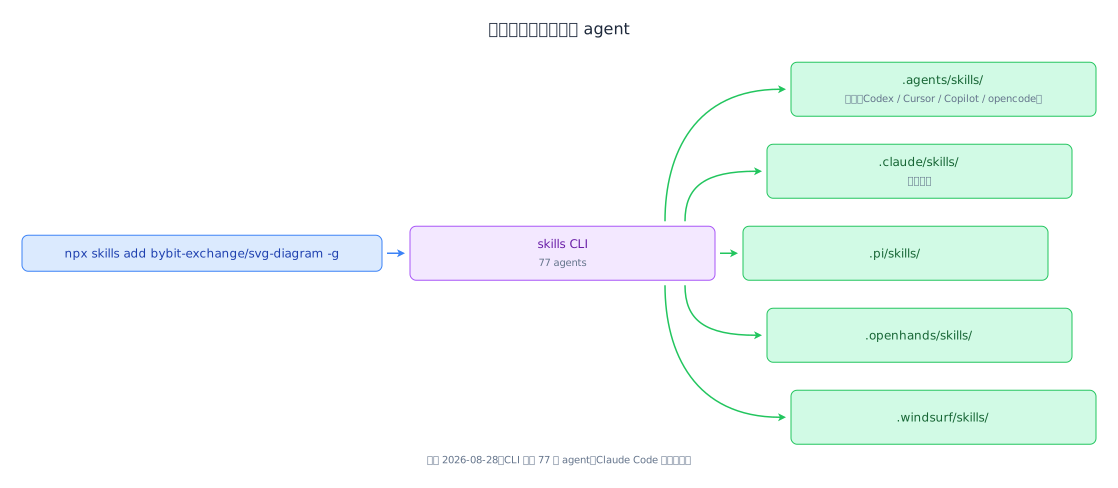
npx skills add bybit-exchange/svg-diagram -g
The CLI detects which agents you have installed and writes each one's path. Drop -g to install into the current project instead.
| Surface | Path |
|---|---|
| Claude Code | ~/.claude/skills/svg-diagram/ |
| Codex, Cursor, Gemini CLI, Copilot, opencode, Antigravity | ~/.agents/skills/svg-diagram/ — they share one directory |
| Pi | ~/.pi/skills/svg-diagram/ |
| Windsurf, Continue, Roo, Goose, Kiro, Trae and 40+ more | ~/.<agent>/skills/svg-diagram/ |
| Claude.ai | Zip the folder and upload it under Settings → Capabilities → Skills (skill text only — svg-lint needs local Node) |
Every path is named from the skill's frontmatter name, not from where the skill sits here, so moving files in this repository doesn't change them.
SKILL.md is at the repository root, so the install copies the root and svg-lint comes along with the skill text. The linter has no dependencies, so it runs from wherever it landed:
node ~/.claude/skills/svg-diagram/tools/svg-lint/bin/svg-lint.mjs diagram.svg
If you only want the skill text, take the one file the agent reads:
mkdir -p ~/.claude/skills/svg-diagram
curl -fsSL https://raw.githubusercontent.com/bybit-exchange/svg-diagram/main/SKILL.md \
  -o ~/.claude/skills/svg-diagram/SKILL.md
The skill works on its own that way; svg-lint is what you give up.
Then start a new session and ask for a diagram — the agent should announce that it's using svg-diagram.
Gallery
Ten diagrams, all drawn under this skill and all lint clean. Each one is here for the rule it demonstrates.
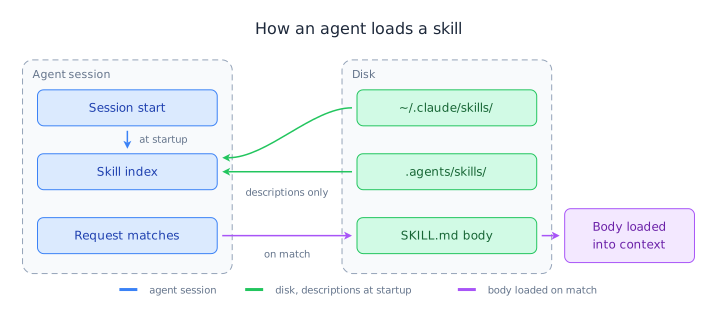
How an agent loads a skill
Two dashed containers side by side. Connectors cross the channel between them, and a colour change marks the point where a request matches.
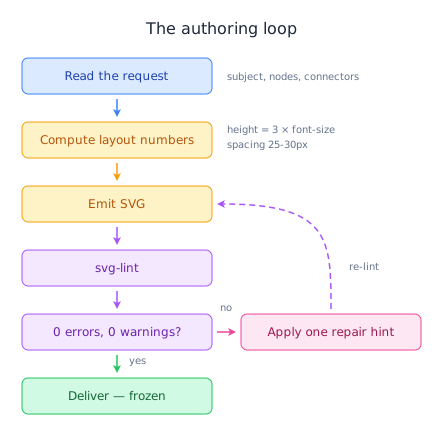
The authoring loop
A cross-layer loop-back line, painted after the boxes so they don't cover it.
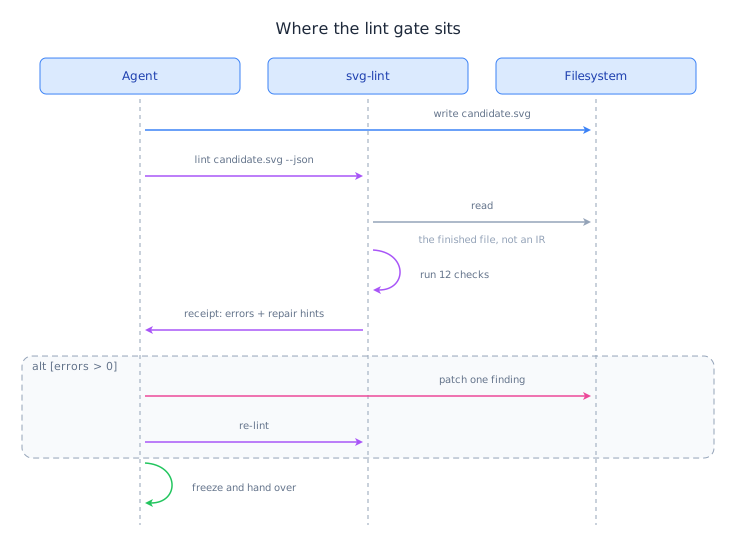
Where the lint gate sits
A self-call that leaves its lifeline and curves back to it, its second control point sharing the end point's y so the arrowhead closes level and points at the participant rather than down the lifeline.
From a data API to a document figure
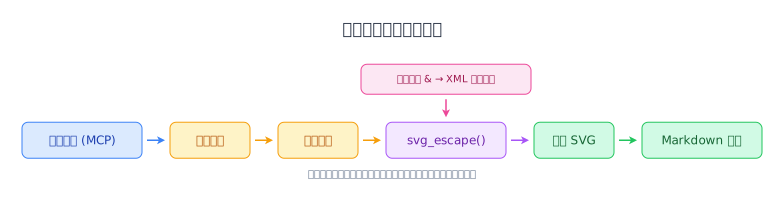
CJK labels sized from the CJK column of the width table — one full font size per character, 12px rather than 7.
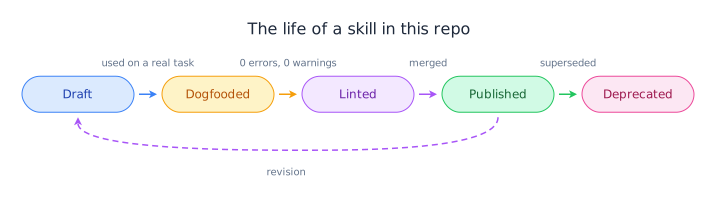
The life of a skill in this repo
One semantic colour triple per state. Each forward arrow carries the colour of the state it leaves.
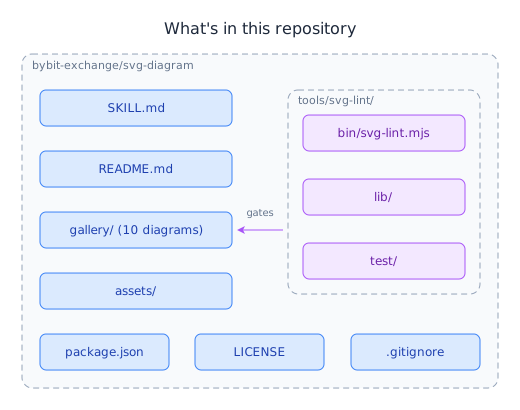
What's in this repository
A dashed border only where the contents are actually drawn — gallery/ and assets/ are directories too, but their members aren't in the figure, so they stay plain boxes.
One command, every agent
A one-to-many fan-out whose branch curves keep each second control point level with the end point, so every arrowhead lands pointing right.
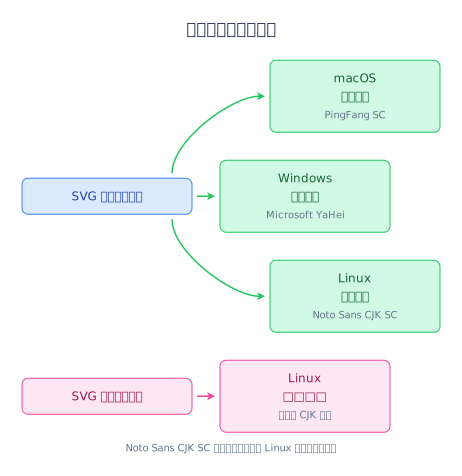
Why the font stack cannot be dropped
A contrast pair built from two semantic triples: the working paths in green, the branch that fails in pink.
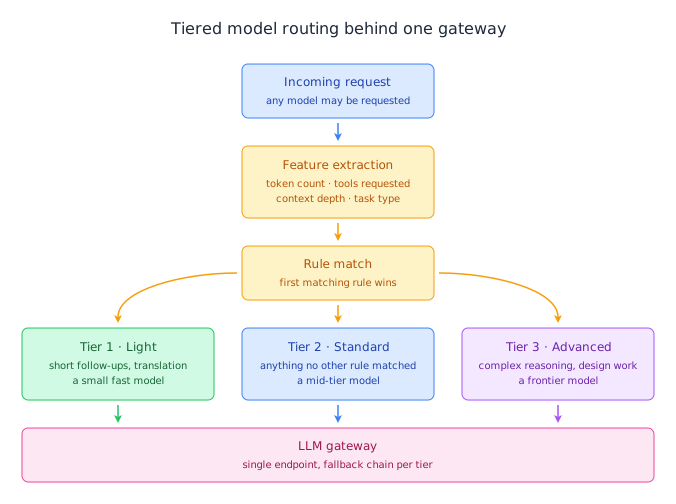
Tiered model routing behind one gateway
A symmetric fan-out and convergence, one triple per tier. Only the middle leg leaves the rule box's bottom edge; the two outer ones leave its sides.
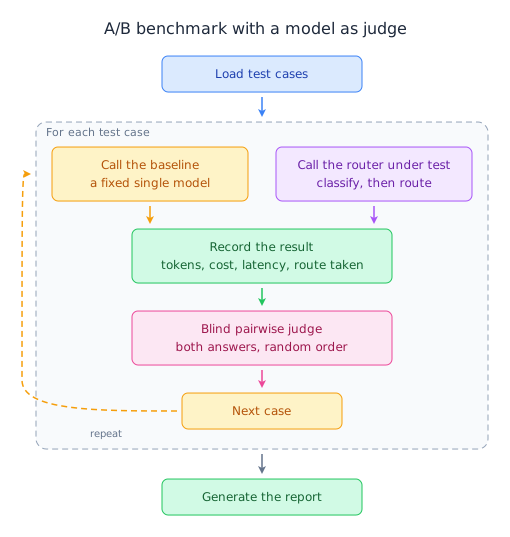
A/B benchmark with a model as judge
A dashed group box around exactly the steps that repeat. The return edge is painted last, so it stays legible where it crosses the wall.
What the skill pins down
| Area | What's pinned down |
|---|---|
| Layout | viewBox margins of 20–25px, the title centred on the content centre rather than the viewBox, and off-centre content shifted with a single <g transform="translate(dx,0)"> |
| Boxes | Height derived from the font — one line is font-size × 3, each extra line adds font-size × 1.5 — and boxes sharing a row whose sizes differ by no more than 60px |
| Connectors | A straight L only when the two ends are co-axial, a C or Q curve for anything that turns, and no right-angle elbows |
| Arrowheads | A notched marker with markerUnits="userSpaceOnUse", sized to the line's stroke width, starting 5px clear of the source and ending 11px short of the target |
| Text | Baseline at box y + height/2 + font-size × 0.35 to centre inside a box, and at least 10px of clearance from a straight connector — 15px from a curve, with the label above a downward bend and below an upward one |
| Fonts | 16px titles, 12px box text, 10px annotations, over a stack that keeps Noto Sans CJK SC so Linux rendering doesn't fall back to tofu |
| Colours | Five semantic fill/stroke/text triples applied through presentation attributes — no CSS classes, no media queries |
| Escaping | &, <, >, " and ' escaped in text and attributes, and anything from a database or an API escaped before it's concatenated into the file |
Every diagram also paints its own white canvas rect as the first element, so it reads as a light card on GitHub's dark theme instead of dark text on a dark background. That isn't theme switching. The diagram carries one colour set, and the rect exists only so that set stays readable wherever the file is embedded.
The full rules — the character width tables, the six arrowhead colour variants, the coordinate bookkeeping, and a twenty-item verification checklist — are in SKILL.md, which is the single source of truth.
Why
- Checked on the real artifact. The linter reads the finished SVG, not an intermediate format. Nothing sits between the receipt and the file you ship.
- Zero dependencies.
svg-lintis plain Node with no packages. It runs in a fresh clone, with no install step and no lockfile. - Placed, not auto-laid-out. The skill hands the agent the arithmetic — box height, baseline offset, arrow clearance, block spacing — so every element lands somewhere chosen rather than somewhere a layout engine picked.
- Findings name the fix. A failure reports the value it found and the value it should hold:
viewBox: 11 → 20–25, not "the margin looks wrong". - CJK-safe by default. A mandatory font stack, plus separate character-width tables for Latin and CJK, so labels are checked for overflow before they're placed.
- Reviewable as text. Every coordinate is a literal, annotated with a comment explaining why it holds that value, so a change to a diagram reads as a diff instead of a re-render.
- Plain SVG out. No runtime, no viewer, no JavaScript. It renders in a README, a docs site, a PDF and a terminal preview.
The lint gate
svg-lint reads the finished SVG and reports what the house style forbids. It's a maintainer tool, run by hand. Nothing invokes it for you, so run it before you hand a diagram over.
node tools/svg-lint/bin/svg-lint.mjs diagram.svg
node tools/svg-lint/bin/svg-lint.mjs diagram.svg --json
Try it on a deliberately broken file:
printf '%s' '<svg xmlns="http://www.w3.org/2000/svg" viewBox="0 0 200 60" width="200"><text x="50" y="20" font-size="12">Load & Save</text></svg>' > /tmp/broken.svg
node tools/svg-lint/bin/svg-lint.mjs /tmp/broken.svg
That reports 3 errors and 7 warnings and exits 1: the unescaped &, the missing font stack, the missing white canvas rect, an off-palette fill, four viewBox margins outside the 20–25px range, and asymmetric margins on both axes. Each finding carries the id of the check that raised it and a repair line:
  1:1  error  No <style> rule declares font-family for text  [font-stack/missing-font-stack]
         repair: font-family: absent → 'PingFang SC', 'Microsoft YaHei', 'Noto Sans CJK SC', system-ui, sans-serif · SKILL.md marks this non-negotiable
The 12 checks cover XML escaping, viewBox clipping, the font stack, box height, baseline offset, block spacing, arrow markers, text overflow, overlap, light-background fallback, palette conformance and connector geometry. A thirteenth id, document-model, raises no findings of its own. It's how the model layer reports what it couldn't read, so the geometry checks never draw conclusions from coordinates they got wrong.
0 errors, 0 warningsis the only pass; a warning is a failure.
Exit codes, the --json shape, and what each check does and doesn't catch are in tools/svg-lint/README.md. SKILL.md carries a troubleshooting table for the symptoms that reach you before the linter does.
Contributing
This repository holds one skill, and the SKILL.md at the root is it.
Frontmatter takes name and description; license and a metadata map (version, author, requirements) are welcome too. name is what every install path keys off. The description is what the agent matches on, so write it as "what it covers + when to use it" — that line is the trigger, and the body costs nothing until the work matches it.
Before you open a PR, use the skill for a real task in a fresh session. If the agent didn't load it on its own, the description needs work; if the output still needed manual correction, the body is missing a rule — or the linter is missing a check.
Diagrams committed here must pass clean, and the test suite has to stay green:
npm run lint:svg:all   # the 11 SVGs this repo ships
npm test               # 984 tests
Everything under tools/svg-lint/test/fixtures/ is excluded from the lint run — for the 14 under fail/, failing is their job, and the 2 under pass/ are asserted by the test suite instead.