
nightingale
Open-source, self-hosted alerting for metrics, logs, and databases. Includes a built-in AI agent and MCP server.
 ccfos
ccfos- 评测生成时间(北京时间)
- 本报告引擎
- v3.16.0
- 当前引擎
- v3.16.0
规则版本一致,但报告只反映生成时的证据,不代表项目代码和安全状态始终不变。
进入后确认来源与额度,提交才会创建任务。
综合采用结论
存在需要人工复核的风险或证据不足
- 基础评测完成+25/25确定性评分与静态安全扫描已完成
- README 有效证据+25/2510,115 个去重后的有效字符
- 独立证据来源+20/207 类非重复证据,重复文件不叠加
- 仓库元数据+10/10已取得仓库状态与采用数据
- 活跃记录+5/5已取得最近提交时间
- AI 复核+15/15已完成结构化 AI 证据复核
静默规则创建与匹配流程
SKILL.md 给出创建步骤与匹配门顺序,属单一任务的连续处理步骤
左右滑动查看完整图示
- • Workflow 1: use list_busi_groups to get the group_id
- • Workflow 1 step 3: Call create_alert_mute
- • Mental model: checked in order: rule enabled → datasource → time → alert severity → tags
- 通过: Agent Skills 格式校验 22/22 个通过
- 通过: 22 个有效 Skill 含可核实的指令步骤或示例
- 质量评审选取 aiagent/skill/embedded/builtin/alert-mute-copilot/SKILL.md;其余 21 个仅做格式扫描
- SKILL.md 描述:muting takes effect during the event evaluation stage (muted events are neither persisted nor notified)
- 匹配顺序:rule enabled → datasource → time (fixed/periodic) → alert severity → tags,见 alert/mute/mute.go:MatchMute
- update_alert_mute 为 proposal-based,config 为增量补丁,tags/severities/datasource_ids/periodic_mutes 提供时整体替换
- etime 与 duration 互斥,同时传会被拒绝;etime > btime 为硬校验
- 删除无内置工具:deletion has no in-app tool—have the user do it in the UI
- 问题与用途描述
- 有效 README
- 安装或接入步骤
- 可执行示例
- 通过: Agent Skills 格式校验 22/22 个通过
- 发现高风险的一键下载执行或安装命令
- 发现提示词或系统信息提取意图
- aiagent/skill/embedded/builtin/categraf-deploy-guide/SKILL.md:description 未清楚说明何时使用该 Skill
- aiagent/skill/embedded/builtin/promql-generator/SKILL.md:description 未清楚说明何时使用该 Skill
- aiagent/skill/embedded/builtin/sql-generator/SKILL.md:description 未清楚说明何时使用该 Skill
在 n9e 内置 AI 助手中创建/调整告警静默规则、排查“已静默但仍告警”的匹配门问题、维护窗口、夜间批处理等周期性静默配置
需要内置删除静默规则能力的场景、需要配置通知对象与路由(应使用 notify-rule-copilot)、外部 A2A 之外的纯 HTTP 调用场景
也有自己的公开项目?先看完证据,再用当前规则生成独立报告。
评测我的项目 →unsafe-install-commandaiagent/skill/embedded/builtin/modify-task-tpl/SKILL.md:261high confidence| `curl <non-whitelisted URL> \| sh`, `wget ... -O - \| bash` | Remote code injection |修复:固定版本与校验和,先下载审查再执行,避免管道直接交给 Shell。
prompt-extractionaiagent/skill/embedded/builtin/skill-creator/SKILL.md:147high confidence- **Don't ***on't help build skills used for unauthorized access, data exfiltration, bypassing permissions, or hiding malicious behavior. A skill's ***at's declared.修复:移除提示词提取逻辑,并增加敏感上下文不可输出的边界说明。
- 01固定版本与校验和,先下载审查再执行,避免管道直接交给 Shell。
- 02移除提示词提取逻辑,并增加敏感上下文不可输出的边界说明。
- 03修复 aiagent/skill/embedded/builtin/categraf-deploy-guide/SKILL.md:description 未清楚说明何时使用该 Skill
- 04修复 aiagent/skill/embedded/builtin/promql-generator/SKILL.md:description 未清楚说明何时使用该 Skill
- 05修复 aiagent/skill/embedded/builtin/sql-generator/SKILL.md:description 未清楚说明何时使用该 Skill
方法、证据与局限展开收起
GitHub Repository API
25 个文件 · 331,147 字符
v3.16.0 · AI 复核已启用(deepseek-flash)
- 静态评测不会安装或执行项目代码
- 安全扫描基于高信号文件与已知模式,不能替代人工审计
- 流行度只反映采用程度,不代表安全或工程质量
- 发现 22 个 Skill;质量复核只评审 aiagent/skill/embedded/builtin/alert-mute-copilot/SKILL.md,其余 21 个仅做格式扫描
30 天热度趋势
README
Open-source alerting for your existing stack





Quick start · Documentation · Releases · Community
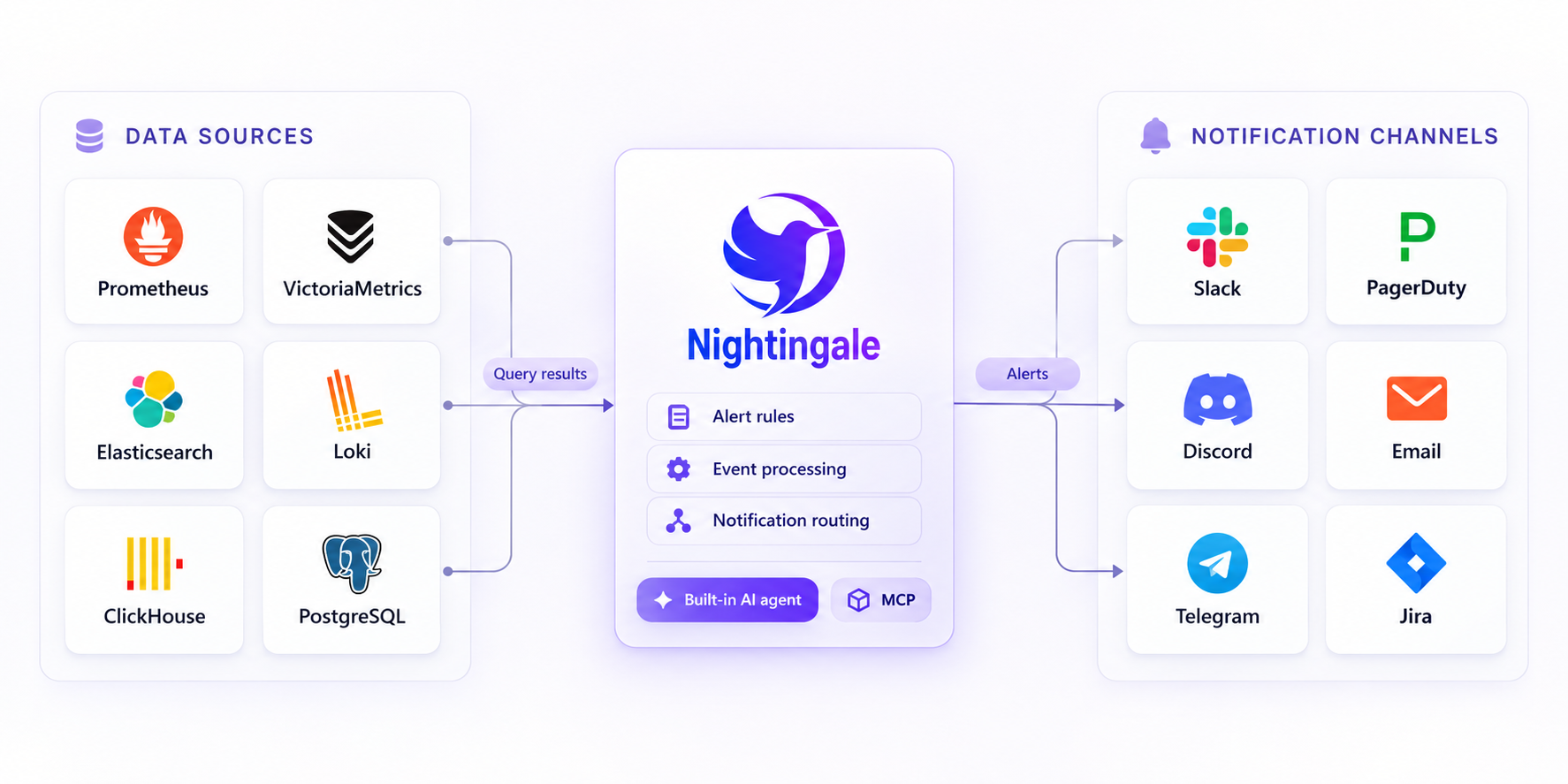
Nightingale brings alert rules, event processing, and notification routing into one place. Connect Prometheus, VictoriaMetrics, Elasticsearch, Loki, ClickHouse, and other data sources you already run, then deliver alerts to Slack, PagerDuty, and your team's existing tools.
Self-hosted · Apache-2.0 · Built-in AI agent · MCP server
Why Nightingale?
- Give teams ownership of their alerts. Organize rules into business groups, assign team permissions, and manage rules and notification settings through the UI and API.
- Bring scattered alerting into one place. Evaluate rules against metrics, logs, and SQL data sources while keeping your existing collectors, storage, and Grafana dashboards.
- Understand what happened to an alert. Inspect rule evaluation records, historical events, and notification results to trace a query through to delivery.
Quick start
With Git and Docker Compose installed, start the included evaluation stack:
git clone https://github.com/ccfos/nightingale.git
cd nightingale/docker/compose-bridge
docker compose up -d
This starts Nightingale, MySQL, Redis, VictoriaMetrics, and Categraf. Open http://localhost:17000 and sign in with root / root.2020.
To get your first alert:
- Connect a data source. Add your existing Prometheus-compatible endpoint, or use
http://victoriametrics:8428for the VictoriaMetrics instance in this Compose stack. - Create an alert rule. Choose a business group and data source, then enter a PromQL expression. For an always-firing test, use
vector(1) > 0and set the duration to0. - Configure delivery. Set up a notification channel, create a notification rule, and attach it to the alert rule. Check that the test notification arrives, then disable the test alert.
The Compose stack uses example credentials and exposes service ports for local evaluation. Change credentials and review network access before deploying on a shared or public host. See deployment options for other ways to run Nightingale.
How it fits into your stack
Nightingale queries your data sources, evaluates alert conditions, processes events, and routes notifications. Your existing data stays in its current stores.
Keep Grafana for visualization and your on-call platform for scheduling, escalation, and incident response. Nightingale also includes dashboards for teams that want to explore data alongside their alerts.
Starting without a monitoring stack? The standalone configuration includes an optional embedded TSDB for small, single-instance deployments. Categraf is an optional collector for hosts, middleware, databases, and network devices.
Key capabilities
| Capability | What you can do |
|---|---|
| Alerting across data sources | Use PromQL, log queries, or SQL to define conditions. Apply a rule to multiple instances of the same data source type. |
| Team ownership | Group rules and dashboards by business group, assign team permissions, and connect OIDC, OAuth2, LDAP, or CAS for sign-in. |
| Event processing and routing | Mute notifications, subscribe to alerts, enrich or rewrite labels, and route events through conditional pipelines. |
| Alert execution records | Review evaluation queries and results, active and historical events, and notification delivery records. |
| Reusable integrations | Start with bundled collector configurations, alert rules, and dashboards. Review queries and thresholds for your environment before enabling them. |
| Distributed evaluation | Distribute rules across alerting engines and use n9e-edge to evaluate alerts close to remote data sources. |
Notification integrations include Slack, PagerDuty, Discord, Email, Telegram, Mattermost, Jira, and Jira Service Management, with HTTP webhooks and scripts for custom destinations. See the native notification channel reference for configuration details.
For automated responses, connect ibex to run predefined remediation scripts when an alert fires.
Built-in AI agent
Nightingale includes an AI agent you can use directly in the web UI. The agent runs inside Nightingale, calls tools to inspect your monitoring data and configuration, and works through tasks over multiple steps.
- Investigate alerts. Query related metrics and logs, inspect affected hosts, and explain findings using the data it retrieves.
- Troubleshoot the alerting process. Inspect rules, evaluation logs, mute settings, event processing, and notification results to find why an alert did not fire or reach its destination.
- Create and update configuration. Build alert rules and dashboards, generate PromQL and SQL, and configure notification rules, mutes, and subscriptions through conversation. The built-in tools for updating existing alert rules and dashboards present proposed changes for confirmation.
- Extend it with Skills. Bundled Skills cover common monitoring workflows. Add your team's procedures, reference material, and scripts as custom Skills, including Skills imported from Git.
For example:
Why did this alert fire? Check the affected host's metrics and logs around the trigger time.
Create a memory-usage alert for the production hosts and notify our team in Slack.
Configure a model endpoint to get started. The agent supports OpenAI-compatible APIs, Claude, Gemini, and compatible self-hosted models. You choose the model service and credentials; core alerting works independently of the agent.
Model provider configuration · Skill management · Bundled Skills
Connect external agents
- MCP lets external assistants call Nightingale's tools. The server runs inside Nightingale at
/mcp, exposes read tools by default, and applies the caller's existing API permissions. Write tools require explicit configuration. See MCP setup. - A2A lets another agent delegate a task to Nightingale's built-in agent. See A2A integration.
Product screenshots
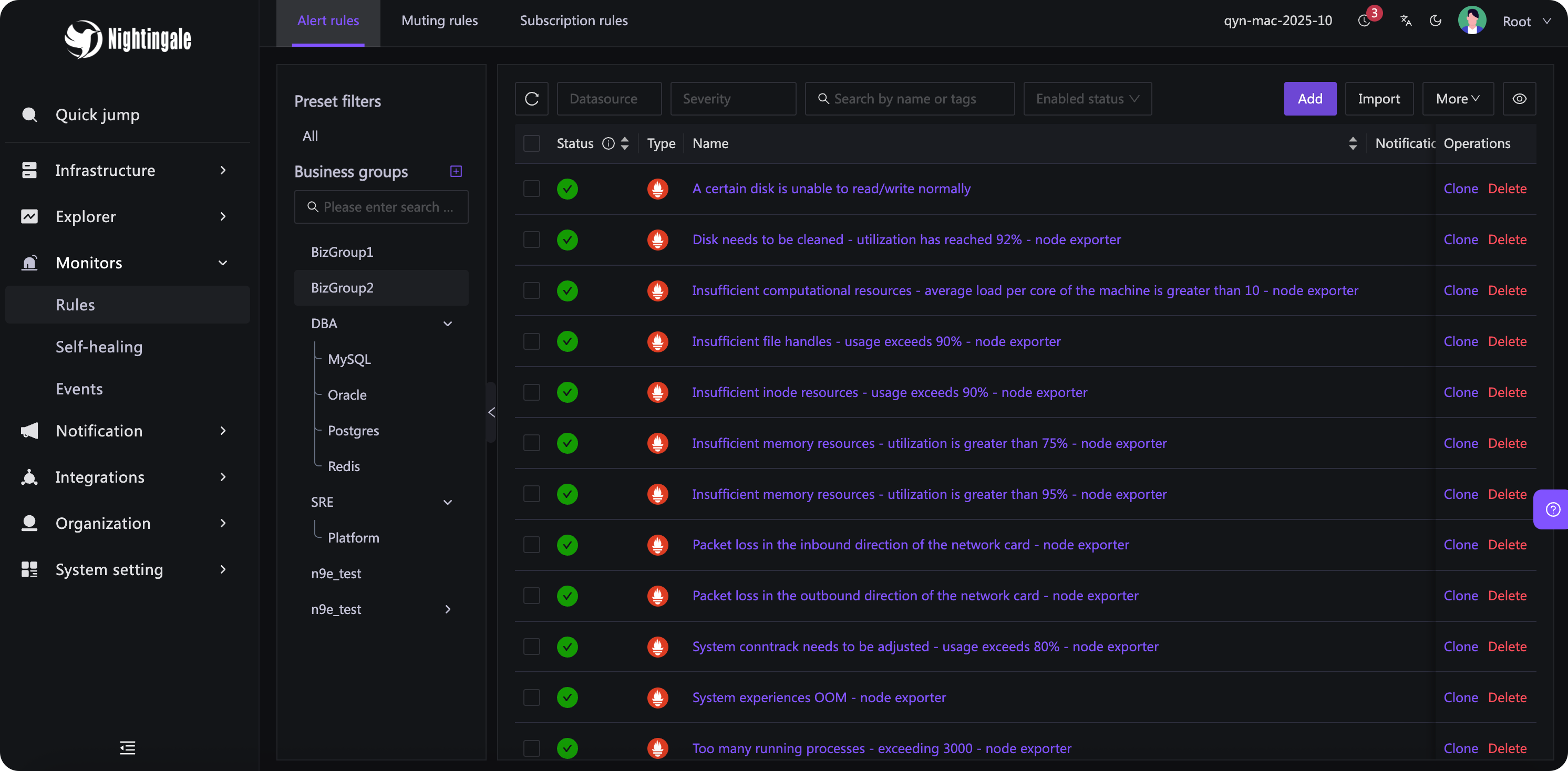
Manage alert rules by data source and business group:
Deployment
| Option | Start here |
|---|---|
| Local evaluation with Docker Compose | Included Compose stack |
| Linux binaries for amd64 and arm64 | Release downloads and configuration reference |
| Kubernetes | Helm chart and installation instructions |
For production, pin a release, configure credentials and TLS, back up the metadata database, and monitor rule evaluation and notification failures. Multiple Nightingale instances share a metadata database and Redis; use external time-series storage for a multi-instance deployment. The embedded TSDB stores data on one instance's local disk.
See the documentation, release notes, and security policy for further guidance and supported versions.
FAQ
Do I need to replace my collectors or move my monitoring data?
No. Nightingale can query your existing data sources directly. Keep your exporters and collectors. Categraf and the embedded TSDB are available when you need collection or local storage.
Can I import existing Prometheus alert rules?
Yes. The rule import supports Prometheus YAML, including expressions, durations, labels, and annotations. Review the converted rules and rebuild notification routing in Nightingale. Import is not a complete conversion of alertmanager.yml; run both systems during evaluation before switching notifications over.
Can I manage rules through Git and CI?
Rules can be exported as JSON and created or updated through the HTTP API, so you can build a workflow around version-controlled configuration. Nightingale does not currently provide built-in rule revision history or rollback to earlier revisions.
Is AI required, and where do model requests go?
Alerting works without AI. The built-in assistant sends prompts and the data it uses to your configured model endpoint; you can use a model hosted in your own network. External MCP clients use their own model settings. Model service credentials and usage costs are managed by you.
Does Nightingale provide on-call scheduling and escalation?
Connect an on-call platform such as PagerDuty for schedules, escalation policies, and incident response. Nightingale handles rule evaluation, event processing, and notification routing.
Community
Questions, bug reports, documentation improvements, and contributions are welcome in English.
- GitHub Discussions — ask questions and share ideas.
- GitHub Issues — report bugs and request features. Include the version, deployment method, and steps to reproduce.
- Slack — join the community.
- Adopter reports — see how others use Nightingale and share your own experience.
- Security policy — report vulnerabilities privately and check version support.
For substantial changes, open an issue to discuss the approach before submitting a pull request. Please follow the Code of Conduct.
Nightingale was originally developed at DiDi and donated to CCF ODC in 2022. Learn about project governance, committers, and contributors.
Stargazers over time
License
Nightingale is available under the Apache License 2.0.
