
draw-your-font
Turn a photo of your handwriting into a real font (TTF/WOFF/WOFF2) - free, open source, no uploads. Node CLI + Claude Code skill.
 danilo-znamerovszkij
- 评测生成时间(北京时间)
- 本报告引擎
- v3.10.0
- 当前引擎
- v3.16.0
本报告与当前引擎使用不同规则;原分数不会自动更新,不同版本的分数不宜直接对比。
进入后确认来源与额度,提交才会创建任务。
综合采用结论
证据充分,整体质量与安全表现优秀
- 基础评测完成+25/25确定性评分与静态安全扫描已完成
- README 有效证据+9/253,515 个去重后的有效字符
- 独立证据来源+12/203 类非重复证据,重复文件不叠加
- 仓库元数据+10/10已取得仓库状态与采用数据
- 活跃记录+5/5已取得最近提交时间
- AI 复核+15/15已完成结构化 AI 证据复核
手写照片转字体流程
README描述了从照片到字体的连续处理步骤,适合用流程图表示。
左右滑动查看完整图示
- • README中'How it works'部分列出流程
- • CLI命令segment和build对应步骤
- • 描述'potrace vectorize'和'shared em-square metrics'
- README描述'Turn a photo of your handwriting into a real font'
- CLI参考表列出template、segment、build、make、preview命令
- 示例命令'npx draw-your-font make photo.jpg --chars "ABCabc" --name "My Hand"'
- 工作原理部分说明'adaptive threshold...potrace vectorize...shared em-square metrics'
- FAQ提及'Kerning, ligatures, letter randomization? v2'
- 问题与用途描述
- 有效 README
- 安装或接入步骤
- 可执行示例
- 未发现已知高风险模式
- 缺少限制、权限或边界
- 缺少限制、权限或边界说明
- 错误处理或排障信息缺失
- 设计细节如安全默认值未展示
- 文档未提及具体版本或依赖约束
希望将手写体转为字体的个人用户、需要本地处理、注重隐私的用户、使用Claude Code的开发者、需要TTF/WOFF/WOFF2格式的网页开发者
需要高级字体功能如连字、随机化的用户、需要图形界面编辑器的用户
也有自己的公开项目?先看完证据,再用当前规则生成独立报告。
评测我的项目 →静态扫描不是安全保证,生产接入前仍应人工复核权限和数据边界。
- 01补充限制、权限或边界
方法、证据与局限展开收起
GitHub Repository API
3 个文件 · 11,495 字符
v3.10.0 · AI 复核已启用(deepseek-chat)
- 静态评测不会安装或执行项目代码
- 安全扫描基于高信号文件与已知模式,不能替代人工审计
- 流行度只反映采用程度,不代表安全或工程质量
30 天热度趋势
README
draw-your-font
Turn a photo of your handwriting into a real font (TTF/WOFF/WOFF2) - free, open source, no uploads, no credits.
Draw your alphabet on paper. Take a photo. Get your font.
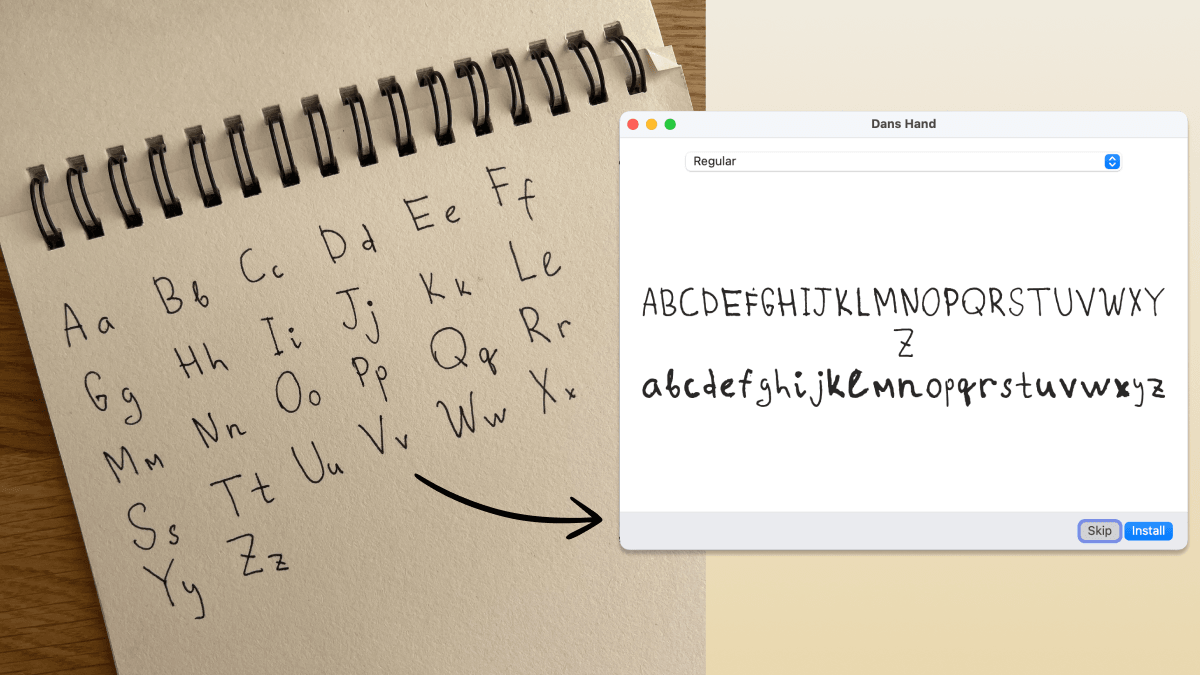
This is a real one-shot result: dim light, spiral binding, page shadow. One photo in, installable font out.
Use it as a Claude Code skill (the fun way)
npx skills add danilo-znamerovszkij/draw-your-font
Then in Claude Code, invoke the skill and hand it your photo:
/draw-your-font "here's a photo of my handwriting - make my font" (drag the photo into the terminal)
Claude finds your letters in the photo, labels them with vision, builds the font, shows you a preview, and critiques its own work. Iterate by talking:
- "make it rounder" / "a bit bolder"
- "the g looks bad" - it shows you the crop and fixes or asks for a re-shoot
- "give me woff2 + css for my website"
- "how readable is it?" - a legibility score and the two worst letter pairs
No photo yet? Say "give me a font template" and you get a printable PDF grid: write your alphabet with a dark pen, photograph the pages, and hand them back. Messy freeform photos work too. Napkins, notebooks, spiral binding, bad lighting: that's what the vision step is for.
Everything runs locally on your machine. Your handwriting never leaves it.
Use it as a CLI (no AI at all)
The skill is a thin layer over a deterministic npm CLI. It works on its own when you can tell it what you wrote:
# freeform photo, you know the order you wrote in:
npx draw-your-font make photo.jpg --chars "ABCabc" --name "My Hand"
# → MyHand.ttf - double-click, install, done.

# best quality: print a template, fill it, photograph:
npx draw-your-font template -o template.pdf --charset minimal   # or: spanish
npx draw-your-font make page1.jpg page2.jpg --charset minimal --name "My Hand"
Pure npm, zero system dependencies: no FontForge, no ImageMagick, no potrace binary. Works on macOS / Linux / Windows wherever Node ≥ 18 runs.
CLI reference
| Command | What it does |
|---|---|
template | printable A4 PDF grid (--charset minimal|spanish) |
segment <photos…> | find letters → crops + numbered contact sheet + blobs.json |
build | labeled crops → font (--labels / --chars / --charset) |
make <photos…> | segment + build in one shot |
preview | render any text with the built font |
Refinement flags: --smooth 0..2 (rounder curves), --weight=-2..2
(thinner/bolder), --formats ttf,woff,woff2,css (web-ready + @font-face
snippet). Run draw-your-font --help for everything.
How it works
photo ──► adaptive threshold ──► blob detection ──► label (Claude / you / template order)
      ──► potrace vectorize ──► shared em-square metrics ──► TTF/WOFF/WOFF2 + preview
The craft is in the metrics step: every character has a vertical band in a
shared 1000-unit em square (cap height, x-height, descender depth), so your
g hangs below the line and your o stays small. That's what makes it feel
like a font instead of a ransom note. Vectorization is potrace, the same
engine inside FontForge and Inkscape. AI never draws your letters; it only
finds, labels, and judges them.
FAQ
Who owns the font? You. 100%, commercial use included. It's your handwriting.
Why is this free when Calligraphr charges $8/month? Their cost is servers and a browser editor. Here your machine does the work and the agent is the editor.
Kerning, ligatures, letter randomization? v2. The pipeline (fonttools
calt) is planned; the current output is a clean single-variant font.
License
MIT. Draw something.