
engram
Persistent memory system for AI coding agents. Agent-agnostic Go binary with SQLite + FTS5, MCP server, HTTP API, CLI, and TUI.
 Gentleman-Programming
- 评测生成时间(北京时间)
- 本报告引擎
- v3.17.3
- 当前引擎
- v3.17.3
规则版本一致,但报告只反映生成时的证据,不代表项目代码和安全状态始终不变。
进入后确认来源与额度,提交才会创建任务。
核对代码版本与送评文本摘要
仅记录实际送评的受限文本,不是完整仓库审计、安装结果或运行时安全保证。Stars、下载量和仓库元数据为采集时的独立信号,不属于此 commit 快照。
Gentleman-Programming/engram @ 2ceda3cc35ac76e50cca64db20b74aaeba8107e7目录树:a37f4d5a9ecd555181188db1d559dc06c70db7cb
README 来源:README.md
- README.md · 25657 字符
SHA-256: 9d4686d10d897089b7373d15247f700f2d1948b5b92804be1291013cf196ade1 - skills/architecture-guardrails/SKILL.md · 1516 字符
SHA-256: eaeff9f5b640a7ccd3143d96036b29d741ab0956381fee15147b7642eb0d2170 - skills/backlog-triage/SKILL.md · 12945 字符
SHA-256: 4d1c67b8dbd7869fda0e9ad527b59b8dffdb9995c2ca023d7c1e8145a892e3b0 - skills/branch-pr/SKILL.md · 15138 字符
SHA-256: da401de97d4e7cd00fa5c8a10faece16184cfe01cca06c9aefc7880006535f66 - skills/business-rules/SKILL.md · 1135 字符
SHA-256: 0832c148a3f12da6b59142b07ae3b3c6967389945ddc567ed8df5e7bfb3f738f - skills/commit-hygiene/SKILL.md · 4289 字符
SHA-256: 83bda399053b2fe92fcaeae322d199bc8b8744b7e1347a1dec1f6e3dc8d4f1f5 - skills/cultural-norms/SKILL.md · 1044 字符
SHA-256: 3f9cc79ada7a21a98fb5eb411d39304225cbf990067aee0fe16722e592b4d672 - skills/dashboard-htmx/SKILL.md · 1174 字符
SHA-256: 016da8bfb01b595af0fb8a23c888b4855bdcbc7b388d0e469b09dad8e2e5cec3 - skills/docs-alignment/SKILL.md · 848 字符
SHA-256: 67ba2237cf4deb47f584e0d21b87136097a7b617414003a5f79f74df11222f93 - skills/gentleman-bubbletea/SKILL.md · 5744 字符
SHA-256: 93c836b6a94163b3b62f3eac730c9dcefb8acadd18afe320f3a942c6d6e6982b - skills/issue-creation/SKILL.md · 9794 字符
SHA-256: 47e9a85c0029ed7cc7bb8fbf2399e6722bc7ac49b15fdc854b4ae5c2f2d50dba - skills/memory-protocol/SKILL.md · 2838 字符
SHA-256: 36626b6306f92be3ec47672b6ddf7d3a55d870a6475460f658aef407da963fb4 - skills/plugin-thin/SKILL.md · 2440 字符
SHA-256: e478d63f5efb8d38a202926e0c522a4e664c4d13328d290008a57feba8074f87 - skills/pr-review-deep/SKILL.md · 786 字符
SHA-256: 36159082c59f4daf1a81f230e8aa50bc1b71e324dbaf3221ad898740cd443e65 - skills/project-structure/SKILL.md · 1347 字符
SHA-256: 286c2f155bba274aca3277f0d1b09e71a956be3556dde86cd948d28674023e66 - skills/server-api/SKILL.md · 890 字符
SHA-256: 84588814ed830ddd9288ea66dd9a59d719feeaba56efaf8e129f82ee293e8af1 - skills/testing-coverage/SKILL.md · 1830 字符
SHA-256: 20df00f0a88ee3e2e8a8c856f209b3ef89521e7c4f2b6f8ecab401f9607b2bd9 - skills/tui-quality/SKILL.md · 881 字符
SHA-256: 55a0653d19779109768001adaeef0abc339c130aaf7e2e299680d2ee1eab9c1c - skills/ui-elements/SKILL.md · 1190 字符
SHA-256: 1ec7a5c10c86bced3666adc8e49adf3618f2f104ba27ddd6b5090b34712362a0 - skills/visual-language/SKILL.md · 1054 字符
SHA-256: a6d1e775924536c9861e0fa333fb8396b01cc80fd11d6a59d944806fc222ce4d - plugin/claude-code/skills/memory/SKILL.md · 5975 字符
SHA-256: 3a778297c5acde399a6a9dd595a4d32d57a2e7769806f1293f161d1413ef679c - plugin/codex/skills/memory/SKILL.md · 6391 字符
SHA-256: acbbd8e29e648612796d3da2fe83df8290353959b5454e1e696965af8c83d3b0 - SECURITY.md · 3078 字符
SHA-256: 0de7c04a51a5ab8f2070733b3cf85e094a12d651ee3ae65a7c3369b85a126783 - docker/cloud/Dockerfile · 561 字符
SHA-256: 073f71db14cd58ca74a164d591cbf8906220684d51498c511833b29122200cfb - plugin/obsidian/package.json · 843 字符
SHA-256: ea8fdf799bfba6a3800dc037c88d1ec6d617406871efc8d2c4c3ea98c678921c
摘要对应送评 UTF-8 文本,可能为限额节选,不等于 Git blob SHA。来源由采集方提供,摘要本身不证明来源真实性。
综合采用结论
证据充分,整体质量与安全表现优秀
- 基础评测完成+25/25确定性评分与静态安全扫描已完成
- README 有效证据+25/2517,115 个去重后的有效字符
- 独立证据来源+20/208 类非重复证据,重复文件不叠加
- 仓库元数据+10/10已取得仓库状态与采用数据
- 活跃记录+5/5已取得最近提交时间
- AI 复核+15/15已完成结构化 AI 证据复核
本报告评了什么
综合分用于静态采用筛选,不是任务成功率,也不代表使用 Skill 后的能力提升。
- 静态检查范围
- 记录 25 个文件 · 109,388 字符
- 只检查采集到的受限文本与已知风险模式;未读取的脚本、依赖和运行环境不在结论内。
- AI 内容复核
- 已使用
- 复核送评文本的说明和设计,不是安装测试或实际任务执行。记录缺失时不推断已使用或未使用。
- 真实任务效果
- 本报告未提供实测证据
- 没有使用/不使用 Skill 的任务对照、重复运行或耗时与 token 成本结果。采用前仍需在隔离环境验证自己的任务。
脚本引用覆盖
已纳入文本静态扫描 0 项/未纳入 7 项
被选 Skill:skills/gentleman-bubbletea/SKILL.md
仅检查被选 Skill 的直接脚本引用,一跳读取,不跟进 imports 或依赖;不执行脚本,脚本文本不送入 AI 质量复核。已纳入只表示文本已扫描,不代表安全。
仅统计本记录中的可识别引用;未纳入或未记录的部分保持未知,不按安全通过处理。
查看 7 项引用明细
1. 未找到文件
引用位置:
skills/gentleman-bubbletea/SKILL.md:26目标路径:
skills/gentleman-bubbletea/model.go固定版本中未找到对应文件。
2. 未找到文件
引用位置:
skills/gentleman-bubbletea/SKILL.md:123目标路径:
skills/gentleman-bubbletea/update.go固定版本中未找到对应文件。
3. 未找到文件
引用位置:
skills/gentleman-bubbletea/SKILL.md:124目标路径:
skills/gentleman-bubbletea/view.go固定版本中未找到对应文件。
4. 未找到文件
引用位置:
skills/gentleman-bubbletea/SKILL.md:246目标路径:
skills/gentleman-bubbletea/installer/internal/tui/model.go固定版本中未找到对应文件。
5. 未找到文件
引用位置:
skills/gentleman-bubbletea/SKILL.md:247目标路径:
skills/gentleman-bubbletea/installer/internal/tui/update.go固定版本中未找到对应文件。
6. 未找到文件
引用位置:
skills/gentleman-bubbletea/SKILL.md:248目标路径:
skills/gentleman-bubbletea/installer/internal/tui/view.go固定版本中未找到对应文件。
7. 未找到文件
引用位置:
skills/gentleman-bubbletea/SKILL.md:249目标路径:
skills/gentleman-bubbletea/installer/internal/tui/styles.go固定版本中未找到对应文件。
Engram 记忆系统组件关系
README 以组件与依赖关系描述代理、单二进制、SQLite 存储及可选 Cloud/Git Sync,无明确时序,故用架构图
左右滑动查看完整图示
- • Features 章节:Agent ↓ MCP stdio → Engram (single Go binary) → SQLite + FTS5
- • Local first 章节:本地 SQLite 为权威,Engram Cloud 为可选的项目级复制
- 未通过: Agent Skills 格式校验 1/21 个通过
- 通过: 1 个有效 Skill 含可核实的指令步骤或示例
- 质量评审选取 skills/gentleman-bubbletea/SKILL.md;其余 20 个仅做格式扫描
- Features 章节图示:Agent → MCP stdio → Engram 单 Go 二进制 → SQLite + FTS5 (~/.engram/engram.db)
- Get started 安装:brew install gentleman-programming/tap/engram,以及 engram setup claude-code/opencode/codex 等 14 条命令
- For agents 章节:mem_current_project、mem_context、mem_search、mem_save、mem_session_summary 等按意图分组的工具契约
- Read-only compatibility observations:engram compatibility --data-dir ... --json,非法参数退出码 2、无 stdout
- Project-aware 章节:解析顺序为显式 project → ENGRAM_PROJECT → cwd,GET /sync/status 拒绝 all_projects=true
- 问题与用途描述
- 有效 README
- 安装或接入步骤
- 可执行示例
- 通过: 1 个有效 Skill 含可核实的指令步骤或示例
- skills/architecture-guardrails/SKILL.md:SKILL.md 父目录名必须与 name 一致
- skills/architecture-guardrails/SKILL.md:description 未清楚说明何时使用该 Skill
- skills/backlog-triage/SKILL.md:SKILL.md 父目录名必须与 name 一致
- skills/backlog-triage/SKILL.md:description 未清楚说明何时使用该 Skill
- skills/branch-pr/SKILL.md:SKILL.md 父目录名必须与 name 一致
使用 Claude Code、OpenCode、Codex 等 MCP 代理并希望跨会话保留项目记忆的开发者、需要本地 SQLite 存储、可离线运行且不想引入外部服务的团队、希望通过 CLI/TUI 浏览与检索代理记忆的用户
需要开箱即用、无需理解项目作用域解析规则的轻量场景、要求完整安全审计与访问控制文档、但不愿跳转外部 DOCS.md 的合规场景
也有自己的公开项目?先看完证据,再用当前规则生成独立报告。
评测我的项目 →静态扫描不是安全保证,生产接入前仍应人工复核权限和数据边界。
- 01修复 skills/architecture-guardrails/SKILL.md:SKILL.md 父目录名必须与 name 一致
- 02修复 skills/architecture-guardrails/SKILL.md:description 未清楚说明何时使用该 Skill
- 03修复 skills/backlog-triage/SKILL.md:SKILL.md 父目录名必须与 name 一致
- 04修复 skills/backlog-triage/SKILL.md:description 未清楚说明何时使用该 Skill
- 05修复 skills/branch-pr/SKILL.md:SKILL.md 父目录名必须与 name 一致
- 06修复 skills/business-rules/SKILL.md:SKILL.md 父目录名必须与 name 一致
方法、证据与局限展开收起
GitHub Repository API
25 个文件 · 109,388 字符
v3.17.3 · AI 内容复核:已使用(deepseek-flash)
- 静态评测不会安装或执行项目代码
- 安全扫描基于高信号文件与已知模式,不能替代人工审计
- 流行度只反映采用程度,不代表安全或工程质量
- 脚本覆盖仅针对被选 Skill 中可识别的直接引用;不递归分析依赖,不执行脚本,脚本未送入 AI 质量复核
- 发现 21 个 Skill;质量复核只评审 skills/gentleman-bubbletea/SKILL.md,其余 20 个仅做格式扫描
30 天热度趋势
README

Engram™
Persistent memory for AI coding agents.





Website • Quickstart • Docs • Candidate staging • Gentle-AI • Wiki
engram /ˈen.ɡræm/ — neuroscience: the physical trace of a memory in the brain.
Your AI coding agent forgets everything when the session ends. Engram gives it a brain.
One brain. Local or cloud. Agent-agnostic, single binary, zero dependencies.
If Engram saved you from re-explaining your project, a star helps other people find it.
WORKS WITH THE AGENT YOU ALREADY HAVE
Claude Code ·
Pi ·
OpenCode ·
Gemini CLI ·
Codex ·
Antigravity ·
Windsurf
Qwen Code ·
Kiro ·
Cursor ·
VS Code (Copilot) ·
Kilo Code ·
Kimi Code ·
CommandCode
14 setup targets · plus any MCP-compatible agent · per-agent setup →

Features
One binary — Memory without a stack
Agent (Claude Code / OpenCode / Gemini CLI / Codex / VS Code / Antigravity / ...)
    ↓ MCP stdio
Engram (single Go binary)
    ↓
SQLite + FTS5 (~/.engram/engram.db)
Codex mutating Engram tools require the running core's /health response to advertise capabilities.runtime_session_resolution: true before resolving the host session. root_session_resume alone is not sufficient. If the core is incompatible, upgrade it to match the CLI, manually restart the running Engram server, and start a new Codex session. Hooks never restart the server automatically. Unregistered sessions and connection or invalid-response failures remain safely blocked with distinct diagnostics; read-only and non-Engram calls are unaffected.
A Go binary with SQLite + FTS5 full-text search, exposed through CLI, HTTP API, MCP, and an interactive TUI. It works with any MCP-compatible agent, including Claude Code, OpenCode, Gemini CLI, Codex, VS Code (Copilot), Antigravity, Cursor, and Windsurf. No Node.js, Python, or Docker is required: one binary, one SQLite file.
The data directory defaults to ~/.engram; a nonblank ENGRAM_DATA_DIR overrides it and must be an absolute path. On Windows, local-SQLite commands (including serve, mcp, and doctor) create and check <data-directory>/tmp/sqlite before opening SQLite, then set TEMP and TMP for that process only. Startup fails with an operation-specific diagnostic if the directory cannot be used. User/system environment settings and the working directory are unchanged. The directory is shared between processes and is not cleaned by Engram; SQLite manages its own uniquely named temporary files. This preparation also covers cloud status, enroll, unenroll, attest-prompt-source, and the local-store cloud upgrade operations (doctor, repair, bootstrap, remirror, status, rollback). It does not run for protocol-mode, setup, cloud serve, cloud config, top-level cloud repair or cloud bootstrap (distinct from the included cloud upgrade repair and cloud upgrade bootstrap), other cloud upgrade subcommands, or unknown commands. Existing orphan-database migration behavior is unchanged, including for commands excluded from this preparation. Linux/macOS, config-free commands, isolated self-tests, compatibility, and migrate-copy retain their existing behavior.
Project-aware — The right memory for the right repo
Project-aware reads use the canonical current project when no selector is supplied: an explicit project, then ENGRAM_PROJECT, then cwd detection. Use --all in the CLI or all_projects=true in HTTP for an intentional global read; do not combine either with an explicit project. engram context retains its positional project as an alias for --project. GET /sync/status supports one resolved project and rejects all_projects=true because its provider cannot aggregate status.
Local first — Portable when needed
Engram keeps memory local by default. The local SQLite database is authoritative; Git Sync exports portable compressed chunks for sharing across machines, and Engram Cloud is optional, project-scoped replication/shared access with browser visibility.
| Need | Start here |
|---|---|
| Local memory and the runtime model | Architecture |
| Share memory with Git | Git Sync reference |
| Use optional Cloud replication | Engram Cloud |
| Diagnose or recover Cloud operations | Cloud troubleshooting |
For an existing local database, use the guided upgrade sequence. If the dry run reports changes, apply them before bootstrap; otherwise continue directly to bootstrap.
engram cloud upgrade doctor --project <project>
engram cloud upgrade repair --project <project> --dry-run
engram cloud upgrade repair --project <project> --apply # only when the dry run reports changes
engram cloud upgrade bootstrap --project <project>
engram cloud upgrade status --project <project>
Terminal UI — Browse what your agent remembers
engram tui
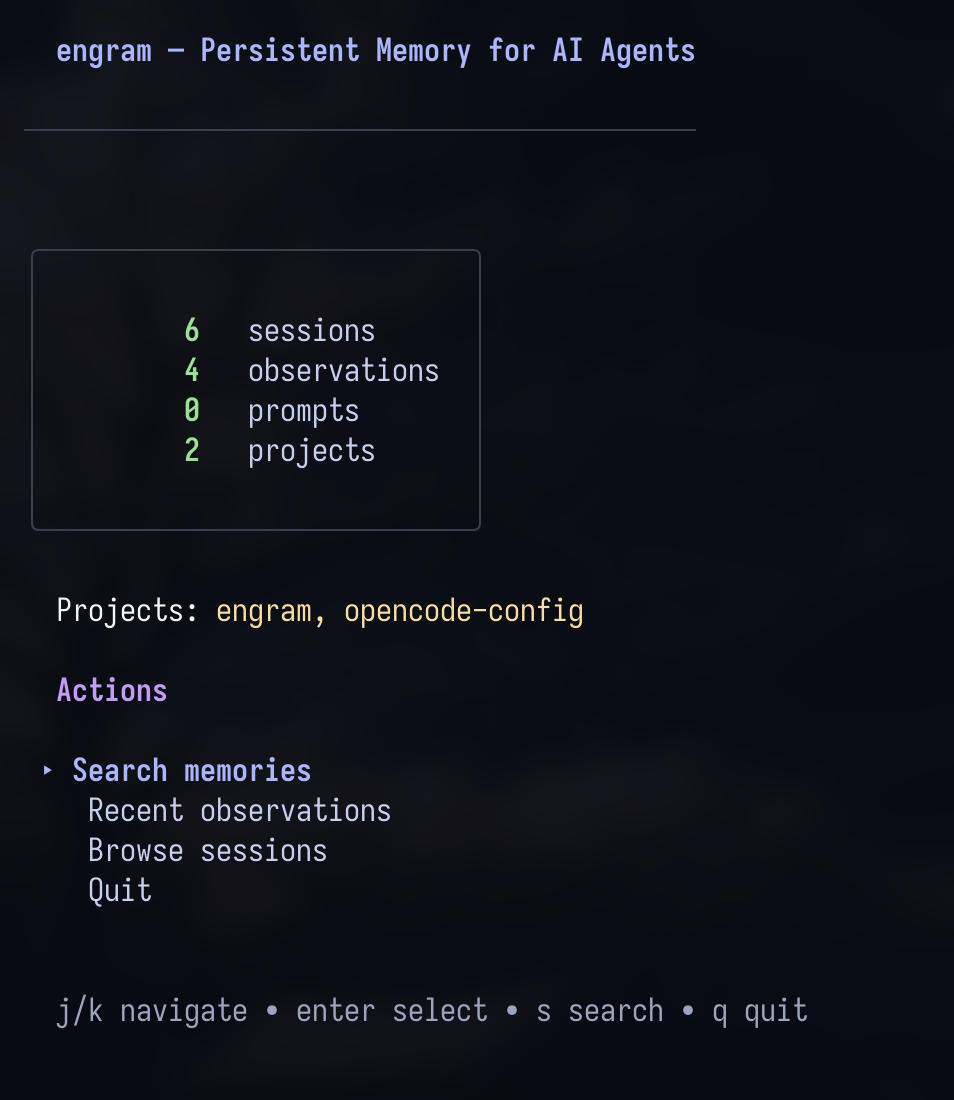
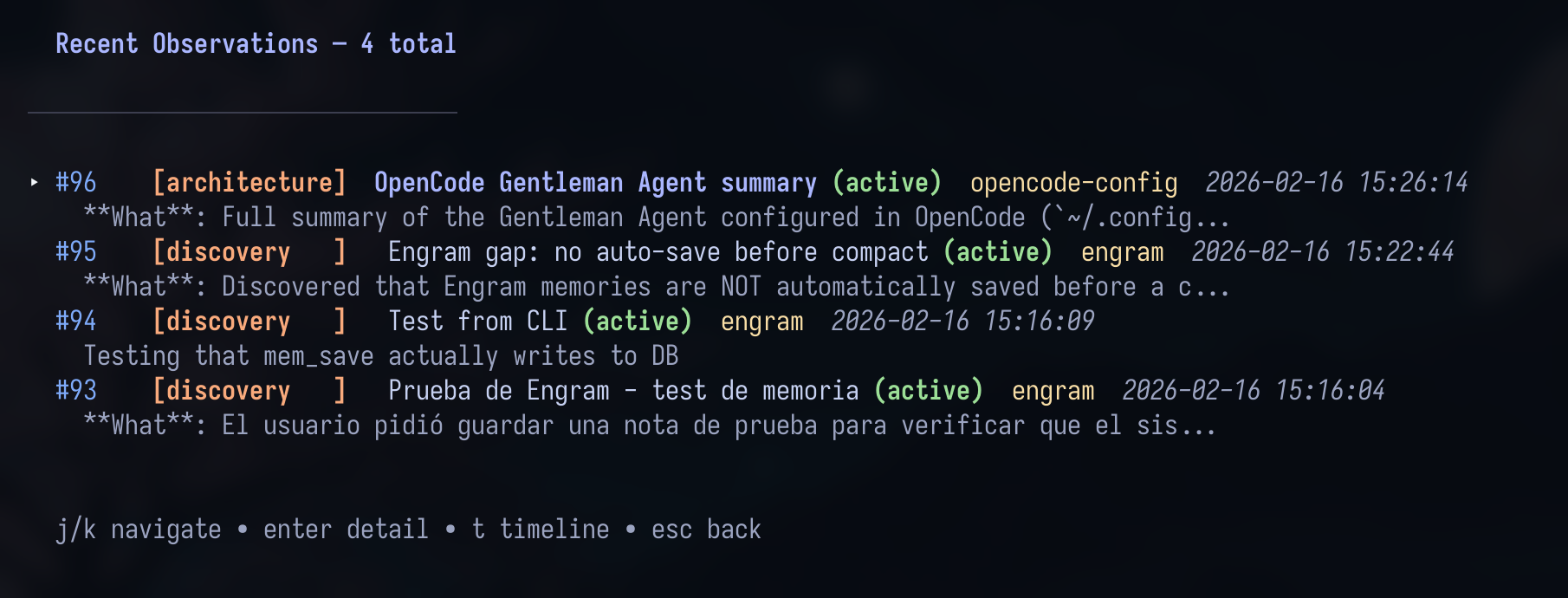
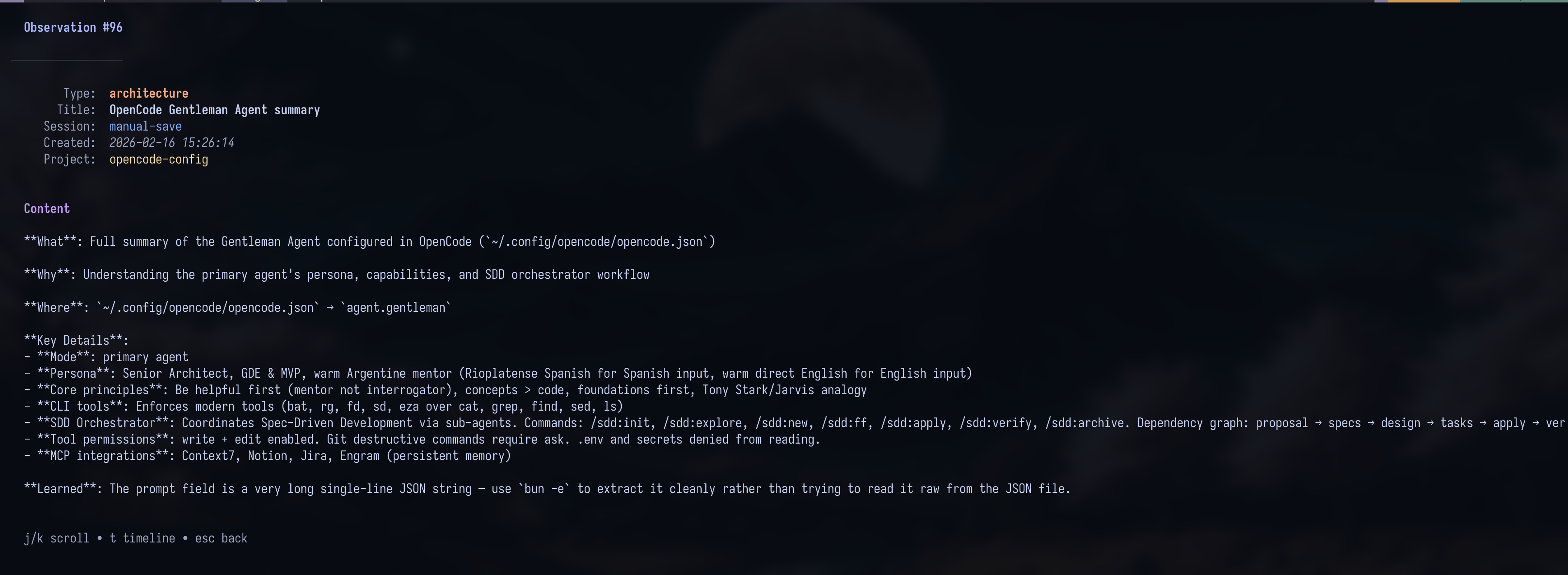
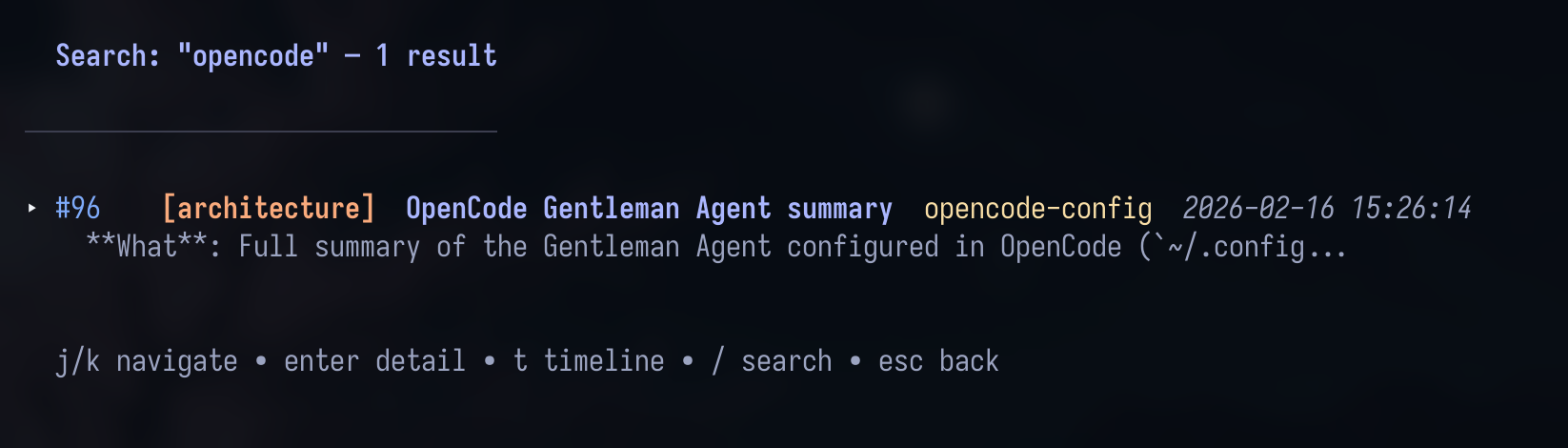
Navigate with j/k, use Enter to drill in, c to copy content to the clipboard, / to search, and Esc to go back. The TUI uses the Catppuccin Mocha theme.
Also in the box
| Component | What it does |
|---|---|
| MCP tools | Save, search, timeline, session, review, and diagnosis tools for your agent |
| HTTP API | The same memory over local HTTP endpoints; compound agent workflows |
| Doctor | engram doctor — read-only operational diagnostics |
| Conflict surfacing | Flags related or conflicting memories so the agent can judge them |
| Plugins | OpenCode and Claude Code plugin details |
gentle-engram | The Engram package for Pi |
| Team usage | Shared-memory conventions |
| Binary self-testing | Isolated reliability and performance checks for released binaries |
| Obsidian Brain | Export memories as an Obsidian knowledge graph (beta) |
Every command, environment variable, and endpoint: Full reference →
Get started
Install
For production use and security support, install the latest stable release from GitHub Releases. Release candidates are prerelease validation and feedback builds; choose one only when you accept prerelease risk. See the Release Policy before upgrading.
Homebrew installs the latest stable release:
brew install gentleman-programming/tap/engram
For Windows, Linux, source builds, and all installation methods, see Installation.
Set up your agent
Run the setup command for the agent you use, then restart that agent. engram setup writes the applicable MCP and integration configuration; it does not require you to start a server for the usual stdio-only setup.
| Agent | Setup |
|---|---|
| Claude Code | engram setup claude-code |
| Pi | engram setup pi |
| OpenCode | engram setup opencode |
| Gemini CLI | engram setup gemini-cli |
| Codex | engram setup codex |
| Antigravity CLI | engram setup antigravity-cli |
| Windsurf | engram setup windsurf |
| Qwen Code | engram setup qwen |
| Kiro | engram setup kiro |
| Cursor | engram setup cursor |
| VS Code (Copilot) | engram setup vscode-copilot |
| Kilo Code | engram setup kilocode |
| Kimi Code | engram setup kimi |
| CommandCode | engram setup commandcode |
| Another MCP-compatible agent | Manual MCP setup |
For Claude Code, rerunning setup updates the marketplace and the user-scope engram@engram plugin when it is already installed; existing project- or local-scope copies are not updated. An update failure fails setup; restart Claude Code after a successful update to load the new hooks.
Per-agent configuration, plugin behavior, manual MCP setup, compaction resilience, and troubleshooting: Agent Setup → · Pi users can also find the package at
gentle-engram.
Read-only compatibility observations
Before considering an existing store, run the explicit-path probe:
engram compatibility --data-dir /absolute/path/to/fixture --json
This command dispatches before updates, configuration, orphan migration or
Store.New. It reads directory metadata, the SQLite header and .instance-id
only; it does not load SQLite, read memories, create directories/locks or repair
identity. Exactly one --data-dir and one --json are accepted; any other
argument, including --help, prints the usage line to stderr. Invalid arguments
or unsafe metadata produce exit 2, no stdout and a diagnostic on stderr.
engram help lists the command. Successful observations produce exit 0 and one
JSON object with revision: 1, source: "offline", both authorization flags
false and, for an existing store, its instance_id. Status is fresh for
an empty directory, legacy_schema/future_schema for non-current headers,
or unknown_shape for a current header. Missing directories, malformed headers,
missing/invalid identity, nonregular database/identity entries, database-name
ambiguity, WAL/SHM/journal sidecars and observed metadata changes are rejected.
Directory aliases are resolved; no filesystem path is returned in the JSON.
Offline success never authorizes opening an existing store. A current header cannot prove schema shape, and normal schema-1 startup still executes DDL and repairs. These observations are not atomic snapshots or leases; an undetected race cannot grant permission because offline authorization is always false.
GET /compatibility provides the actual running store's startup facts, under
the same optional bearer authentication as other protected API routes. A
successful current-schema startup returns source: "active", status: "ready",
active_reuse_authorized: true, its actual instance_id, a per-store-opening
random runtime_id, and capability: "startup-verified-store-v1". The response
is not derived from /health, release version or externally supplied metadata.
Nil, closed, generation-invalidated and future-schema-skipped handles return
status: "unknown" and deny reuse. Reads do not open SQLite connections or
resolve configuration. Startup facts do not certify arbitrary external in-place
schema edits or future changes; clients must not treat this response as a lease,
an authentication token or offline migration permission. Compare explicit store
identity when reusing a selected runtime; never silently substitute another
endpoint. Unknown evidence should leave memory disabled, with guidance to back
up, update and restart the existing server, then recheck.
For agents
Treat Engram as a curated project memory, not a transcript sink. Use this operating contract throughout the session.
- Orient before writing. Start with
mem_current_projectto confirm the resolved project and its source. At the start of related work, usemem_contextandmem_searchto recover the relevant history. - Search before repeating. Before revisiting a decision, bug, convention, or request that may already be known, search with focused terms. Search results are previews, not the complete record.
- Retrieve progressively. Use
mem_searchfor candidates,mem_timelinewhen surrounding session context matters, andmem_get_observationbefore relying on a full observation. - Save significant knowledge deliberately. Save completed bug fixes, decisions, discoveries, configuration changes, patterns, and durable user constraints with
mem_save. Do not capture raw tool output or every conversational turn. - Keep evolving knowledge stable. Give an evolving topic a stable
topic_keysuch asarchitecture/auth-model; reuse it to update that topic rather than creating competing memories. Usemem_suggest_topic_keywhen the key is unclear. - Leave a handoff. Before ending a session, save a
mem_session_summarywith the goal, instructions, discoveries, accomplished work, next steps, and relevant files. - Recover after compaction. Persist the compacted handoff with
mem_session_summaryfirst. Then callmem_contextto recover recent session history before continuing.
When Git initialization changes the detected project
Before creating a repository's first private Git identity, Engram checks local
session history for the exact working directory. If Git suggests remote-app
but that directory has history under local-app, implicit project selection
stops with project_transition_conflict instead of silently changing scope.
History is only a precaution: explicit or imported sessions can also trigger it.
Choose the intended scope deliberately. For a persistent choice, run
engram init local-app in the project directory; existing explicit project
filters and valid registered-session writes remain available. Do not overwrite
an existing configuration without reviewing it. This choice changes future
resolution; it does not merge or move previously split memories.
Historical directories are matched as absolute, lexically normalized paths;
Engram does not access their filesystems. Relative history without a recorded
base is ignored. Only the selected working directory is filesystem-canonicalized,
so legacy history stored under a symlink alias may require an explicit project
choice (engram init local-app) rather than automatic recognition.
Existing Git bindings stay stable. This check cannot reconstruct history without a usable absolute directory, across relocated paths, or in another local store.
A useful memory is structured
**What**: Added retry-safe upload handling.
**Why**: Retries could create duplicate records.
**Where**: internal/upload/handler.go
**Learned**: Reuse the request id as the idempotency key.
Use a short, searchable title and a fitting type with that content. The full Memory Protocol defines the durable-save rules and session-summary shape.
Choose MCP tools by intent
Tool availability can vary by MCP profile. Start with the intent, then use your client's tool discovery mechanism (such as ToolSearch) only when a deferred tool is needed.
| Intent | Start with |
|---|---|
| Confirm the project and recover recent work | mem_current_project, mem_context |
| Find prior knowledge without repeating work | mem_search |
| Inspect a result in enough detail | mem_timeline, mem_get_observation |
| Save or refine durable knowledge | mem_save, mem_update, mem_suggest_topic_key |
| Consolidate observations after preview and explicit confirmation | mem_consolidate (Go MCP server; contract) |
| Preserve the user's request | mem_save_prompt |
| Hand off or close a session | mem_session_summary, mem_session_start, mem_session_end; MCP atomic close: mem_session_finalize |
| Review stale knowledge or memory relationships | mem_review, mem_judge, mem_compare; MCP batch: mem_judge_many |
| Diagnose project or store state | mem_doctor |
For parameters and the complete, current tool reference, see the full documentation.
Documentation
| Where to go | What you'll find |
|---|---|
| Intended Usage | The human mental model for using Engram |
| Installation · Release Policy | Platform support, all installation methods, and stable, RC, security-support, upgrade, and rollback guidance |
| Agent Setup · Plugins | Per-agent configuration, compaction resilience, and OpenCode and Claude Code plugin details |
| Architecture · Codebase Guide | Memory model, tool behavior, project structure, flows, and implementation landmarks |
| Engram Cloud · Team Usage | Cloud quickstart, deployment, technical links, and shared-memory conventions |
| Doctor · Binary self-testing | Operational diagnosis and repair workflows, and isolated reliability and performance checks for released binaries |
| Beta Testing · Obsidian Brain | Isolated beta testing flows and cleanup guidance, and exporting memories as an Obsidian knowledge graph (beta) |
| Comparison | Engram compared with claude-mem |
| Full Docs · Contributing | Complete CLI, environment, API, and operational reference, and the contributor workflow |
Dashboard contributors: if you modify
.templfiles ininternal/cloud/dashboard/, runmake templto regenerate before committing. See Dashboard templ regeneration.
Community
Every change starts with an approved issue. See Contributing for the issue-first workflow, labels, review requirements, and contributor standards.



This project exists because of these people.
About the author
Built by Alan Buscaglia (Gentleman Programming). Engram is also the memory layer of Gentle-AI, and it stays a standalone tool you can use with any MCP-compatible agent.



Trademark notice: The Engram™ names and logos are trademarks of Alan Buscaglia. The symbol appears on the first prominent mention, and this notice covers the rest. The MIT License applies to the code; it does not permit implying endorsement or official affiliation. See TRADEMARKS.md.