
unslop
A Claude skill that turns vibecoded, AI-looking UI into a designed interface
 heydamir
- 评测生成时间(北京时间)
- 本报告引擎
- v3.17.3
- 当前引擎
- v3.17.3
规则版本一致,但报告只反映生成时的证据,不代表项目代码和安全状态始终不变。
进入后确认来源与额度,提交才会创建任务。
核对代码版本与送评文本摘要
仅记录实际送评的受限文本,不是完整仓库审计、安装结果或运行时安全保证。Stars、下载量和仓库元数据为采集时的独立信号,不属于此 commit 快照。
heydamir/unslop @ 97daa3eb365670ea3f87ed85356cbfcee18105a5目录树:8aa81c2622a932dac438469654182c9747a359d6
README 来源:README.md
- README.md · 3896 字符
SHA-256: bfd3abede142e2bc31f06914f9c2e3b570fe686b1d5aaef74c01d6d52b7fb047 - skills/unslop/SKILL.md · 31646 字符
SHA-256: 19afd7f1841316ddff3f854ea8ead675c738e08b30c41e51a8f1822fa0111947
摘要对应送评 UTF-8 文本,可能为限额节选,不等于 Git blob SHA。来源由采集方提供,摘要本身不证明来源真实性。
综合采用结论
证据充分,整体质量与安全表现优秀
- 基础评测完成+25/25确定性评分与静态安全扫描已完成
- README 有效证据+9/253,401 个去重后的有效字符
- 独立证据来源+8/202 类非重复证据,重复文件不叠加
- 仓库元数据+10/10已取得仓库状态与采用数据
- 活跃记录+5/5已取得最近提交时间
- AI 复核+15/15已完成结构化 AI 证据复核
本报告评了什么
综合分用于静态采用筛选,不是任务成功率,也不代表使用 Skill 后的能力提升。
- 静态检查范围
- 记录 2 个文件 · 35,542 字符
- 只检查采集到的受限文本与已知风险模式;未读取的脚本、依赖和运行环境不在结论内。
- AI 内容复核
- 已使用
- 复核送评文本的说明和设计,不是安装测试或实际任务执行。记录缺失时不推断已使用或未使用。
- 真实任务效果
- 本报告未提供实测证据
- 没有使用/不使用 Skill 的任务对照、重复运行或耗时与 token 成本结果。采用前仍需在隔离环境验证自己的任务。
脚本引用覆盖
已纳入文本静态扫描 0 项/未纳入 2 项
被选 Skill:skills/unslop/SKILL.md
仅检查被选 Skill 的直接脚本引用,一跳读取,不跟进 imports 或依赖;不执行脚本,脚本文本不送入 AI 质量复核。已纳入只表示文本已扫描,不代表安全。
仅统计本记录中的可识别引用;未纳入或未记录的部分保持未知,不按安全通过处理。
查看 2 项引用明细
1. 动态引用
引用位置:
skills/unslop/SKILL.md:36目标含动态表达式,不能确定要读取的文件。
2. 动态引用
引用位置:
skills/unslop/SKILL.md:206目标含动态表达式,不能确定要读取的文件。
unslop 单屏改造流程
SKILL.md 按 Look at the screen→Direction→九轮 pass 的固定顺序执行,属单一任务的连续处理步骤
左右滑动查看完整图示
- • SKILL.md Run it 节:先看屏幕、可截图或快照线上站点
- • SKILL.md Direction 节:动手前写 Product/Character/World/Moments 五行
- • SKILL.md 章节顺序:1. Spacing 至 9. Motion,Visuals 在 Motion 之前
- 通过: Agent Skills 格式校验 1/1 个通过
- 通过: 1 个有效 Skill 含可核实的指令步骤或示例
- README Install 节:git clone 后 cp -r unslop/skills/unslop ~/.claude/skills/,Codex 用 $skill-installer install
- SKILL.md Run it 节:仅有链接时用 node <skill folder>/scripts/snapshot.mjs <url> unslop/original.html,并加 --dark/--light
- SKILL.md Visuals 节:无图像工具时提议接入 MCP server,每次付费生成前展示 prompt 并询问
- SKILL.md 1. Spacing 节:4px 网格、列表行同高同间距、导航行 32–36 高
- README License 节:CC BY 4.0,商用需署名 Damir Sokolovsky 并回链仓库
- 问题与用途描述
- 有效 README
- 安装或接入步骤
- 可执行示例
- 通过: Agent Skills 格式校验 1/1 个通过
- 缺少限制、权限或边界
- 缺少权限与数据边界声明,如读取项目文件、快照线上站点的范围
- 付费图像生成仅“展示 prompt 并询问”,无预算上限或失败回退说明
- Story video 依赖 Playwright 与 ffmpeg,但未说明缺失时的降级路径
- 无代码时需重建静态 HTML,重建保真度与验收标准未定义
已有可运行前端代码、希望去除模板化视觉的 React/Tailwind 项目、需要把线上站点快照后离线改造的场景、希望获得设计方向而非仅样式微调的落地页、愿意按清单逐轮验收 UI 质量的团队
无源码且仅有截图、要求像素级还原原站的场景、禁止调用外部图像生成服务或离线受限环境、需要严格权限审计与数据合规声明的企业流程
也有自己的公开项目?先免登录查已有报告;没有报告时,可保留地址继续登录评测。
查找我项目的报告 →静态扫描不是安全保证,生产接入前仍应人工复核权限和数据边界。
- 01补充限制、权限或边界
方法、证据与局限展开收起
GitHub Repository API
2 个文件 · 35,542 字符
v3.17.3 · AI 内容复核:已使用(deepseek-flash)
- 静态评测不会安装或执行项目代码
- 安全扫描基于高信号文件与已知模式,不能替代人工审计
- 流行度只反映采用程度,不代表安全或工程质量
- 脚本覆盖仅针对被选 Skill 中可识别的直接引用;不递归分析依赖,不执行脚本,脚本未送入 AI 质量复核
30 天热度趋势
README
unslop
Created by Damir Sokolovsky (@heydamir), who started the Unslopping series on X.
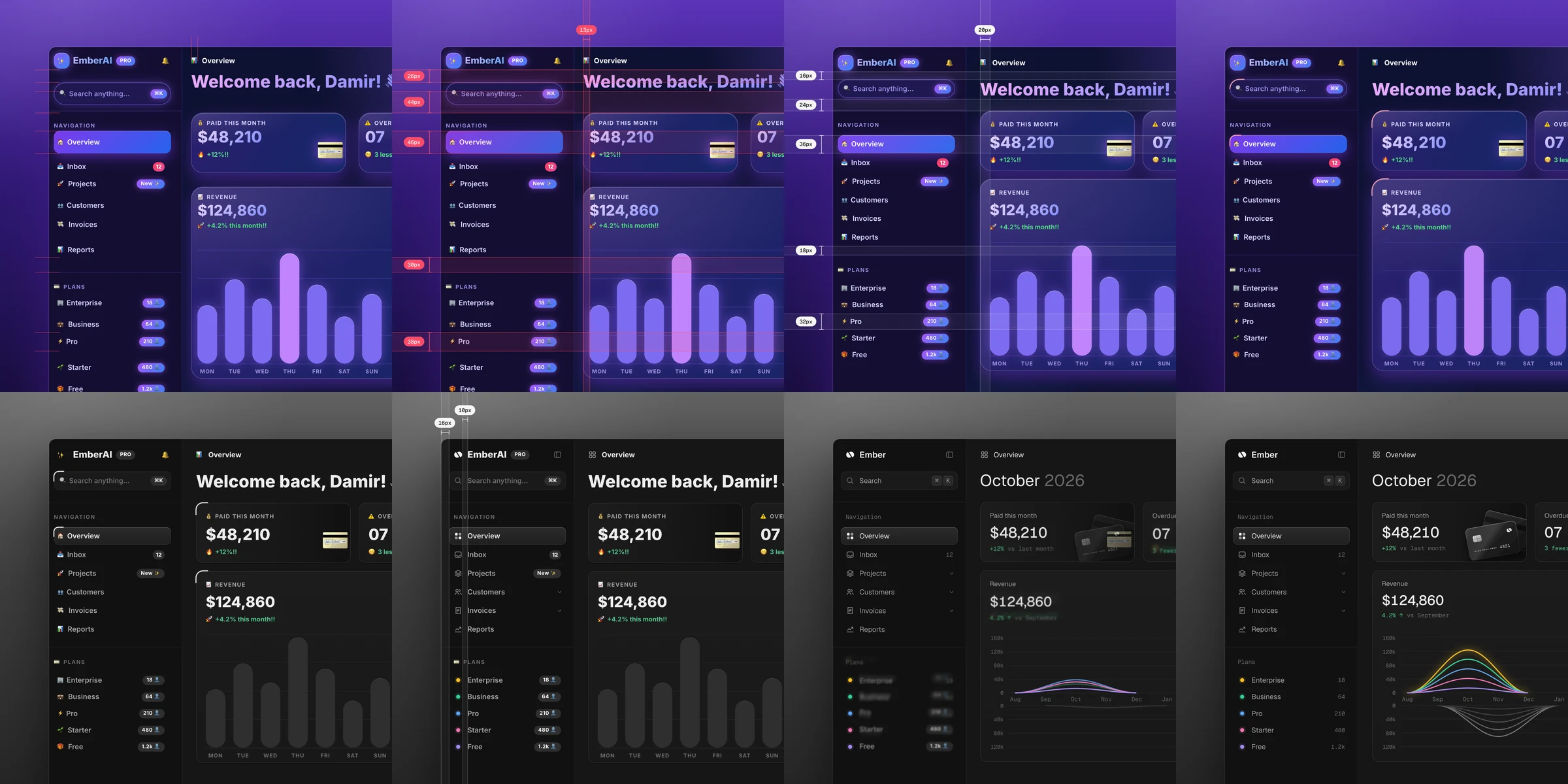
unslop is a skill for Claude Code, Codex and Google Antigravity that turns vibecoded, AI-looking UI into a designed interface with its own character. It finds the slop first, the purple gradients, glows, emoji labels, shouty copy and uneven spacing, then sets a direction from your product and fixes the screen pass by pass like a designer doing a redline review. It works in whatever your screen is built with, like Next.js, React, Vue, Svelte, Tailwind or plain HTML and CSS, on dashboards, apps and landing pages, and even on a live site when all you have is a link.
Install
For Claude Code, copy the skill into your skills folder.
git clone https://github.com/heydamir/unslop
mkdir -p ~/.claude/skills && cp -r unslop/skills/unslop ~/.claude/skills/
For a single project, copy it into .claude/skills/ inside that project instead.
For Codex, ask it to install the skill straight from this repo.
$skill-installer install https://github.com/heydamir/unslop/tree/main/skills/unslop
Or copy it by hand into ~/.agents/skills/, or into .agents/skills/ inside a single project.
git clone https://github.com/heydamir/unslop
mkdir -p ~/.agents/skills && cp -r unslop/skills/unslop ~/.agents/skills/
For Google Antigravity, copy the skill into your skills folder.
git clone https://github.com/heydamir/unslop
mkdir -p ~/.gemini/antigravity/skills && cp -r unslop/skills/unslop ~/.gemini/antigravity/skills/
For a single project, copy it into .agents/skills/ inside that project instead.
To snapshot a live site or create a story video, install Playwright and its Chromium browser from the project directory where you run the skill:
npm install -D playwright
npx playwright install chromium
Story videos also require ffmpeg installed and available on your PATH.
Use
In Claude Code, type /unslop with what you want. In Codex, type $unslop the same way. Or just ask in your own words and the agent picks the skill up by itself.
/unslop this dashboard
/unslop the hero of https://example.com
/unslop my landing page and make the story video so I can post it
It audits the screen and proposes a direction before it edits anything, so you can steer it early. If the screen is already good, it tells you so and suggests a few small refinements instead of redesigning it.
What it does
- Audit. Lists every sign of slop with where it lives.
- Direction. Character, world, the one or two moments that carry the color, and a signature detail, all taken from your product.
- Passes. Spacing, color, icons, copy, type, layout, details, visuals and motion, in that order.
- Visuals. Shows your product instead of a glossy blob. When a hero needs a scene or an object, it can generate one through an image service like fal, Replicate, OpenAI images or Higgsfield. If none is connected, it offers to connect one as an MCP server, and it shows the prompt and asks before every paid generation. Dashboards and apps rarely need one.
- Story video. A square video under 10 seconds of your screen unslopping itself, ready to post. It needs Playwright and ffmpeg.
Try it on the two vibecoded screens in examples.
Hire the unslopper
Would rather have a designer do it? Damir unslops one key screen in 3 days, built in your stack, at heydamir.design/unslop.
License
CC BY 4.0. Use it, change it and share it, including commercially, as long as you credit Damir Sokolovsky (@heydamir) and link back to this repository.