
whatsapp-mcp
WhatsApp MCP server
 lharries
- 评测生成时间(北京时间)
- 本报告引擎
- v3.17.3
- 当前引擎
- v3.17.3
规则版本一致,但报告只反映生成时的证据,不代表项目代码和安全状态始终不变。
进入后确认来源与额度,提交才会创建任务。
核对代码版本与送评文本摘要
仅记录实际送评的受限文本,不是完整仓库审计、安装结果或运行时安全保证。Stars、下载量和仓库元数据为采集时的独立信号,不属于此 commit 快照。
lharries/whatsapp-mcp @ 7d6a06dcdce1f01dfb24f60e1030d5efba9f3b88目录树:f44f4b090fa70124e2084018afac331382528d68
README 来源:README.md
- README.md · 9023 字符
SHA-256: ad3e4cc17892d2ec2ad7c2ad989a174c076f8991fad305c63feb8a72b957a0cb - whatsapp-mcp-server/pyproject.toml · 234 字符
SHA-256: d505213ebea640c9014f0fed9b3832ab78763e7cf76018180f37675bbc39802c
摘要对应送评 UTF-8 文本,可能为限额节选,不等于 Git blob SHA。来源由采集方提供,摘要本身不证明来源真实性。
综合采用结论
存在需要人工复核的风险或证据不足
- 基础评测完成+25/25确定性评分与静态安全扫描已完成
- README 有效证据+21/258,533 个去重后的有效字符
- 独立证据来源+8/202 类非重复证据,重复文件不叠加
- 仓库元数据+10/10已取得仓库状态与采用数据
- 活跃记录+5/5已取得最近提交时间
- AI 复核+15/15已完成结构化 AI 证据复核
本报告评了什么
综合分用于静态采用筛选,不是任务成功率,也不代表使用 Skill 后的能力提升。
- 静态检查范围
- 记录 2 个文件 · 9,257 字符
- 只检查采集到的受限文本与已知风险模式;未读取的脚本、依赖和运行环境不在结论内。
- AI 内容复核
- 已使用
- 复核送评文本的说明和设计,不是安装测试或实际任务执行。记录缺失时不推断已使用或未使用。
- 真实任务效果
- 本报告未提供实测证据
- 没有使用/不使用 Skill 的任务对照、重复运行或耗时与 token 成本结果。采用前仍需在隔离环境验证自己的任务。
脚本引用覆盖
脚本引用覆盖记录不可得;不推断没有引用或已经检查。
WhatsApp MCP 消息收发链路
README 的 Technical Details 明确 Claude、Python MCP Server、Go Bridge、WhatsApp API 之间的请求与数据回传顺序
左右滑动查看完整图示
- • Technical Details:Claude 向 Python MCP server 发请求
- • Technical Details:MCP server 查询 Go bridge 或直接访问 SQLite
- • Technical Details:发送消息经 MCP server 到 Go bridge 再到 WhatsApp
- MCP Tools 章节列出 search_contacts、list_messages、send_message、send_file、download_media 等工具
- Installation 步骤 2 要求 cd whatsapp-bridge 并 go run main.go,首次需扫码认证
- Data Storage 说明消息存于 whatsapp-bridge/store/ 的 SQLite 数据库
- Caution 段落引用 lethal trifecta,承认项目注入可能导致私有数据外泄
- Troubleshooting 给出删除 messages.db 与 whatsapp.db 后重启重新认证的恢复方式
- 有效 README
- 安装或接入步骤
- 可执行示例
- 输入、参数或工具说明
- 明确列出 12 个 MCP 工具,覆盖搜索、读取、发送与媒体下载
- 发现提示词或系统信息提取意图
- 发现高风险的一键下载执行或安装命令
- 缺少问题与用途描述
- 缺少许可证信息
- 无许可证信息
个人在 Claude/Cursor 中检索与发送 WhatsApp 消息、需要本地存储消息并做 AI 辅助对话的场景、需要发送图片、视频、文档与语音消息的用户
需要多用户或团队共享账号的部署、对许可证合规有硬性要求的使用、无法运行 Go 与 Python 双进程环境的使用者
也有自己的公开项目?先看完证据,再用当前规则生成独立报告。
评测我的项目 →prompt-extractionREADME.md:15high confidence> *Caution:* as with many MCP servers, the WhatsApp MCP is subject to [the lethal trifecta](https://simonwillison.net/2025/Jun/16/the-lethal-trifecta/). This means that project inj修复:移除提示词提取逻辑,并增加敏感上下文不可输出的边界说明。
unsafe-install-commandREADME.md:24high confidence- UV (Python package manager), install with `curl -LsSf https://astral.sh/uv/install.sh | sh`修复:固定版本与校验和,先下载审查再执行,避免管道直接交给 Shell。
- 01移除提示词提取逻辑,并增加敏感上下文不可输出的边界说明。
- 02固定版本与校验和,先下载审查再执行,避免管道直接交给 Shell。
- 03补充问题与用途描述
- 04补充许可证信息
方法、证据与局限展开收起
GitHub Repository API
2 个文件 · 9,257 字符
v3.17.3 · AI 内容复核:已使用(deepseek-flash)
- 静态评测不会安装或执行项目代码
- 安全扫描基于高信号文件与已知模式,不能替代人工审计
- 流行度只反映采用程度,不代表安全或工程质量
30 天热度趋势
README
WhatsApp MCP Server
This is a Model Context Protocol (MCP) server for WhatsApp.
With this you can search and read your personal Whatsapp messages (including images, videos, documents, and audio messages), search your contacts and send messages to either individuals or groups. You can also send media files including images, videos, documents, and audio messages.
It connects to your personal WhatsApp account directly via the Whatsapp web multidevice API (using the whatsmeow library). All your messages are stored locally in a SQLite database and only sent to an LLM (such as Claude) when the agent accesses them through tools (which you control).
Here's an example of what you can do when it's connected to Claude.
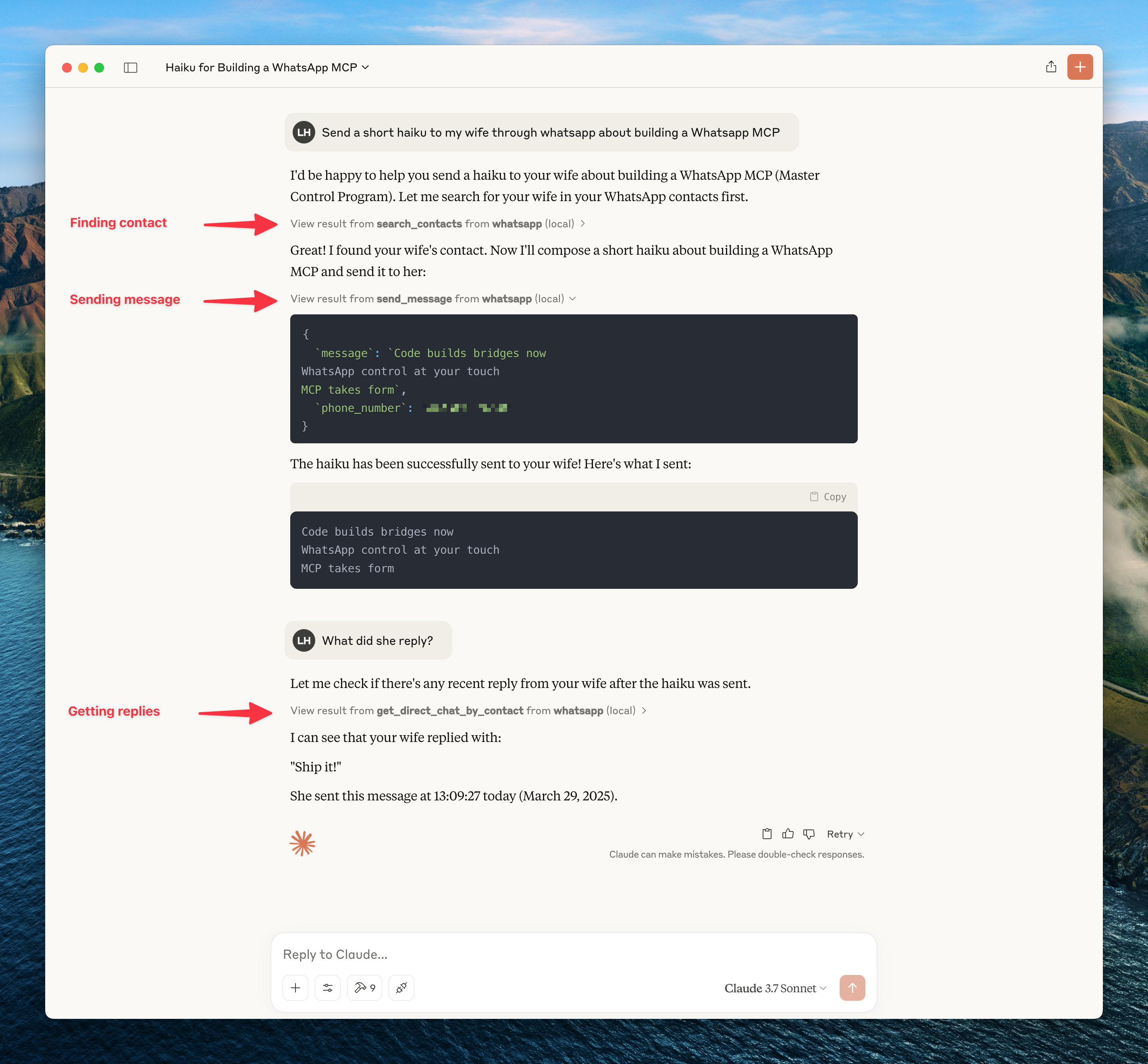
To get updates on this and other projects I work on enter your email here
Caution: as with many MCP servers, the WhatsApp MCP is subject to the lethal trifecta. This means that project injection could lead to private data exfiltration.
Installation
Prerequisites
- Go
- Python 3.6+
- Anthropic Claude Desktop app (or Cursor)
- UV (Python package manager), install with
curl -LsSf https://astral.sh/uv/install.sh | sh - FFmpeg (optional) - Only needed for audio messages. If you want to send audio files as playable WhatsApp voice messages, they must be in
.oggOpus format. With FFmpeg installed, the MCP server will automatically convert non-Opus audio files. Without FFmpeg, you can still send raw audio files using thesend_filetool.
Steps
-
Clone this repository
git clone https://github.com/lharries/whatsapp-mcp.git cd whatsapp-mcp -
Run the WhatsApp bridge
Navigate to the whatsapp-bridge directory and run the Go application:
cd whatsapp-bridge
go run main.go
The first time you run it, you will be prompted to scan a QR code. Scan the QR code with your WhatsApp mobile app to authenticate.
After approximately 20 days, you will might need to re-authenticate.
-
Connect to the MCP server
Copy the below json with the appropriate {{PATH}} values:
{
  "mcpServers": {
    "whatsapp": {
      "command": "{{PATH_TO_UV}}", // Run `which uv` and place the output here
      "args": [
        "--directory",
        "{{PATH_TO_SRC}}/whatsapp-mcp/whatsapp-mcp-server", // cd into the repo, run `pwd` and enter the output here + "/whatsapp-mcp-server"
        "run",
        "main.py"
      ]
    }
  }
}
For Claude, save this as
claude_desktop_config.jsonin your Claude Desktop configuration directory at:~/Library/Application Support/Claude/claude_desktop_config.jsonFor Cursor, save this as
mcp.jsonin your Cursor configuration directory at:~/.cursor/mcp.json -
Restart Claude Desktop / Cursor
Open Claude Desktop and you should now see WhatsApp as an available integration.
Or restart Cursor.
Windows Compatibility
If you're running this project on Windows, be aware that go-sqlite3 requires CGO to be enabled in order to compile and work properly. By default, CGO is disabled on Windows, so you need to explicitly enable it and have a C compiler installed.
Steps to get it working:
-
Install a C compiler
We recommend using MSYS2 to install a C compiler for Windows. After installing MSYS2, make sure to add theucrt64\binfolder to yourPATH.
→ A step-by-step guide is available here. -
Enable CGO and run the app
cd whatsapp-bridge
go env -w CGO_ENABLED=1
go run main.go
Without this setup, you'll likely run into errors like:
Binary was compiled with 'CGO_ENABLED=0', go-sqlite3 requires cgo to work.
Architecture Overview
This application consists of two main components:
-
Go WhatsApp Bridge (
whatsapp-bridge/): A Go application that connects to WhatsApp's web API, handles authentication via QR code, and stores message history in SQLite. It serves as the bridge between WhatsApp and the MCP server. -
Python MCP Server (
whatsapp-mcp-server/): A Python server implementing the Model Context Protocol (MCP), which provides standardized tools for Claude to interact with WhatsApp data and send/receive messages.
Data Storage
- All message history is stored in a SQLite database within the
whatsapp-bridge/store/directory - The database maintains tables for chats and messages
- Messages are indexed for efficient searching and retrieval
Usage
Once connected, you can interact with your WhatsApp contacts through Claude, leveraging Claude's AI capabilities in your WhatsApp conversations.
MCP Tools
Claude can access the following tools to interact with WhatsApp:
- search_contacts: Search for contacts by name or phone number
- list_messages: Retrieve messages with optional filters and context
- list_chats: List available chats with metadata
- get_chat: Get information about a specific chat
- get_direct_chat_by_contact: Find a direct chat with a specific contact
- get_contact_chats: List all chats involving a specific contact
- get_last_interaction: Get the most recent message with a contact
- get_message_context: Retrieve context around a specific message
- send_message: Send a WhatsApp message to a specified phone number or group JID
- send_file: Send a file (image, video, raw audio, document) to a specified recipient
- send_audio_message: Send an audio file as a WhatsApp voice message (requires the file to be an .ogg opus file or ffmpeg must be installed)
- download_media: Download media from a WhatsApp message and get the local file path
Media Handling Features
The MCP server supports both sending and receiving various media types:
Media Sending
You can send various media types to your WhatsApp contacts:
- Images, Videos, Documents: Use the
send_filetool to share any supported media type. - Voice Messages: Use the
send_audio_messagetool to send audio files as playable WhatsApp voice messages.- For optimal compatibility, audio files should be in
.oggOpus format. - With FFmpeg installed, the system will automatically convert other audio formats (MP3, WAV, etc.) to the required format.
- Without FFmpeg, you can still send raw audio files using the
send_filetool, but they won't appear as playable voice messages.
- For optimal compatibility, audio files should be in
Media Downloading
By default, just the metadata of the media is stored in the local database. The message will indicate that media was sent. To access this media you need to use the download_media tool which takes the message_id and chat_jid (which are shown when printing messages containing the meda), this downloads the media and then returns the file path which can be then opened or passed to another tool.
Technical Details
- Claude sends requests to the Python MCP server
- The MCP server queries the Go bridge for WhatsApp data or directly to the SQLite database
- The Go accesses the WhatsApp API and keeps the SQLite database up to date
- Data flows back through the chain to Claude
- When sending messages, the request flows from Claude through the MCP server to the Go bridge and to WhatsApp
Troubleshooting
- If you encounter permission issues when running uv, you may need to add it to your PATH or use the full path to the executable.
- Make sure both the Go application and the Python server are running for the integration to work properly.
Authentication Issues
- QR Code Not Displaying: If the QR code doesn't appear, try restarting the authentication script. If issues persist, check if your terminal supports displaying QR codes.
- WhatsApp Already Logged In: If your session is already active, the Go bridge will automatically reconnect without showing a QR code.
- Device Limit Reached: WhatsApp limits the number of linked devices. If you reach this limit, you'll need to remove an existing device from WhatsApp on your phone (Settings > Linked Devices).
- No Messages Loading: After initial authentication, it can take several minutes for your message history to load, especially if you have many chats.
- WhatsApp Out of Sync: If your WhatsApp messages get out of sync with the bridge, delete both database files (
whatsapp-bridge/store/messages.dbandwhatsapp-bridge/store/whatsapp.db) and restart the bridge to re-authenticate.
For additional Claude Desktop integration troubleshooting, see the MCP documentation. The documentation includes helpful tips for checking logs and resolving common issues.