
SurfSense
Open-source NotebookLM alternative. Research the open web with live data(Reddit, YT, IG, TikTok, Indeed, Google Search, Maps etc) through one platform, API or MCP server. Join our Discord: https://discord.gg/ejRNvftDp9
 MODSetter
- 评测生成时间(北京时间)
- 本报告引擎
- v3.12.0
- 当前引擎
- v3.16.0
本报告与当前引擎使用不同规则;原分数不会自动更新,不同版本的分数不宜直接对比。
进入后确认来源与额度,提交才会创建任务。
综合采用结论
存在需要人工复核的风险或证据不足
- 基础评测完成+25/25确定性评分与静态安全扫描已完成
- README 有效证据+25/2514,531 个去重后的有效字符
- 独立证据来源+20/205 类非重复证据,重复文件不叠加
- 仓库元数据+10/10已取得仓库状态与采用数据
- 活跃记录+5/5已取得最近提交时间
- AI 复核+15/15已完成结构化 AI 证据复核
SurfSense MCP服务器调用流程
README展示了客户端通过MCP服务器调用连接器获取数据的交互过程,存在请求和响应关系。
左右滑动查看完整图示
- • README中'MCP server'部分说明暴露每个连接器为原生工具
- • Quick start中MCP配置示例展示客户端连接
- • 连接器表格说明每个连接器返回结构化JSON
- README中'Live data connectors'表格列出Reddit、YouTube等连接器及功能
- Quick start部分提供curl示例和MCP配置JSON
- Self-host部分提供Linux/macOS和Windows安装命令
- 对比表详细列出与NotebookLM的功能差异
- 文档中未提及错误处理、权限边界或许可证信息
- 问题与用途描述
- 有效 README
- 安装或接入步骤
- 可执行示例
- 提供多种实时数据连接器(Reddit、YouTube等),覆盖广泛数据源
- 发现高风险的一键下载执行或安装命令
- 缺少限制、权限或边界
- 缺少错误处理或排障
- 缺少许可证信息
- 缺少错误处理、权限边界和许可证信息
需要实时社交媒体和搜索数据的AI代理开发者、希望自托管研究平台并集成MCP的用户、需要结构化数据而非HTML解析的研究人员、需要多平台数据连接器的团队
需要严格错误处理和排障指南的生产环境、需要明确许可证合规性的企业用户、需要离线或本地文档的用户
也有自己的公开项目?先看完证据,再用当前规则生成独立报告。
评测我的项目 →unsafe-install-commandREADME.md:123high confidencecurl -fsSL https://raw.githubusercontent.com/MODSetter/SurfSense/main/docker/scripts/install.sh | bash修复:固定版本与校验和,先下载审查再执行,避免管道直接交给 Shell。
- 01固定版本与校验和,先下载审查再执行,避免管道直接交给 Shell。
- 02补充限制、权限或边界
- 03补充错误处理或排障
- 04补充许可证信息
方法、证据与局限展开收起
GitHub Repository API
25 个文件 · 366,198 字符
v3.12.0 · AI 复核已启用(deepseek-chat)
- 静态评测不会安装或执行项目代码
- 安全扫描基于高信号文件与已知模式,不能替代人工审计
- 流行度只反映采用程度,不代表安全或工程质量
30 天热度趋势
README





SurfSense
The air-gapped, open-source NotebookLM alternative.
Turn documents you can't upload into briefings, decks, reports, study guides and podcasts, entirely on your own machine.
Download · Docs · What it makes · Compare · Pricing · Discord
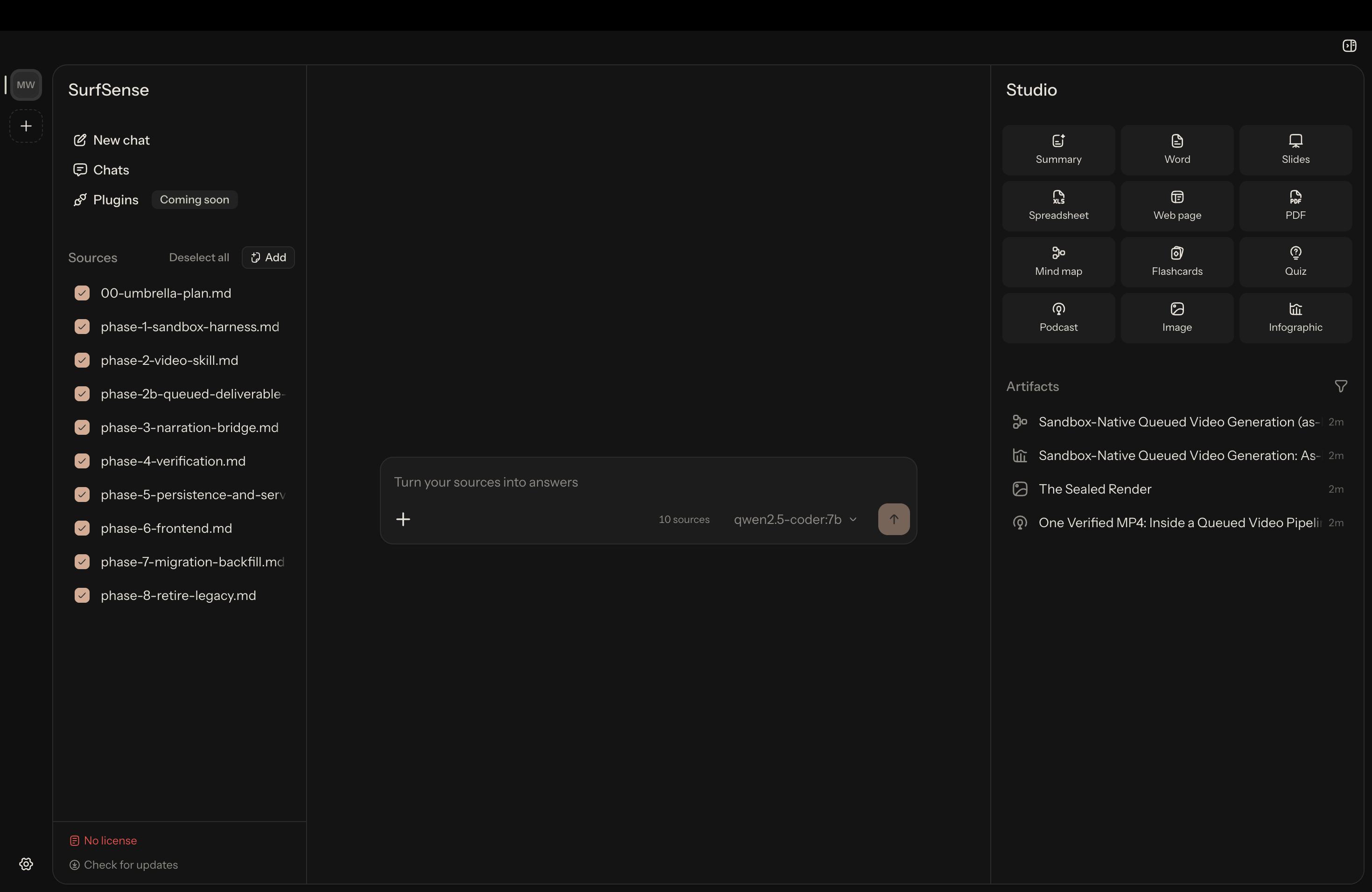
SurfSense is a free, open-source desktop app for the documents you already have. Drop them in, ask questions and get answers that cite their sources, then turn the same documents into a briefing, a slide deck, a report, a study guide or a podcast. All of it runs on your own machine: the index sits on your disk, you pick the model, and the app uploads nothing. There is no account to create.
Get started. Download the installer for your machine, then bring your own model key or let the app pull a local model for you.
| Platform | Download |
|---|---|
| Windows x64 | SurfSense-Setup.exe |
| macOS Apple Silicon | SurfSense-arm64.dmg |
| Linux x64 (AppImage) | SurfSense.AppImage |
| Linux x64 (deb) | SurfSense.deb |
Every link is a permalink to the newest release. You can also pick from surfsense.com/downloads or browse all releases. The AppImage auto-updates; the deb does not.
[!NOTE] Used the hosted web app? It is being retired. Open it once to export your workspaces, then import the bundle into the desktop app; documents, folders, titles and chat threads all come across. The export window closes on 18 October 2026. Details on the sunset page.
What SurfSense makes
Pick some documents and a format. The app writes it from the sources you chose, on your machine.
| Format | What you get | Needs |
|---|---|---|
| Summary | A structured brief of the selected sources | generation model |
| Flashcards | An interactive deck, one card at a time | generation model |
| Quiz | Multiple-choice questions with answers | generation model |
| Mind map | A zoomable, collapsible Markmap | generation model |
| Slides | An editable .pptx, not a picture of a deck | generation model |
| Document | An editable .docx report | generation model |
| Spreadsheet | An .xlsx of tables pulled from the sources | generation model |
| Web page | A self-contained HTML page | generation model |
| A typeset PDF | generation model | |
| Podcast | A two-host audio conversation, voiced offline by Kokoro-82M | generation model + bundled voice |
| Image | An illustration for the material | image model + generation model |
| Infographic | A single-panel visual summary | image model + generation model |
Some jobs need more than one. A study guide is a summary, a flashcard deck and a quiz over the same source set, and a client briefing is usually the deck you present from plus the summary you send after. Video overviews are not built yet.
Everything stays on your machine
People point this at case papers, client working papers, interview transcripts, internal specs, unpublished research and a term's worth of lecture notes. You can ask questions across all of it and every answer cites the source it came from. The app does not upload any of it.
- The index is local. Parsing, chunking and embedding happen on your computer, into SQLite under
~/.surfsense. SurfSense keeps no copy of it and no log of what you asked. - Every role can run locally. The document parser, the retrieval model and the podcast voice ship inside the installer. Chat and image generation ship as local servers whose weights you download once, so you can produce text, audio and pictures without an account or an API key. We test it by ingesting a PDF with networking disabled.
- Outbound connections are off by default. An egress panel lists every destination the app can reach and you switch on the ones you want.
- No telemetry, no crash reporting. Nothing phones home, so there is no opt-out to find.
SurfSense cannot tell you whether that satisfies a particular regulation. That depends on your own controls and your regulator. All the app can tell you is which machine your documents are on.
How SurfSense compares
Three kinds of product get called "the local NotebookLM", and they answer different questions. None of them is a bad tool; they just leave you with different things.
vs Jan, AnythingLLM, Open WebUI, LM Studio. These run a model locally and give you somewhere to chat with it. SurfSense answers the next question: how do you get a finished document out of one? Use them together if you like, by pointing SurfSense at any OpenAI-compatible endpoint, including one of theirs.
vs RemNote, Quizlet, NoteGPT, StudyFetch, Gamma. These do produce artifacts, and some look better than ours. The trade is where your material goes: you upload it, you pay monthly, and your files live in someone else's account.
vs Google NotebookLM. It already ships flashcards, quizzes, mind maps and audio overviews, so both produce much the same things. The difference is whose machine does the work and which model you can point at it.
| Google NotebookLM | SurfSense | |
|---|---|---|
| Runs offline / air-gapped | No | Yes |
| Your documents leave your machine | Yes | No |
| Account required | Google account | None |
| Open source | No | Apache-2.0 |
| Price | Free tier; Pro $19.99/mo; Ultra $249.99/mo | App is free |
| Models | Gemini only | Any OpenAI-compatible API, or a local one |
| Source limits | 50 to 600 sources, 500,000 words each | Whatever your disk holds |
| Audio and video overviews | Yes, and better | Audio yes, offline; video not yet |
NotebookLM wins on audio quality and it has video. If you are content with your sources sitting on Google's servers, use it. If you are not, this is the same kind of tool without the upload.
Quick start
You do not need Docker, a terminal, a GPU or a compose file.
- Download the installer from the table above. It is signed, so your OS will not fight you.
- Pick a model. Let the app pull a local one (Qwen3 in six sizes, from 0.5 GB) or paste a base URL and key for any OpenAI-compatible API. The picker checks your machine can run a model before offering it, and any key you give it is stored encrypted, with the secret held in your OS keychain.
- Drop in documents. The app parses PDFs, Office files and images on your machine.
- Ask questions. Every answer cites the source it came from.
- Open Studio, choose a format, collect the file.
The download is the slow part, because the installer carries the parser, the retrieval model, the podcast voice and the local model servers, so the app works with the network off.
Docs, roadmap and community
The app and its updates are free. A licence adds plugins and priority support and gates nothing else, so an expired licence still leaves you the app and every future update. See pricing.
The Docker stack in this repo (surfsense_backend, surfsense_web, compose files) stays open source and installable, and is community-supported: no SLA and no hosted service behind it. The desktop app is the supported path for new users.
- Documentation for install, models, Studio formats and self-hosting
- Importing from the hosted app
- MCP server for the hosted scraper API
- Roadmap discussion and the project board
- Discord for help and ideas, Discussions for direction, Issues for reproducible bugs
- Star the repo if you want to follow where this goes
Pull requests welcome. Start with CONTRIBUTING.md; the desktop app lives in surfsense_local/ and its README covers the development loop.
Thanks to all our Surfers:
Star history
License
Apache-2.0. See LICENSE.