
serena
A powerful MCP toolkit for coding, providing semantic retrieval and editing capabilities - the IDE for your agent
 oraios
- 评测生成时间(北京时间)
- 本报告引擎
- v3.9.0
- 当前引擎
- v3.16.0
本报告与当前引擎使用不同规则;原分数不会自动更新,不同版本的分数不宜直接对比。
进入后确认来源与额度,提交才会创建任务。
综合采用结论
证据充分,整体质量与安全表现优秀
- 基础评测完成+25/25确定性评分与静态安全扫描已完成
- README 有效证据+25/2512,318 个去重后的有效字符
- 独立证据来源+4/201 类非重复证据,重复文件不叠加
- 仓库元数据+10/10已取得仓库状态与采用数据
- 活跃记录+5/5已取得最近提交时间
- AI 复核+15/15已完成结构化 AI 证据复核
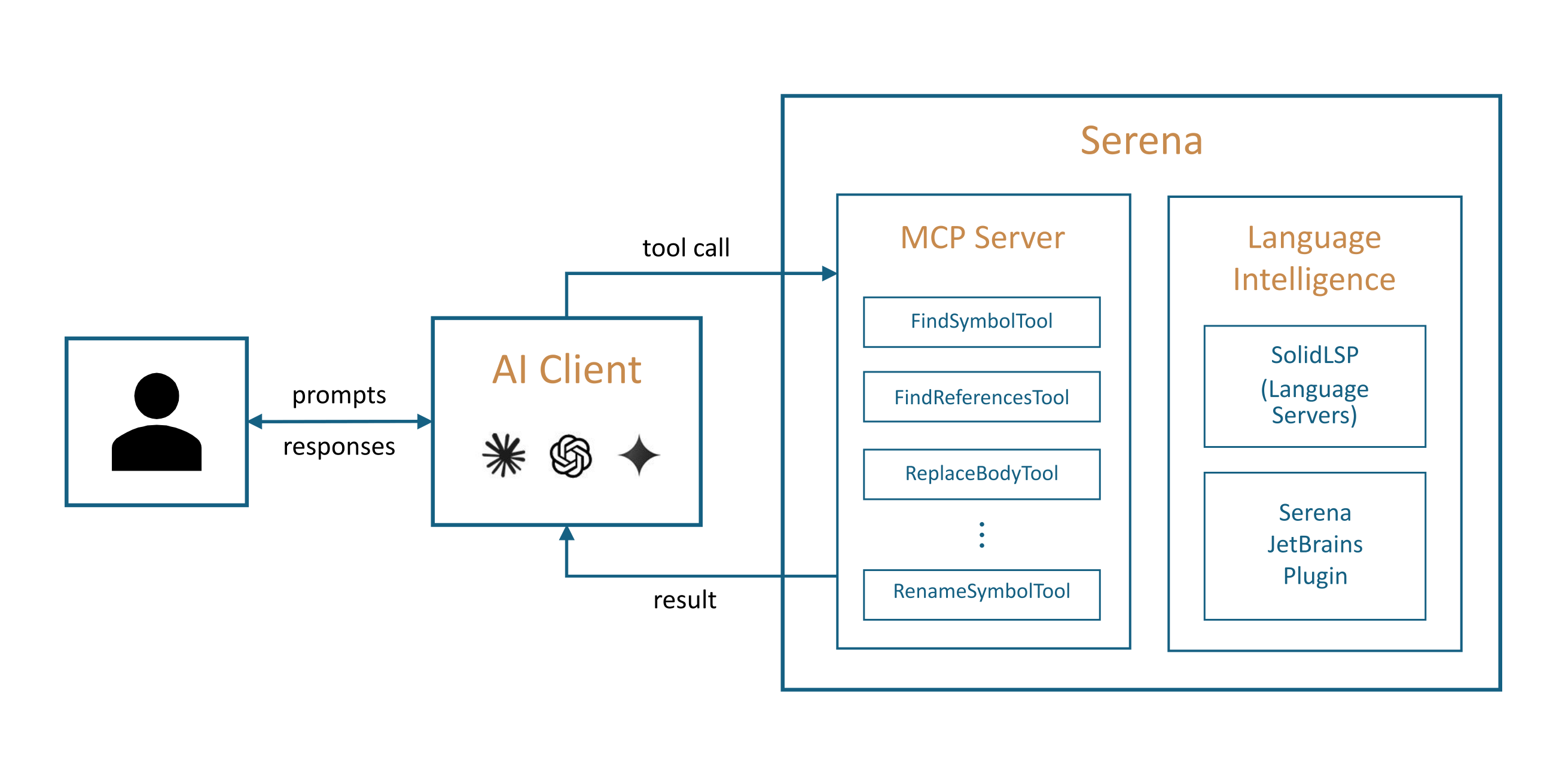
Serena MCP服务器架构
README展示了Serena作为MCP服务器与客户端及后端(语言服务器或JetBrains插件)的关系,无明确时间顺序。
左右滑动查看完整图示
- • How Serena Works: 通过MCP连接客户端
- • Programming Language Support: 两种后端技术
- • Quick Start: 初始化选择后端
- Quick Start: uv tool install -p 3.13 serena-agent
- Features: 检索、重构、符号编辑等工具列表
- Programming Language Support: 超过40种语言
- Configurability: 多层级配置系统
- 文档链接: https://oraios.github.io/serena/
- 问题与用途描述
- 有效 README
- 安装或接入步骤
- 可执行示例
- 未发现已知高风险模式
- 缺少输出或结果说明
- 缺少限制、权限或边界
- 输出或结果格式未详细说明
- 部分工具限制(如find declaration)未完全明确
- JetBrains插件为付费,可能限制部分用户
大型复杂代码库的语义检索、跨文件重命名与移动重构、需要符号级编辑的代理工作流、多语言项目支持
仅需简单文本编辑的场景、预算有限且不愿付费使用JetBrains插件的用户
也有自己的公开项目?先看完证据,再用当前规则生成独立报告。
评测我的项目 →静态扫描不是安全保证,生产接入前仍应人工复核权限和数据边界。
- 01补充输出或结果说明
- 02补充限制、权限或边界
方法、证据与局限展开收起
GitHub Repository API
1 个文件 · 14,489 字符
v3.9.0 · AI 复核已启用(deepseek-chat)
- 静态评测不会安装或执行项目代码
- 安全扫描基于高信号文件与已知模式,不能替代人工审计
- 流行度只反映采用程度,不代表安全或工程质量
30 天热度趋势
README


The IDE for Your Coding Agent


- Serena provides essential semantic code retrieval, editing, refactoring and debugging tools that are akin to an IDE's capabilities, operating at the symbol level and exploiting relational structure.
- It integrates with any client/LLM via the model context protocol (MCP).
Serena's agent-first tool design involves robust high-level abstractions, distinguishing it from approaches that rely on low-level concepts like line numbers or primitive search patterns.
Practically, this means that your agent operates faster, more efficiently and more reliably, especially in larger and more complex codebases.
[!IMPORTANT] Do not install Serena via an MCP or plugin marketplace! They contain outdated and suboptimal installation commands. Instead, follow our Quick Start instructions.
Quick Demo
https://github.com/user-attachments/assets/8d11646e-b80e-4723-b9d7-32d6101b5f58
:tv: Longer video: Introduction to Serena in 5 Minutes (YouTube)
What Our "End Users" Say
While it is humans who download and set up Serena, our end users are essentially AI agents. As the ones actually applying Serena's tools, they are in the best position to evaluate Serena.
We crafted an unbiased evaluation prompt that leads the agent to perform ~20 routine coding tasks, representative of everyday development work, in order to estimate the value added by Serena's tools when used alongside its own built-ins.
Here's a one-sentence summary of what the agents had to say:
Opus 4.6 (high) in Claude Code on a large Python codebase:
"Serena's IDE-backed semantic tools are the single most impactful addition to my toolkit – cross-file renames, moves, and reference lookups that would cost me 8–12 careful, error-prone steps collapse into one atomic call, and I would absolutely ask any developer I work with to set them up."
GPT 5.4 (high) in Codex CLI on a Java codebase:
"As a coding AI agent, I would ask my owner to add Serena because it gives me the missing IDE-level understanding of symbols, references, and refactorings, turning fragile text surgery into calmer, faster, more confident code changes where semantics matter."
GPT 5.4 (medium) in Copilot CLI on a large, multi-language monorepo:
"As a coding agent, I’d absolutely ask my owner to add Serena because it makes me noticeably sharper and calmer on real code – especially symbol-aware navigation, cross-file refactors, and monorepo dependency jumps – while I still lean on built-ins for tiny text edits and non-code work."
Different agents in different settings independently converge on the same verdict.
Give your agent the tools it has been asking for and add Serena MCP to your client!
See our documentation for the full methodology and much more detailed evaluation results, or run your own evaluation on a project of your choice.
How Serena Works
Serena provides the necessary tools for coding workflows, but an LLM is required to do the actual work, orchestrating tool use.
Serena can extend the functionality of your existing AI client via the model context protocol (MCP). Most modern AI chat clients directly support MCP, including
- terminal-based clients like Claude Code, Codex, OpenCode, or Gemini-CLI,
- IDEs and IDE assistant plugins for VSCode, Cursor and JetBrains IDEs (Copilot, Junie, JetBrains AI Assistant, etc.),
- desktop and web clients like Claude Desktop, Codex App, or OpenWebUI.
:tv: See also: Introduction to Serena in 5 Minutes (YouTube)
To connect the Serena MCP server to your client, you either
- provide the client with a launch command that allows it to start the MCP server, or
- start the Serena MCP server yourself in HTTP mode and provide the client with the URL.
See the Quick Start section below for information on how to get started.
Programming Language Support & Semantic Analysis Capabilities
Serena provides a set of versatile code querying and editing functionalities based on symbolic understanding of the code. Equipped with these capabilities, your agent discovers and edits code just like a seasoned developer making use of an IDE's capabilities would. Serena can efficiently find the right context and do the right thing even in very large and complex projects!
There are two alternative technologies powering these capabilities:
- Language servers implementing the language server protocol (LSP) — the free/open-source alternative which is used by default.
- The Serena JetBrains Plugin, which leverages the powerful code analysis and editing capabilities of your JetBrains IDE (paid plugin; free trial available).
You can choose either of these backends depending on your preferences and requirements.
Language Servers
Serena incorporates a powerful abstraction layer for the integration of language servers that implement the language server protocol (LSP). The underlying language servers are typically open-source projects or at least freely available for use.
When using Serena's language server backend, we provide support for over 40 programming languages, including Ada / SPARK, AL, Angular, Ansible, Bash, BSL, C#, C/C++, Clojure, Crystal, CUE, Dart, Deno, Elixir, Elm, Erlang, Fortran, F#, GDScript, Gleam, GLSL, Go, Groovy, Haskell, Haxe, HLSL, HTML, Java, JavaScript, JSON, Julia, Kotlin, LaTeX, Lean 4, Lua, Luau, Markdown, MATLAB, mSL, Nextflow, Nix, OCaml, Pascal, Perl, PHP, PowerShell, Python, QML, R, Rego, Ruby, Rust, Scala, SCSS / Sass / CSS, Solidity, Svelte, Swift, SystemVerilog, Terraform, TOML, TypeScript, Vue, WGSL, Wolfram Language, YAML, and Zig.
The Serena JetBrains Plugin
The paid Serena JetBrains Plugin (free trial available) leverages the powerful code analysis capabilities of your JetBrains IDE. The plugin naturally supports all programming languages and frameworks that are supported by JetBrains IDEs, including IntelliJ IDEA, PyCharm, Android Studio, WebStorm, PhpStorm, RubyMine, GoLand, and potentially others (Rider and CLion are unsupported though).

See our documentation page for further details and instructions on how to apply the plugin.
Features
Serena provides a wide range of tools for efficient code retrieval, editing and refactoring, as well as a memory system for long-lived agent workflows.
Given its large scope, Serena adapts to your needs by offering a multi-layered configuration system.
Details
Retrieval
Serena's retrieval tools allow agents to explore codebases at the symbol level, understanding structure and relationships without reading entire files.
| Capability | Language Servers | JetBrains Plugin |
|---|---|---|
| find symbol | yes | yes |
| symbol overview (file outline) | yes | yes |
| find referencing symbols | yes | yes |
| search in project dependencies | -- | yes |
| type hierarchy | -- | yes |
| find declaration | yes* | yes |
| find implementations | yes** | yes |
| query external projects | yes | yes |
| diagnostics/inspections | yes | yes |
*: Will generally not work for declarations in external dependencies.
**: Only available for some languages, limited by the language server functionality.
Refactoring
Without precise refactoring tools, agents are forced to resort to unreliable and expensive search and replace operations.
| Capability | Language Servers | JetBrains Plugin |
|---|---|---|
| rename | yes (only symbols) | yes (symbols, files, directories) |
| move (symbol, file, directory) | -- | yes |
| inline | -- | yes |
| propagate deletions (remove unused code) | -- | yes |
Symbolic Editing
Serena's symbolic editing tools are less error-prone and much more token-efficient than typical alternatives.
| Capability | Language Servers | JetBrains Plugin |
|---|---|---|
| replace symbol body | yes | yes |
| insert after symbol | yes | yes |
| insert before symbol | yes | yes |
| safe delete | yes | yes |
Interactive Debugging
Exclusive to the JetBrains plugin, Serena supports a highly general debugging tool, which allows an agent to set breakpoints, inspect variables, evaluate expressions and control execution flow via a persistent REPL-style interface.
Basic Features
Beyond its semantic capabilities, Serena includes a set of basic utilities for completeness. When Serena is used inside an agentic harness such as Claude Code or Codex, these tools are typically disabled by default, since the surrounding harness already provides overlapping file, search, and shell capabilities.
search_for_pattern– flexible regex search across the codebasereplace_content– agent-optimised regex-based and literal text replacementlist_dir/find_file– directory listing and file searchread_file– read files or file chunksexecute_shell_command– run shell commands (e.g. builds, tests, linters)
Memory Management
A memory system is elemental to long-lived agent workflows, especially when knowledge is to be shared across
sessions, users and projects.
Despite its simplicity, we received positive feedback from many users who tend to combine Serena's memory management system with their
agent's internal system (e.g., AGENTS.md files).
It can easily be disabled if you prefer to use something else.
Configurability
Active tools, tool descriptions, prompts, language backend details and many other aspects of Serena can be flexibly configured on a per-case basis by simply adjusting a few lines of YAML. To achieve this, Serena offers multiple levels of (composable) configuration:
- global configuration
- MCP launch command (CLI) configuration
- per-project configuration (with local overrides)
- execution context-specific configuration (e.g. for particular clients)
- dynamically composable configuration fragments (modes)
Quick Start
Prerequisites. Serena is managed by uv, and installing uv is the only required prerequisite.
[!NOTE] When using the language server backend, some additional dependencies may need to be installed to support certain languages; see the Language Support page for details.
Install Serena. Serena is installed via uv as follows:
uv tool install -p 3.13 serena-agent
After successful installation, the command serena should be available in your shell.
Initialise Serena. To initialise Serena and verify that your setup works correctly, simply run:
serena init
By default, this will set up Serena to use the language server backend. To use the JetBrains backend instead, add the parameters -b JetBrains
(see the JetBrains Plugin documentation page for additional usage details).
Either way, you should receive a success message indicating that Serena has been initialised successfully.
Configuring Your Client. To connect Serena to your preferred MCP client, you typically need to configure a launch command in your client. Follow the link for specific instructions on how to set up Serena for Claude Code, Codex, Claude Desktop, MCP-enabled IDEs and other clients (such as local and web-based GUIs).
[!TIP] While getting started quickly is easy, Serena is a powerful toolkit with many configuration options. We highly recommend reading through the user guide to get the most out of Serena.
Specifically, we recommend to read about ...
User Guide
Please refer to the user guide for detailed instructions on how to use Serena effectively.
Acknowledgements
A significant part of Serena, especially support for various languages, was contributed by the open source community. We are very grateful for the many contributors who made this possible and who played an important role in making Serena what it is today.
License
Serena is licensed per component: SolidLSP (src/solidlsp) under the MIT License,
the Serena application (everything else) under GPL-3.0-or-later.
Distributions combining both are as a whole subject to the GPL.
See LICENSE for the authoritative overview and the license documentation for the background. Contributions require acceptance of our CLA; see CONTRIBUTING.md.