
ouroboros
Agent OS: the agent gets smarter on its own. We just hold the line: Interview-gated, staged evaluation, budgeted evolution loop. MCP server, 14 runtimes: Claude Code, Codex CLI, Gemini CLI, OpenCode, Copilot, Kiro and more.
 Q00
- 评测生成时间(北京时间)
- 本报告引擎
- v3.17.3
- 当前引擎
- v3.17.3
规则版本一致,但报告只反映生成时的证据,不代表项目代码和安全状态始终不变。
进入后确认来源与额度,提交才会创建任务。
核对代码版本与送评文本摘要
仅记录实际送评的受限文本,不是完整仓库审计、安装结果或运行时安全保证。Stars、下载量和仓库元数据为采集时的独立信号,不属于此 commit 快照。
Q00/ouroboros @ 125327a5497025aa57a713329708800a1ae4faf4目录树:4d4096679e09cbb9c847c2b510c0cac02b99c94d
README 来源:README.md
- README.md · 42722 字符
SHA-256: faaa789cfbdb32fef729989a766b36335b1d182a6862b89f2728358efe3277aa - skills/auto/SKILL.md · 13623 字符
SHA-256: 57a0c58872a86737bbf6ebd7ac9c8295b539c80396d6d7f6edf1b5b71816d2be - skills/brownfield/SKILL.md · 7313 字符
SHA-256: acc3c95233e3da055e068ec619a4ff253af6c58a609d8edbfa9ce929f704aff2 - skills/cancel/SKILL.md · 4633 字符
SHA-256: cb74dd350725b1004135a98d062f4fda7da8a9544c2ebbdf98cfa6966faeacca - skills/config/SKILL.md · 3520 字符
SHA-256: e90d80f144e492dbb11af63b1f1638068620f7c76c64309ab6c29182e8f75b32 - skills/evaluate/SKILL.md · 6930 字符
SHA-256: bd3267403911a6c81546f9787d38636067efb6cc649ac6358e26727c3c16a7eb - skills/evolve/SKILL.md · 4900 字符
SHA-256: c31d711a9479fe75834d878fa164db859795577ca72c815d4cda8f7ea3bacd4c - skills/help/SKILL.md · 4923 字符
SHA-256: b39240837852c2ef1c9120feeac67b36f0a04c1471b84335c577b6aecfb4648d - skills/interview/SKILL.md · 22549 字符
SHA-256: a63ef59dbb706d684d462472d6e044d2bc943f0e5c7e9a6a10f788d2a8f687d8 - skills/ooo/SKILL.md · 849 字符
SHA-256: d1f5855f8c343c128cd86cdd2bed5925a9f1e8ee34385cf423477f268a35b6c5 - skills/pm/SKILL.md · 12529 字符
SHA-256: 45b06fac7cfebad92b59df9d13dbd86dc2cd2d9d6b2e27b4dfac6d1d2c9476bb - skills/publish/SKILL.md · 5814 字符
SHA-256: cb89a7443f76125c90781b375d894acf8f2e021252e90c599c862cb796cd3378 - skills/qa/SKILL.md · 6162 字符
SHA-256: b6832ae5c1946f89674f5a762f708707f86a7f7281e086fd45bc8bee6f7c4ab3 - skills/ralph/SKILL.md · 8975 字符
SHA-256: 8f7219df5e3149501ac2f983e9f6755d5221ef12d532a2bd98d166b5aed3c912 - skills/resume-session/SKILL.md · 2171 字符
SHA-256: adde1df883dc1b8db88c089b220240004c07fba8139aeb3c4470d2015c7bce2d - skills/run/SKILL.md · 14348 字符
SHA-256: 5e65778dfc35fe1de6f9a55da9443c2bfc7748139a57c5770fcef2cb23046163 - skills/seed/SKILL.md · 14713 字符
SHA-256: 8993f89b07e97f27539211168a6dc4412d621bb8c669ec3f39a69ce3e76c2186 - skills/setup/SKILL.md · 14445 字符
SHA-256: 32a2fdefb43d4bbaaae43d77a7329ccf7837a7e39215c1ae4c7e70ffe83deb39 - skills/status/SKILL.md · 2445 字符
SHA-256: 121d7af9aa5576e071d1ba7cf1ecc66134ddb0a2cb09d929e8ce9fa5acc7727c - skills/tutorial/SKILL.md · 2951 字符
SHA-256: 8772faab3a5537e1d4447cbdeedaa9909666a80012451fa52cb6af86beec8a2b - skills/unstuck/SKILL.md · 9375 字符
SHA-256: 5d9d89f0ad3f4249e25ec889f419b63bd4cd768992cc104a2128a69a0091c535 - skills/update/SKILL.md · 2789 字符
SHA-256: 9047bd3e2459b6b5bb2052d9ab9d66525a1d55b2d57544034d3ab0ee828940ac - skills/welcome/SKILL.md · 24586 字符
SHA-256: a13315d75c9cc00b28b0f0abb438581fd8e3f8e1ce08e202775e6058378535b5 - .claude/skills/threat-model/SKILL.md · 8176 字符
SHA-256: 18ef22c45962ab82005b4e1ac5e5d76db71ac7de2e9e72782b52b50d58d7d34e - .claude/skills/triage/SKILL.md · 44114 字符
SHA-256: 8b7fac7cfb2aec67a862ceea07dea92e1419c1a2a8534c64edd82f7f678c55b0
摘要对应送评 UTF-8 文本,可能为限额节选,不等于 Git blob SHA。来源由采集方提供,摘要本身不证明来源真实性。
综合采用结论
存在需要人工复核的风险或证据不足
- 基础评测完成+25/25确定性评分与静态安全扫描已完成
- README 有效证据+25/2529,364 个去重后的有效字符
- 独立证据来源+20/205 类非重复证据,重复文件不叠加
- 仓库元数据+10/10已取得仓库状态与采用数据
- 活跃记录+5/5已取得最近提交时间
- AI 复核+15/15已完成结构化 AI 证据复核
本报告评了什么
综合分用于静态采用筛选,不是任务成功率,也不代表使用 Skill 后的能力提升。
- 静态检查范围
- 记录 25 个文件 · 285,555 字符
- 只检查采集到的受限文本与已知风险模式;未读取的脚本、依赖和运行环境不在结论内。
- AI 内容复核
- 已使用
- 复核送评文本的说明和设计,不是安装测试或实际任务执行。记录缺失时不推断已使用或未使用。
- 真实任务效果
- 本报告未提供实测证据
- 没有使用/不使用 Skill 的任务对照、重复运行或耗时与 token 成本结果。采用前仍需在隔离环境验证自己的任务。
脚本引用覆盖
脚本引用覆盖记录不可得;不推断没有引用或已经检查。
auto 技能调度与监控流程
主会话调用 MCP 启动任务,再派生观察者子会话并回传事件,存在请求与回调关系
左右滑动查看完整图示
- • SKILL.md「Dispatch requirement」:返回 job_id 与 auto_session_id 并保留
- • SKILL.md「Background monitoring」第2条:派生恰好一个观察者并原样传递契约
- 未通过: Agent Skills 格式校验 18/24 个通过
- 通过: 18 个有效 Skill 含可核实的指令步骤或示例
- 质量评审选取 skills/auto/SKILL.md;其余 23 个仅做格式扫描
- SKILL.md「Dispatch requirement」:必须调用 ouroboros_start_auto,否则停止并报告工具不可用
- SKILL.md「CLI flag → MCP arg translation」:--pipeline-timeout-seconds 仅限新启动,--resume 时拒绝
- SKILL.md「Behavior」第4条:链式 Ralph 默认 3 代,无总墙钟上限
- SKILL.md「Background monitoring」:observer 契约需通过 v1 校验,否则 fail closed
- README「Quick Start」:curl 安装脚本与 ooo setup / ooo interview 首命令
- 问题与用途描述
- 有效 README
- 安装或接入步骤
- 可执行示例
- 通过: 18 个有效 Skill 含可核实的指令步骤或示例
- 发现高风险的一键下载执行或安装命令
- skills/brownfield/SKILL.md:description 未清楚说明何时使用该 Skill
- skills/cancel/SKILL.md:description 未清楚说明何时使用该 Skill
- skills/evolve/SKILL.md:description 未清楚说明何时使用该 Skill
- skills/publish/SKILL.md:description 未清楚说明何时使用该 Skill
需要从模糊需求生成可验收规格并自动执行的编码代理用户、使用 Claude Code/Codex 等支持 MCP 与子会话的运行时、跨多文件或框架迁移类任务
仅需小改动或问答的场景(技能自述不适用)、无 MCP 工具或子会话能力的运行时、需要严格总时长上限的流水线
也有自己的公开项目?先看完证据,再用当前规则生成独立报告。
评测我的项目 →unsafe-install-commandskills/setup/SKILL.md:116high confidence`curl -LsSf https://astral.sh/uv/install.sh | sh` is the last resort.修复:固定版本与校验和,先下载审查再执行,避免管道直接交给 Shell。
- 01固定版本与校验和,先下载审查再执行,避免管道直接交给 Shell。
- 02修复 skills/brownfield/SKILL.md:description 未清楚说明何时使用该 Skill
- 03修复 skills/cancel/SKILL.md:description 未清楚说明何时使用该 Skill
- 04修复 skills/evolve/SKILL.md:description 未清楚说明何时使用该 Skill
- 05修复 skills/publish/SKILL.md:description 未清楚说明何时使用该 Skill
- 06修复 skills/qa/SKILL.md:description 未清楚说明何时使用该 Skill
方法、证据与局限展开收起
GitHub Repository API
25 个文件 · 285,555 字符
v3.17.3 · AI 内容复核:已使用(deepseek-flash)
- 静态评测不会安装或执行项目代码
- 安全扫描基于高信号文件与已知模式,不能替代人工审计
- 流行度只反映采用程度,不代表安全或工程质量
- 发现 24 个 Skill;质量复核只评审 skills/auto/SKILL.md,其余 23 个仅做格式扫描
30 天热度趋势
README
◯ ─────────── ◯
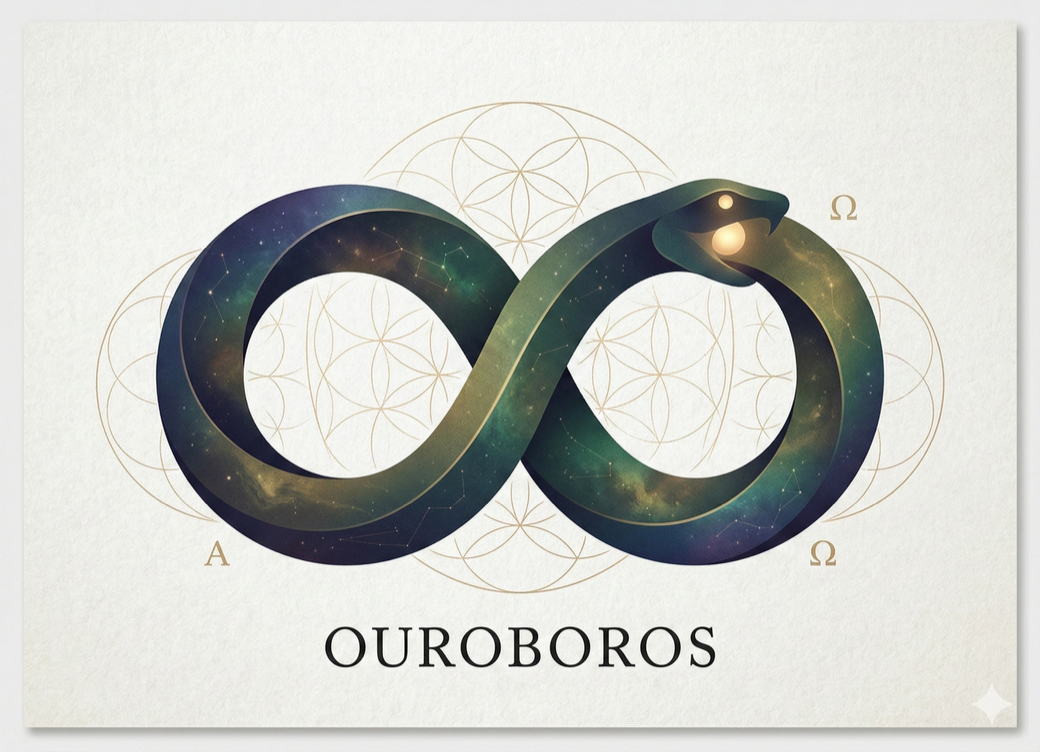
O U R O B O R O S
◯ ─────────── ◯
It gets smarter on its own. We just hold the line.
Skip the prompt engineering. The agent runs, fails, and gets smarter every generation. The grading command and expected result never make it into the success contract we hand it.
The Agent OS for replayable AI coding workflows


Quick Start · Why · Results · How It Works · Commands · Philosophy · Guide
# macOS / Linux / WSL 2
curl -fsSL https://raw.githubusercontent.com/Q00/ouroboros/main/scripts/install.sh | OUROBOROS_INSTALL_REF=readme-hero bash
# Windows (PowerShell) — no Python needed; installs Git and uv for you
irm https://raw.githubusercontent.com/Q00/ouroboros/main/scripts/install.ps1 | iex
One command installs it. Then run ooo setup once inside your coding agent — details in Quick Start.
Demo videos for each runtime.
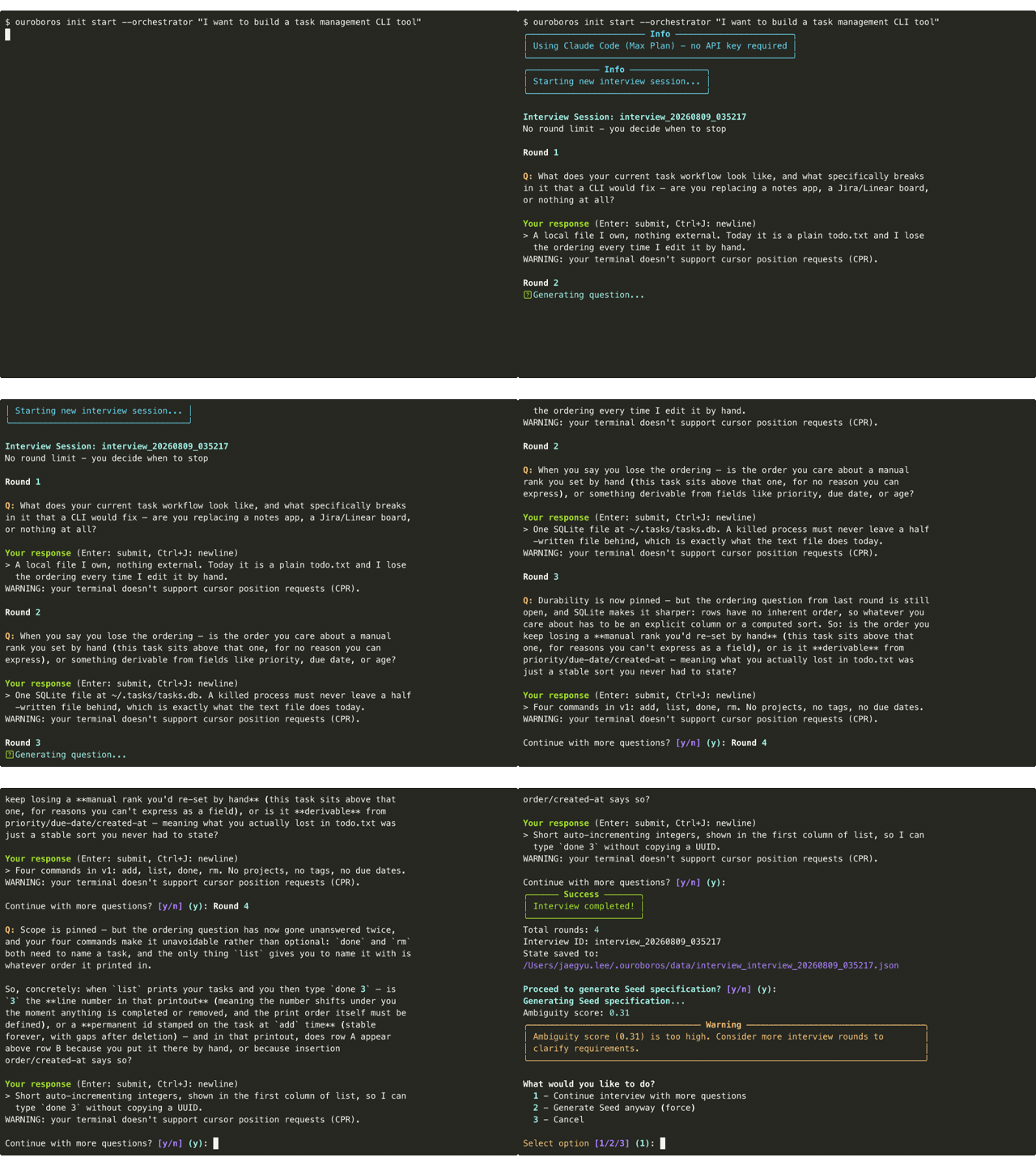 Terminal CLI — a task-management CLI: ouroboros init start asking aboutordering and scope, then reporting an ambiguity score | 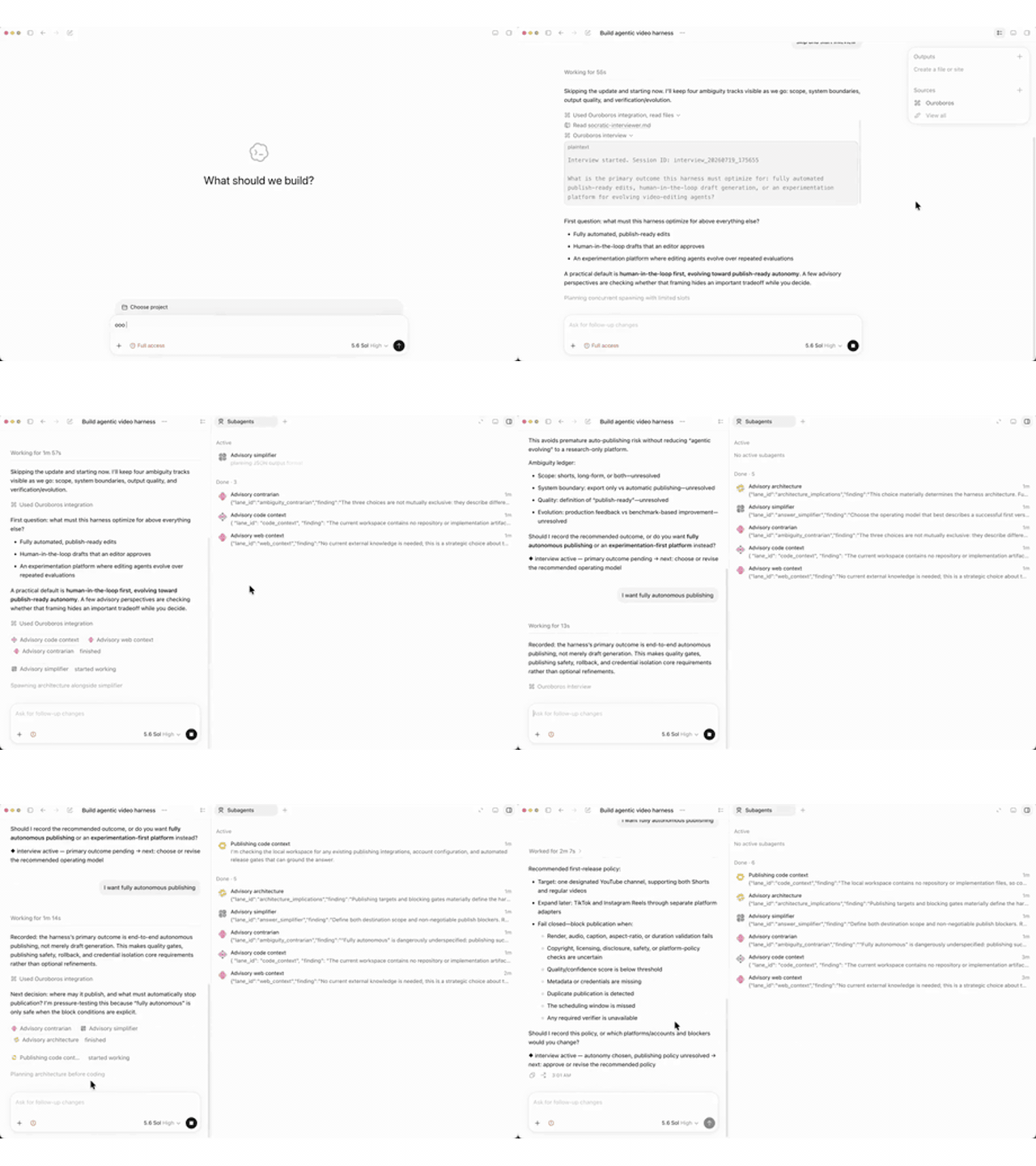 ChatGPT (Codex) — called as an integration, on a video-publishing harness: the interview, its advisory lanes, and the ambiguity ledger | 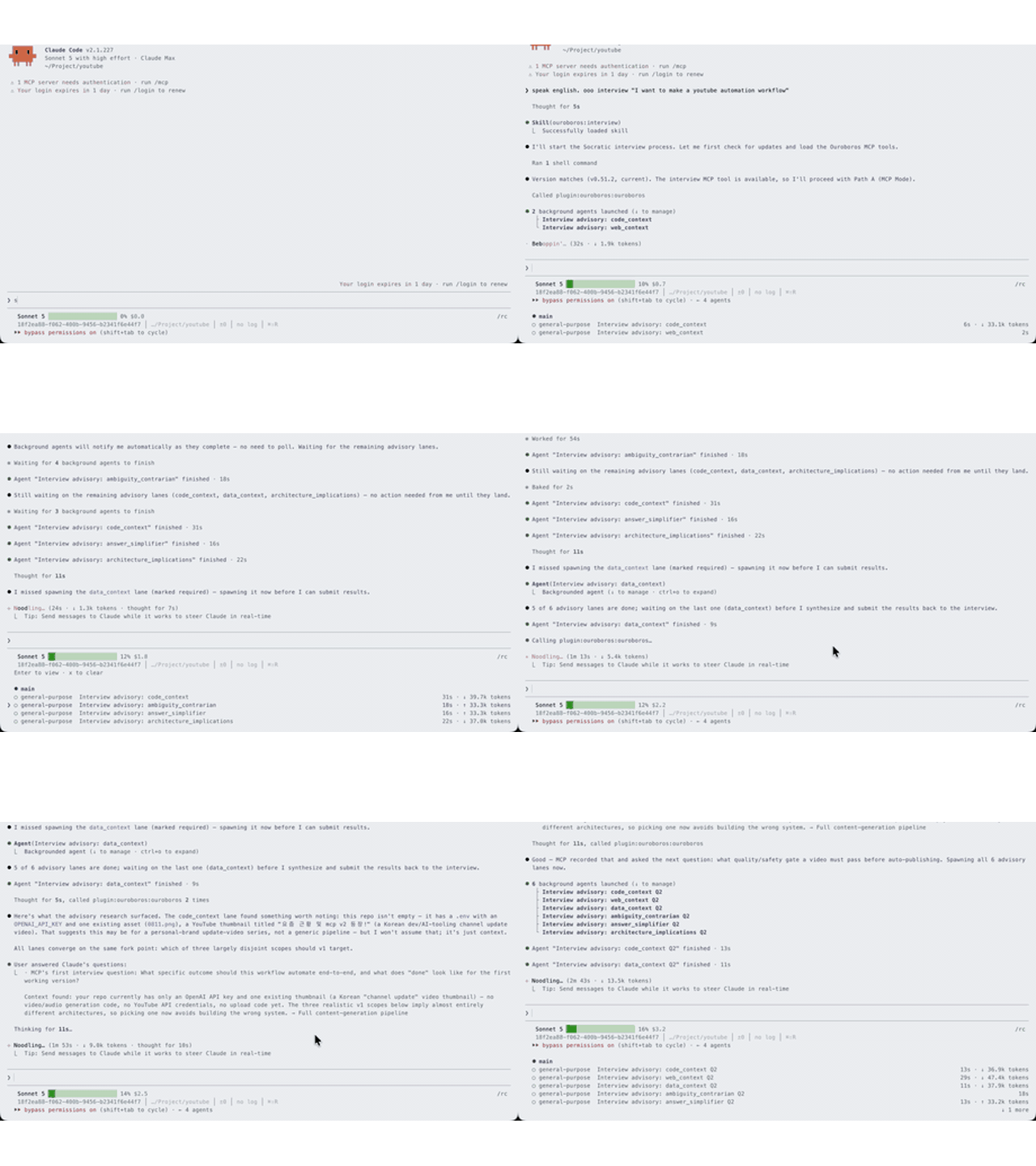 Claude Code — a YouTube automation task, with the six advisory lanes running in parallel before the interview submits | 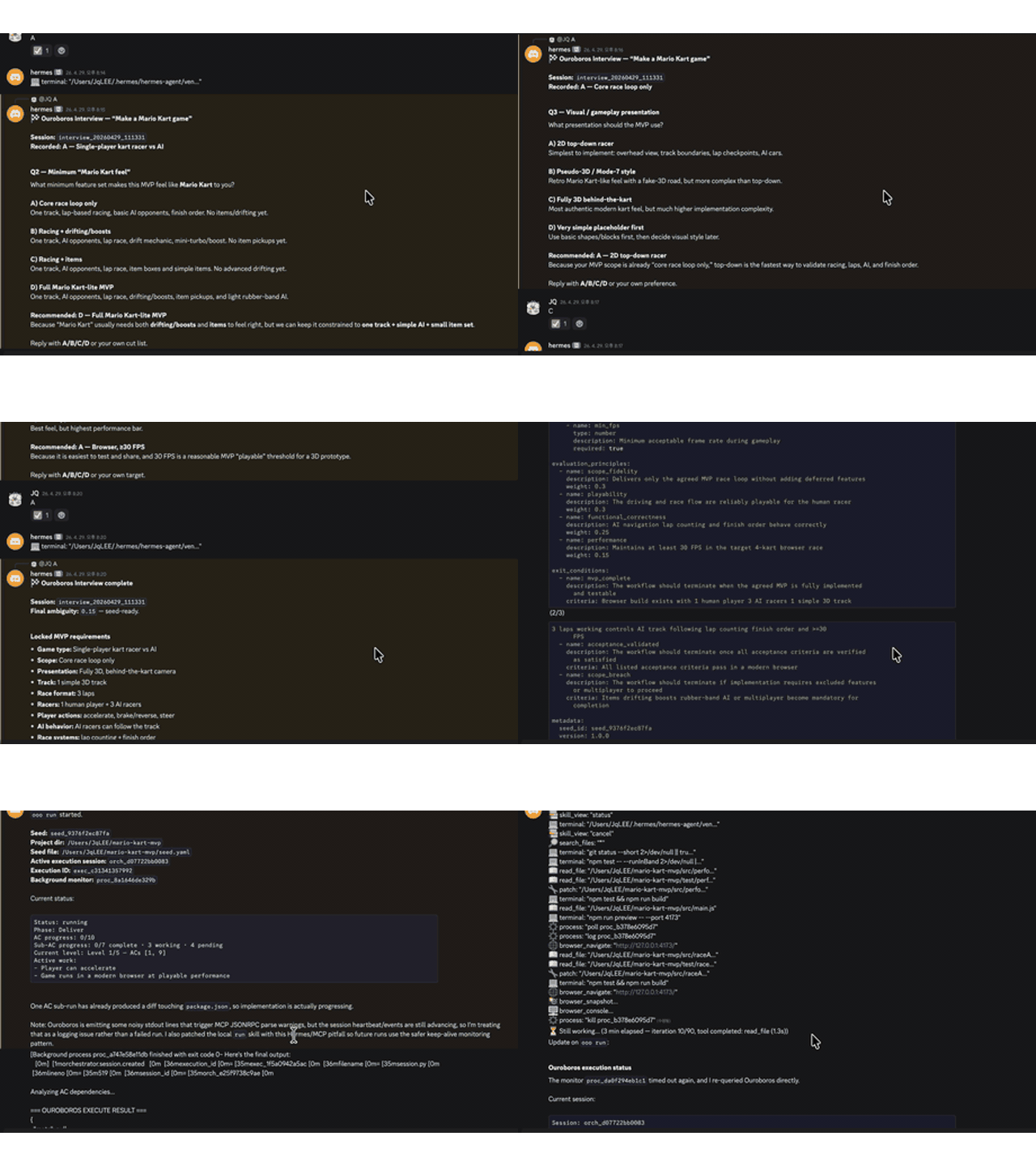 Hermes (Discord) — a kart-racing game, run as a chat bot, ending at Final ambiguity: 0.15 |  DeepSeek Harness — an OSS-trend outreach script, driven from a dsh chat: mcp__ouroboros__ouroboros_interviewturn by turn, fan-out results submitted between rounds | 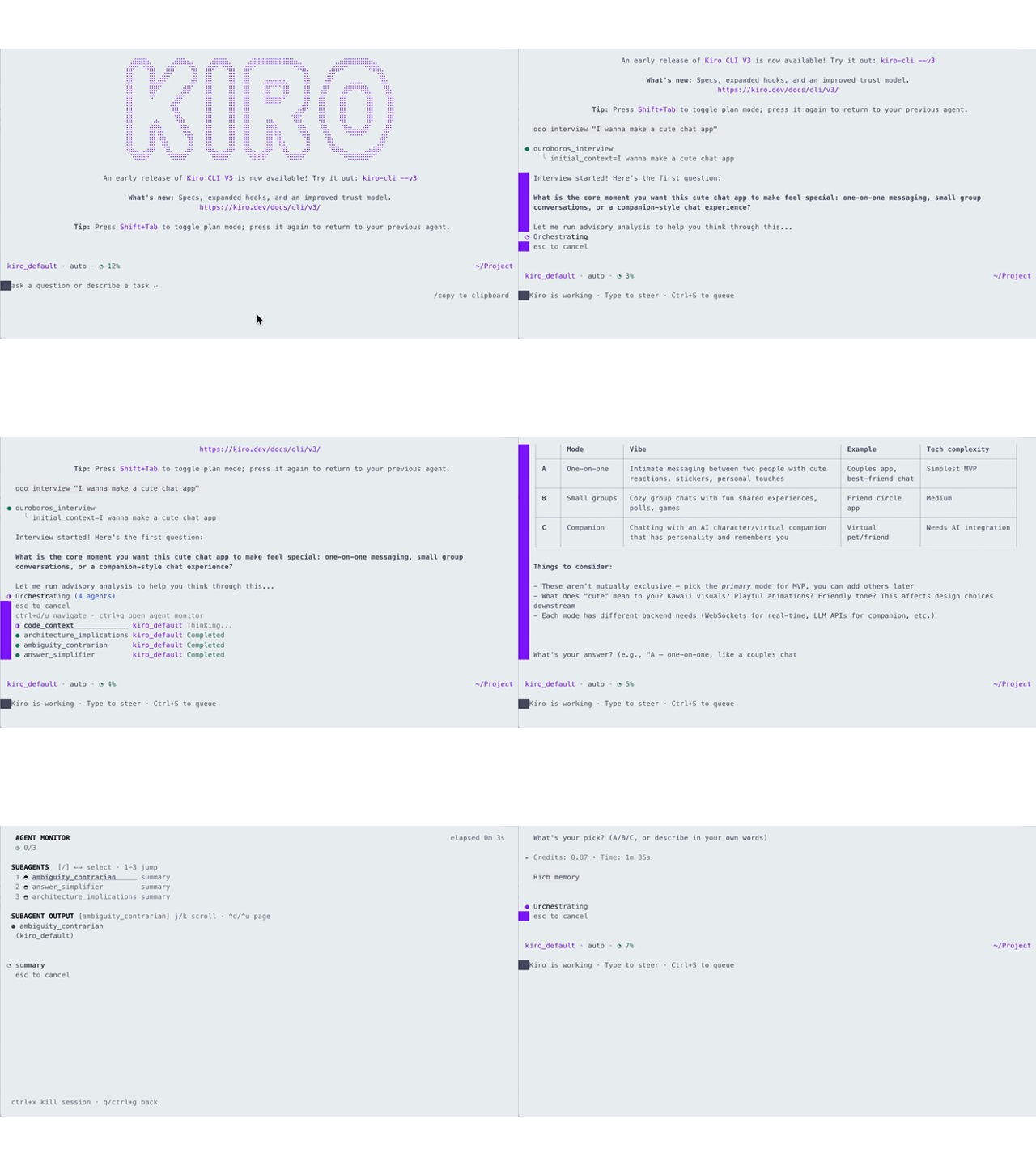 Kiro — the Kiro CLI running the Ouroboros interview flow, turning a vague request into a structured, testable Seed | 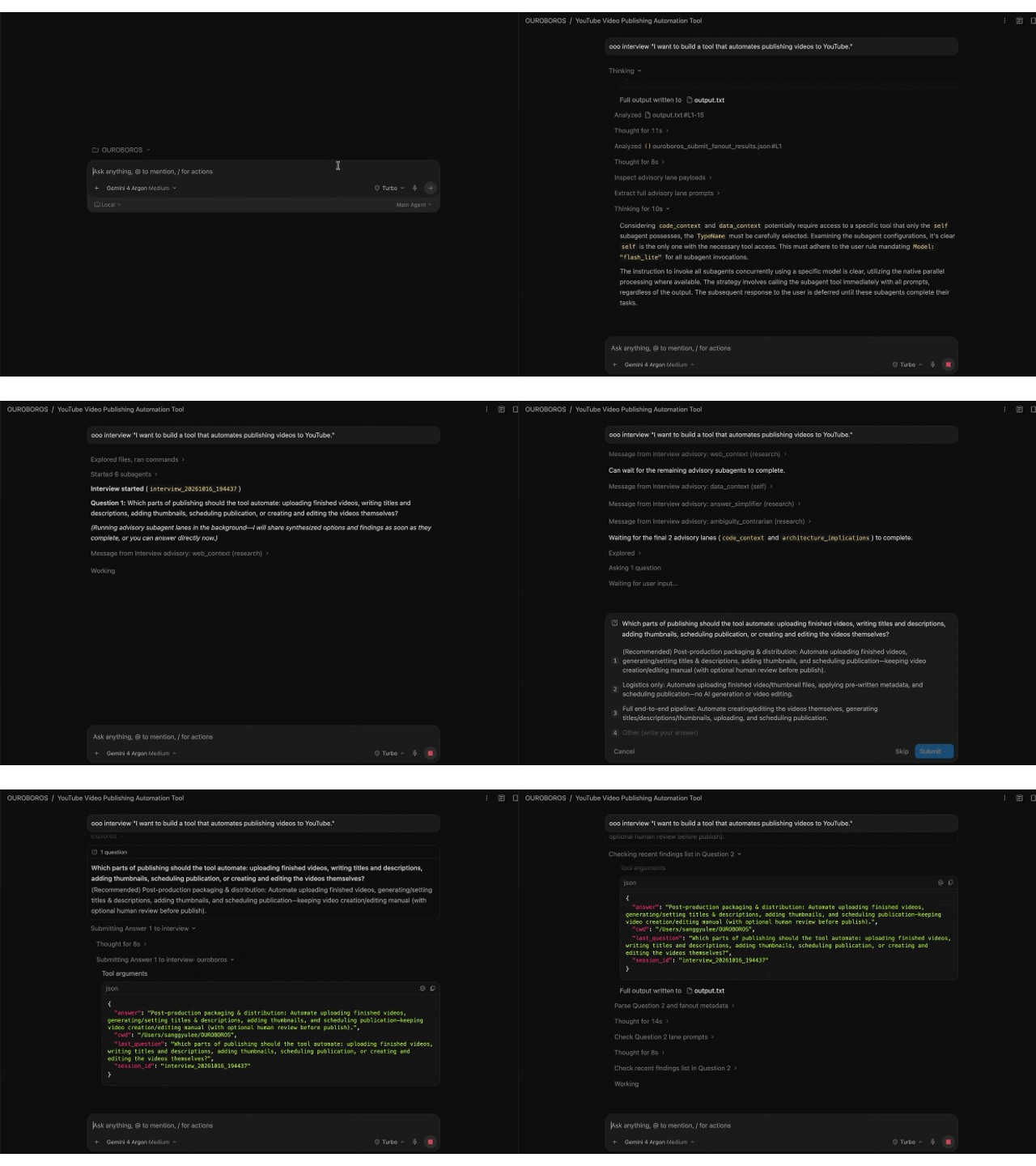 Antigravity — a YouTube-publishing automation interview: asks what to automate, shows advisory lanes, and submits the selected answer |
Turn a vague idea into a verified, working codebase -- across Claude Code, Codex CLI, OpenCode, Hermes, Gemini, Kiro, Copilot, Pi, OMP, Zcode, Goose, GJC, Antigravity, and Grok.
Ouroboros is an Agent OS for AI coding: a local-first runtime layer that turns non-deterministic agent work into a replayable, observable, policy-bound execution contract. It replaces ad-hoc prompting with a structured specification-first workflow: interview, crystallize, execute, evaluate, evolve.
The Ouroboros Agent OS Stack
Like any OS, Ouroboros is split into a stable OS layer of primitives, an application layer of domain workflows, and a shell that humans actually sit in front of. Three repos, one stack:
| Layer | Repo | Role | What it gives you |
|---|---|---|---|
| Shell (terminal client) | Ouro-labs/ourocode | Native terminal UI for running ooo workflows across Claude / Codex / Gemini CLIs in one session | TUI, wonderTool decision pickers, MCP pane state, command discovery |
| Apps (domain workflows) | Ouro-labs/ouroboros-plugins | UserLevel plugin contract — composes core primitives into installable domain programs (PR ops, Jira sync, incidents, releases) | Plugin manifest, scoped permissions, audit/provenance, reference plugins |
| OS (this repo) | Q00/ouroboros | Agent OS core — Seed, Ledger, Runtime, MCP, safety boundaries | ooo commands, spec-first workflow engine, multi-runtime adapter |
How they connect:
  ourocode  ──►  ooo / ouroboros-plugins  ──►  ouroboros core (Seed · Ledger · MCP · Runtime)
   shell             user-level apps                        kernel
- The kernel (
ouroboros) owns the contract: every action becomes a Seed-bound, ledger-recorded, replayable event — regardless of which LLM executes it. - Plugins (
ouroboros-plugins) declare scoped capabilities against that contract, so domain workflows (review a PR, triage a Linear ticket, run a release) stay auditable and policy-bound instead of being one-off prompts. - Ourocode is the terminal shell: it surfaces MCP state, interview questions, and wonderTool decisions as first-class TUI elements, so you can drive the OS without leaving the keyboard or switching between CLIs.
Use ouroboros alone with any supported CLI, layer plugins on for domain
workflows, or install ourocode when you want a unified terminal cockpit.
Disclaimer. The Ouroboros project and community are not affiliated with any cryptocurrency, token, memecoin, or trading community — including, but not limited to, any "ouroboros" tickers on pump.fun or other launchpads. This is an open-source developer tool. We do not issue, endorse, or hold any coins. Any token claiming association with this project is unauthorized.
Naming note. A separate, unaffiliated open-source project also uses the name "Ouroboros" — Anton Razzhigaev's self-modifying, autonomous-memory agent at
github.com/razzant/ouroboros. No shared code, no relationship. This project locks a specification before executing rather than rewriting its own architecture; if you're looking for the latter, that's the other one.
Why Ouroboros?
Most AI coding fails at the input, not the output. The bottleneck is not AI capability -- it is human clarity.
| Problem | What Happens | Ouroboros Fix |
|---|---|---|
| Vague prompts | AI guesses, you rework | Socratic interview exposes hidden assumptions |
| No spec | Architecture drifts mid-build | Immutable seed spec locks intent before code |
| Manual QA | "Looks good" is not verification | 3-stage automated evaluation gate |
Quick Start
Install — one command, everything auto-detected:
# macOS / Linux / WSL 2
curl -fsSL https://raw.githubusercontent.com/Q00/ouroboros/main/scripts/install.sh | OUROBOROS_INSTALL_REF=readme bash
# Windows (PowerShell 5.1+ or pwsh 7+) — nothing to install first
irm https://raw.githubusercontent.com/Q00/ouroboros/main/scripts/install.ps1 | iex
The Windows installer installs Git and uv through winget when they are missing,
lets uv download its own Python, then installs ouroboros-ai and wires the
host it finds. Native Windows is experimental and Codex CLI needs WSL 2; see
platform support.
First command — open your AI coding agent and run these in order:
> ooo setup
> ooo interview "I want to build a task management CLI"
ooo setup is a one-time configuration step. ooo interview is the first
workflow command and starts the Socratic interview. After setup, Codex follows
its currently selected model and Claude Code starts with its recommended model
settings. Choose Directly configure models only when you want to pin a
stage to a specific model; it opens the local settings screen in your browser.
You can return to those settings any time with ooo config.
Or from a plain terminal, without an agent host:
$ ouroboros init start --orchestrator "I want to build a task management CLI tool"
That recording is this exact command. It is at the top of this page so you can see the tool before installing it.
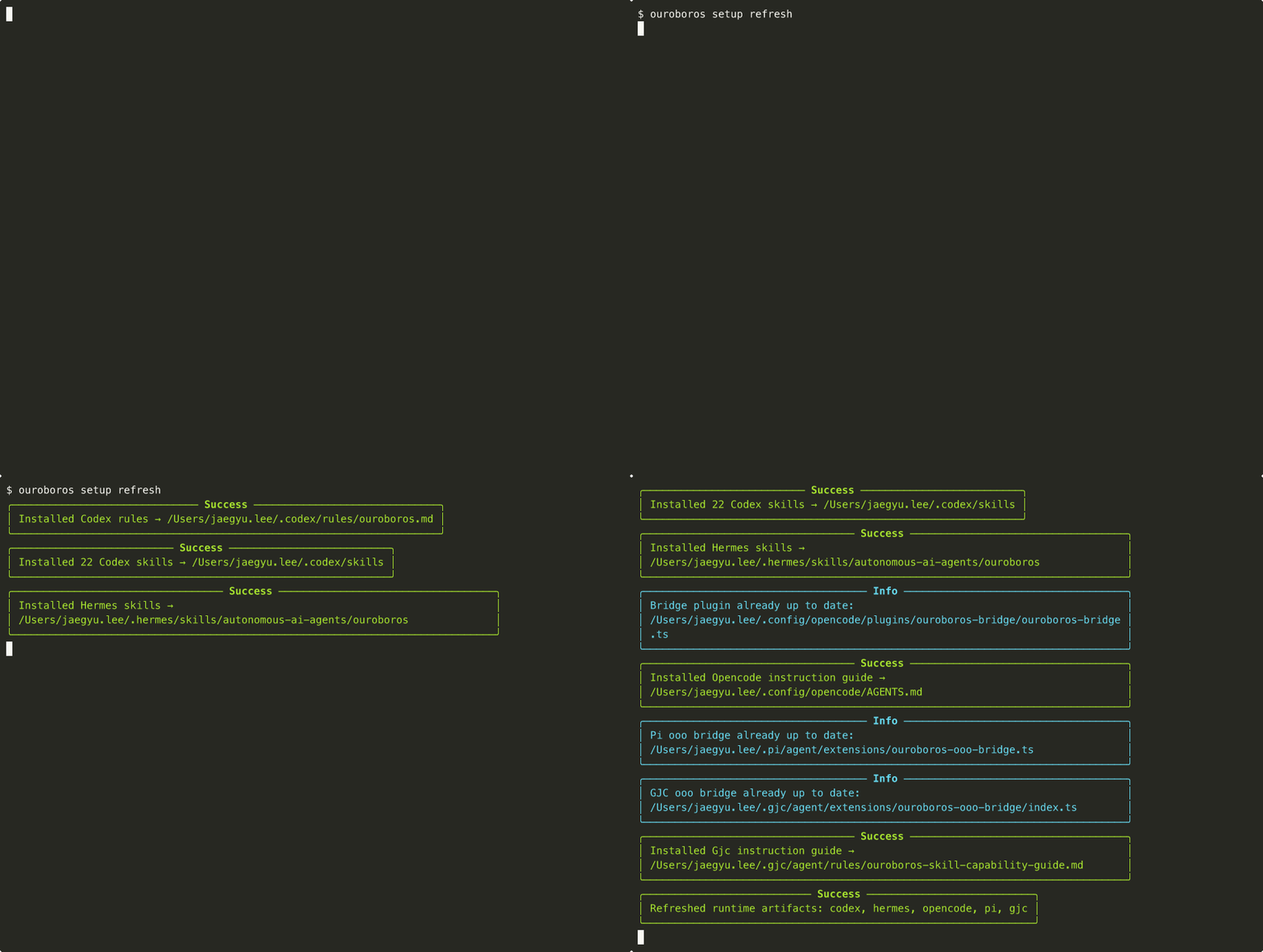
ouroboros setup refresh on one machine. It installs into the hosts that machine actually has, each in the shape that host expects: rules and skills for Codex, skills for Hermes, a plugin and an AGENTS.md for OpenCode, bridges for Pi and GJC. Your machine will show whichever of the thirteen you have installed.
Works with Claude Code, Codex CLI, GitHub Copilot CLI, OpenCode, Hermes, Gemini, Kiro CLI, Pi CLI, OMP CLI, Zcode, Goose, GJC, Antigravity CLI, and Grok Build CLI. The installer detects available runtimes and registers the MCP server where the host supports it. For explicit selection, run
ouroboros setup --runtime <opencode|kiro|copilot|gemini|pi|omp|zcode|goose|gjc|antigravity|grok>after installation. Copilot live-discovers its subscription catalog via the GitHub Copilot models API; Kiro's settings picker queries the authenticated CLI withkiro-cli chat --listmodels -f json, so account and enterprise allow-list changes appear without a hardcoded model table.
DeepSeek support. Ouroboros speaks DeepSeek two ways. Point the interview/Seed/QA pipeline at DeepSeek's own models with
--llm-backend dsh(ouroboros mcp serve --runtime claude-cli --llm-backend dsh, orOUROBOROS_LLM_BACKEND=dsh) — this drives DeepSeek Harness's ACP server under the hood. Or go the other way: install thedsh-ouroborosplugin (dsh plugin --profile <your-profile> add "github:Q00/ouroboros#main&path:integrations/dsh-plugin") and typeooo interview/ooo autodirectly in the DeepSeek Harness chat — the sameouroboros_interview/ouroboros_autotools run natively inside it, Socratic questions and all. Both directions, including what thedshbackend needs beyond the one variable, are in the DeepSeek Harness guide.
Codex plugin quick start
Needs codex on your PATH and uvx on the host (the plugin's MCP descriptor
launches the server with it). Install uv with pipx install uv,
pip install --user uv, or brew install uv.
codex plugin marketplace add Q00/ouroboros
codex plugin add ouroboros@ouroboros
Start a new Codex session, then run these commands in order:
ooo setup
ooo interview "Build a task management CLI"
ooo setup is the one-time runtime preparation. Once ready, Ouroboros follows
Codex's current default model; choose Directly configure models only when
you want to pin a specific model for a pipeline stage.
Kiro CLI quick start
pipx install 'ouroboros-ai[mcp]'       # or: uv tool install 'ouroboros-ai[mcp]'
ouroboros setup --runtime kiro         # detects Kiro CLI, registers MCP server, and
                                        # writes OUROBOROS_RUNTIME=kiro into
                                        # ~/.kiro/settings/mcp.json (the trusted,
                                        # setup-managed location -- a project .env
                                        # is untrusted input and this key is ignored there)
Then use ooo commands inside a Kiro CLI session.
GitHub Copilot CLI quick start
gh auth login                                # one-time GitHub auth (used for live model discovery)
pipx install 'ouroboros-ai[mcp]'             # or: uv tool install 'ouroboros-ai[mcp]'
ouroboros setup --runtime copilot            # discovers models live, picks a default,
                                             # registers MCP server in ~/.copilot/mcp-config.json
Restart your Copilot CLI session, then use ooo commands inside it. Model-ID mapping is catalog-gated: the prior direct and OpenRouter Opus 5 pins resolve to claude-opus-5 when that ID is present; current Anthropic API pins convert only their trailing numeric separator and only when the discovered catalog contains the exact candidate. Unknown IDs remain unchanged so Copilot reports an explicit unavailable-model error instead of silently selecting a different model. Leave role models unset so setup writes a discovered ID, or set a Copilot-valid ID explicitly. See the Copilot runtime guide.
See the GitHub Copilot CLI runtime guide for full details.
Other install methods
Claude Code plugin only (no Python package or global Python to install; the
host needs uv, which provides both uvx for the MCP server and the skills'
Python >= 3.12 fallback):
claude plugin marketplace add Q00/ouroboros && claude plugin install ouroboros@ouroboros
Then run ooo setup inside a Claude Code session.
pip / uv / pipx:
pip install 'ouroboros-ai[mcp,tui]' && ouroboros setup --runtime claude-cli  # recommended MCP v2 default
pip install 'ouroboros-ai[claude]'      # Claude Agent SDK profile (MCP 1.x, isolated)
pip install 'ouroboros-ai[claude-cli]'  # dependency-free Claude CLI worker
pip install 'ouroboros-ai[claude-sdk]'  # explicit alias for the Claude SDK profile
pip install 'ouroboros-ai[litellm]'     # + LiteLLM multi-provider; Python 3.12-3.13
pip install 'ouroboros-ai[mcp]'         # MCP v2 server/client without the GUI
pip install 'ouroboros-ai[tui]'         # settings GUI only
pip install 'ouroboros-ai[all]'         # MCP 1.x app bundle; excludes MCP 2 by design
ouroboros setup                         # configure runtime
Core and non-LiteLLM installs support Python 3.12-3.14. LiteLLM-bearing installs ([litellm], [all], and source --extra all) support Python 3.12-3.13; use Python 3.13 for current examples. See Platform Support.
The recommended standalone installation is ouroboros-ai[mcp,tui] followed by
an explicit MCP v2-compatible runtime selection. The example uses
--runtime claude-cli; substitute another compatible runtime such as codex,
opencode, hermes, gemini, goose, kiro, copilot, pi, or gjc.
Use [claude] and [claude-sdk] only in isolated MCP 1.x environments.
pip install 'ouroboros-ai[mcp]' is valid for embedding the MCP client/server library in an already isolated Python environment, but host registration requires uvx --isolated --python '>=3.12' or pipx. Use pipx install 'ouroboros-ai[mcp]' or uv tool install 'ouroboros-ai[mcp]' before ouroboros setup --runtime <claude-cli|codex|opencode|hermes|gemini|goose|kiro|copilot|pi|gjc>; setup exits without changing runtime configuration when neither isolated launcher is available.
Legacy compatibility: ouroboros-ai[dashboard] is still accepted as a compatibility alias/no-op; it does not install dashboard runtime payload. ouroboros-ai[all] includes that no-op alias only for compatibility.
Homebrew (macOS/Linux):
brew tap q00/tap
brew install ouroboros-ai
ouroboros setup                         # configure runtime
Self-hosted tap, not yet in homebrew-core. Installs the same package published to PyPI.
See runtime guides: Claude Code · Codex CLI · Hermes · OpenCode · Kiro CLI · Gemini CLI · GitHub Copilot CLI · Zcode · Pi JSON mode · OMP (Oh My Pi) · Goose · GJC · Antigravity CLI · Grok Build CLI
Uninstall
ouroboros uninstall
Removes all configuration, MCP registration, and data. See UNINSTALL.md for details.
Python >= 3.12 required. LiteLLM-bearing profiles support Python 3.12-3.13. See Platform Support and pyproject.toml.
Installing as an MCP server: use 0.51.1 or later. Earlier versions can fail at startup with
Failed to reconnect to plugin:ouroboros:ouroboros: -32000when an existing environment shadows the[mcp]profile (#2012). This matters if you install through a downstream package rather than PyPI, since those can lag.
Most people find out they were unclear about three files into the review.
If that feels familiar, star Q00/ouroboros on GitHub so the next person it could save can find it.
What You Get
After one loop of the Ouroboros cycle, a vague idea becomes a verified codebase:
| Step | Before | After |
|---|---|---|
| Interview | "Build me a task CLI" | 12 hidden assumptions exposed, ambiguity scored to 0.19 |
| Seed | No spec | Immutable specification with acceptance criteria, ontology, constraints |
| Evaluate | Manual review | 3-stage gate: Mechanical (free) -> Semantic -> Multi-Model Consensus |
What just happened?
interview  ->  Socratic questioning exposed 12 hidden assumptions
seed       ->  Crystallized answers into an immutable spec (Ambiguity: 0.15)
run        ->  Executed via Double Diamond decomposition
evaluate   ->  3-stage verification: Mechanical -> Semantic -> Consensus
Use
ooo <cmd>inside your AI coding agent session, orouroboros init start,ouroboros run seed.yaml, etc. from the terminal.
The serpent completed one loop. Each loop, it knows more than the last.
How It Compares
AI coding tools are powerful -- but they solve the wrong problem when the input is unclear.
| Vanilla AI Coding | Ouroboros | |
|---|---|---|
| Vague prompt | AI guesses intent, builds on assumptions | Socratic interview forces clarity before code |
| Spec validation | No spec -- architecture drifts mid-build | Immutable seed spec locks intent; ambiguity gate (<= 0.2) blocks premature code without explicit force |
| Evaluation | "Looks good" / manual QA | 3-stage automated gate: Mechanical -> Semantic -> Multi-Model Consensus |
| Rework rate | High -- wrong assumptions surface late | Low -- assumptions surface in the interview, not in the PR review |
The Loop
The ouroboros -- a serpent devouring its own tail -- is not decoration. It IS the architecture:
    Interview -> Seed -> Execute -> Evaluate
        ^                           |
        +---- Evolutionary Loop ----+
Each cycle does not repeat -- it evolves. The output of evaluation feeds back as input for the next generation, until the system truly knows what it is building.
| Phase | What Happens |
|---|---|
| Interview | Socratic questioning exposes hidden assumptions |
| Seed | Answers crystallize into an immutable specification |
| Execute | Double Diamond: Discover -> Define -> Design -> Deliver |
| Evaluate | 3-stage gate: Mechanical ($0) -> Semantic -> Multi-Model Consensus |
| Evolve | Wonder ("What do we still not know?") -> Reflect -> next generation |
"This is where the Ouroboros eats its tail: the output of evaluation becomes the input for the next generation's seed specification." --
reflect.py
Convergence is reached when ontology similarity >= 0.95 -- when the system has questioned itself into clarity.
Ralph: The Loop That Never Stops
ooo ralph runs the evolutionary loop persistently -- across session boundaries -- until convergence is reached. Each step is stateless: the EventStore reconstructs the full lineage, so even if your machine restarts, the serpent picks up where it left off.
Ralph Cycle 1: evolve_step(lineage, seed) -> Gen 1 -> action=CONTINUE
Ralph Cycle 2: evolve_step(lineage)       -> Gen 2 -> action=CONTINUE
Ralph Cycle 3: evolve_step(lineage)       -> Gen 3 -> action=CONVERGED
                                                +-- Ralph stops.
                                                    The ontology has stabilized.
Commands
Inside AI coding agent sessions, use ooo <cmd> skills. From the terminal, use the ouroboros CLI.
Skill (ooo) | CLI equivalent | What It Does |
|---|---|---|
ooo setup | ouroboros setup | Register runtime and configure project (one-time) |
ooo interview | ouroboros init start | Socratic questioning -- expose hidden assumptions |
ooo auto | ouroboros auto | Goal → A-grade Seed → execution handoff with bounded loops |
ooo seed | (generated by interview) | Crystallize into immutable spec |
ooo run | ouroboros run seed.yaml | Execute via Double Diamond decomposition |
ooo evaluate | (via MCP) | 3-stage verification gate |
ooo evolve | (via MCP) | Evolutionary loop until ontology converges |
ooo unstuck | (via MCP) | 5 lateral thinking personas when you are stuck |
ooo status | ouroboros status executions / ouroboros status execution <id> | Session tracking + (MCP-only) drift detection |
ooo resume-session | ouroboros resume | List in-flight sessions and re-attach commands |
ooo cancel | ouroboros cancel execution [<id>|--all] | Cancel stuck or orphaned executions |
ooo ralph | (via MCP) | Persistent loop until verified |
ooo tutorial | (interactive) | Interactive hands-on learning |
ooo help | ouroboros --help | Full reference |
ooo pm | (via MCP) | PM-focused interview + PRD generation |
ooo qa | (via skill) | General-purpose QA verdict for any artifact |
ooo update | ouroboros update | Check for updates + upgrade to latest |
ooo brownfield | (via skill) | Scan and manage brownfield repo/worktree defaults |
ooo publish | (skill/runtime surface; uses gh CLI) | Publish a Seed as GitHub Epic/Task issues for team workflows |
Not all skills have direct CLI equivalents. Some (
evaluate,evolve,unstuck,ralph,publish) are available through agent skills, runtime rules, or MCP tools rather than a directouroboros <subcommand>shell command./resumeis reserved for Claude Code's built-in session picker; useooo resume-sessionfor Ouroboros in-flight sessions. Claude Code also reserves/run,/status,/help, and/config. The safe direct skill forms are/ouroboros:ouroboros-run,/ouroboros:ouroboros-status,/ouroboros:ouroboros-help, and/ouroboros:ouroboros-config; the familiarooo run,ooo status,ooo help, andooo configphrases remain supported.
See the CLI reference for full details.
The Nine Minds
Nine highlighted agents below, with 12 more specialized agents available (21 total). All loaded on-demand, never preloaded:
| Agent | Role | Core Question |
|---|---|---|
| Socratic Interviewer | Questions-only. Never builds. | "What are you assuming?" |
| Ontologist | Finds essence, not symptoms | "What IS this, really?" |
| Seed Architect | Crystallizes specs from dialogue | "Is this complete and unambiguous?" |
| Evaluator | 3-stage verification | "Did we build the right thing?" |
| Contrarian | Challenges every assumption | "What if the opposite were true?" |
| Hacker | Finds unconventional paths | "What constraints are actually real?" |
| Simplifier | Removes complexity | "What's the simplest thing that could work?" |
| Researcher | Stops coding, starts investigating | "What evidence do we actually have?" |
| Architect | Identifies structural causes | "If we started over, would we build it this way?" |
Under the Hood
Architecture overview -- Python >= 3.12
src/ouroboros/
+-- bigbang/        Interview, ambiguity scoring, brownfield explorer
+-- router/         PAL Router -- 3-tier cost optimization (1x / 10x / 30x)
+-- execution/      (deprecated — logic moved to orchestrator/ and mcp/tools/)
+-- evaluation/     Mechanical -> Semantic -> Multi-Model Consensus
+-- evolution/      Wonder / Reflect cycle, convergence detection
+-- resilience/     4-pattern stagnation detection, 5 lateral personas
+-- observability/  3-component drift measurement, auto-retrospective
+-- persistence/    Event sourcing (SQLAlchemy + aiosqlite), checkpoints
+-- orchestrator/   Runtime abstraction layer (Claude Code, Codex CLI, OpenCode, Hermes, Gemini, Kiro, Copilot, Pi, OMP, GJC, Goose, Antigravity, Grok, Zcode)
+-- core/           Types, errors, seed, ontology, security
+-- providers/      LiteLLM adapter (100+ models)
+-- mcp/            MCP client/server integration
+-- plugin/         Plugin system (skill/agent auto-discovery)
+-- tui/            Terminal UI dashboard
+-- cli/            Typer-based CLI
Key internals:
- PAL Router -- Frugal (1x) -> Standard (10x) -> Frontier (30x) with auto-escalation on failure, auto-downgrade on success
- Drift -- Goal (50%) + Constraint (30%) + Ontology (20%) weighted measurement, threshold <= 0.3
- Brownfield -- Auto-detects config files across multiple language ecosystems
- Evolution -- Up to 30 generations, convergence at ontology similarity >= 0.95
- Stagnation -- Detects spinning, oscillation, no-drift, and diminishing returns patterns
- Agent OS runtime -- Replayable execution contract across capability discovery, policy, directives, event journal, and agent processes
- Runtime backends -- Pluggable abstraction layer (
orchestrator.runtime_backendconfig) with first-class support for every canonical backend returned byruntime_backend_choices(), including GJC, Antigravity, Grok, and Zcode; same workflow spec, different execution engines
See Architecture for the full design document.
From Wonder to Ontology
The philosophical engine behind Ouroboros
Wonder -> "How should I live?" -> "What IS 'live'?" -> Ontology -- Socrates
Every great question leads to a deeper question -- and that deeper question is always ontological: not "how do I do this?" but "what IS this, really?"
   Wonder                          Ontology
"What do I want?"    ->    "What IS the thing I want?"
"Build a task CLI"   ->    "What IS a task? What IS priority?"
"Fix the auth bug"   ->    "Is this the root cause, or a symptom?"
This is not abstraction for its own sake. When you answer "What IS a task?" -- deletable or archivable? solo or team? -- you eliminate an entire class of rework. The ontological question is the most practical question.
Ouroboros embeds this into its architecture through the Double Diamond:
    * Wonder          * Design
   /  (diverge)      /  (diverge)
  /    explore      /    create
 /                 /
* ------------ * ------------ *
 \                 \
  \    define       \    deliver
   \  (converge)     \  (converge)
    * Ontology        * Evaluation
The first diamond is Socratic: diverge into questions, converge into ontological clarity. The second diamond is pragmatic: diverge into design options, converge into verified delivery. Each diamond requires the one before it -- you cannot design what you have not understood.
Ambiguity Score: The Gate Between Wonder and Code
The Interview does not end when you feel ready -- it ends when the math says you are ready. Ouroboros quantifies ambiguity as the inverse of weighted clarity:
Ambiguity = 1 - Sum(clarity_i * weight_i)
Each dimension is scored 0.0-1.0 by the LLM (temperature 0.1 for reproducibility), then weighted:
| Dimension | Greenfield | Brownfield |
|---|---|---|
| Goal Clarity -- Is the goal specific? | 40% | 35% |
| Constraint Clarity -- Are limitations defined? | 30% | 25% |
| Success Criteria -- Are outcomes measurable? | 30% | 25% |
| Context Clarity -- Is the existing codebase understood? | -- | 15% |
Threshold: Ambiguity <= 0.2. A score above that blocks Seed generation. Passing force explicitly is what gets past it, and the CLI puts that choice on screen next to continue and cancel. The gate is a default worth arguing with, not a lock.
Example (Greenfield):

  Goal: 0.9 * 0.4  = 0.36
  Constraint: 0.8 * 0.3  = 0.24
  Success: 0.7 * 0.3  = 0.21
                        ------
  Clarity             = 0.81
  Ambiguity = 1 - 0.81 = 0.19  <= 0.2 -> Ready for Seed
Why 0.2? Because at 80% weighted clarity, the remaining unknowns are small enough that code-level decisions can resolve them. Above that threshold, you are still guessing at architecture.
Ontology Convergence: When the Serpent Stops
The evolutionary loop does not run forever. It stops when consecutive generations produce ontologically identical schemas. Similarity is measured as a weighted comparison of schema fields:
Similarity = 0.5 * name_overlap + 0.3 * type_match + 0.2 * exact_match
| Component | Weight | What It Measures |
|---|---|---|
| Name overlap | 50% | Do the same field names exist in both generations? |
| Type match | 30% | Do shared fields have the same types? |
| Exact match | 20% | Are name, type, AND description all identical? |
Threshold: Similarity >= 0.95 -- the loop converges and stops evolving.
But raw similarity is not the only signal. The system also detects pathological patterns:
| Signal | Condition | What It Means |
|---|---|---|
| Stagnation | Similarity >= 0.95 for 3 consecutive generations | Ontology has stabilized |
| Oscillation | Gen N ~ Gen N-2 (period-2 cycle) | Stuck bouncing between two designs |
| Repetitive feedback | >= 70% question overlap across 3 generations | Wonder is asking the same things |
| Hard cap | 30 generations reached | Safety valve |
Gen 1: {Task, Priority, Status}
Gen 2: {Task, Priority, Status, DueDate}     -> similarity 0.78 -> CONTINUE
Gen 3: {Task, Priority, Status, DueDate}     -> similarity 1.00 -> CONVERGED
Two mathematical gates, one philosophy: do not build until you are clear (Ambiguity <= 0.2), do not stop evolving until you are stable (Similarity >= 0.95).
Contributing
git clone https://github.com/Q00/ouroboros
cd ouroboros
uv sync --python 3.13 --all-groups
uv run --python 3.13 --no-sync pytest
Issues · Discussions · Contributing Guide
Sponsors
Ouroboros is MIT-licensed and built in the open. If it saves you rework — or you want the loop to keep evolving — consider sponsoring. Sponsorship directly funds maintenance, new runtime integrations, and sponsor-only deep-dive content.

Every sponsor keeps the serpent evolving. Thank you.
Activity
These numbers are generated from GitHub data and refreshed automatically; caching may delay updates.


"The beginning is the end, and the end is the beginning."
The serpent does not repeat -- it evolves.
MIT License