
trigger.dev
Trigger.dev – build and deploy durable AI agents and workflows
 triggerdotdev
- 评测生成时间(北京时间)
- 本报告引擎
- v3.10.0
- 当前引擎
- v3.16.0
本报告与当前引擎使用不同规则;原分数不会自动更新,不同版本的分数不宜直接对比。
进入后确认来源与额度,提交才会创建任务。
综合采用结论
证据充分,整体质量与安全表现优秀
- 基础评测完成+25/25确定性评分与静态安全扫描已完成
- README 有效证据+22/258,863 个去重后的有效字符
- 独立证据来源+20/206 类非重复证据,重复文件不叠加
- 仓库元数据+10/10已取得仓库状态与采用数据
- 活跃记录+5/5已取得最近提交时间
- AI 复核+15/15已完成结构化 AI 证据复核
Trigger.dev 任务创建与部署流程
README 展示了从编写任务到部署的连续步骤,包括代码示例和部署说明。
左右滑动查看完整图示
- • README 中 'Write tasks in your codebase' 示例
- • Deployment 章节说明 'no infrastructure to manage'
- README 中 'Write tasks in your codebase' 提供 task 定义示例
- Key features 列出 'Long-running tasks'、'Automatic retries' 等
- Self-hosting 章节提供 Docker 和 Kubernetes 指南
- Getting started 指向 web app 和快速开始文档
- 问题与用途描述
- 有效 README
- 可执行示例
- 输入、参数或工具说明
- 未发现已知高风险模式
- 缺少安装或接入步骤
- 缺少限制、权限或边界
- 作为 MCP Server 未提供 MCP 接入配置或工具列表
- 缺少安装步骤和最小可运行示例
- 未说明权限、数据边界或安全默认值
需要构建长时运行 AI 工作流的 TypeScript 开发者、需要任务重试、队列和可观测性的团队、希望自托管工作流平台的用户、需要人机协同(human-in-the-loop)的 AI 应用
需要快速集成 MCP 的客户端场景(缺少 MCP 配置)、非 TypeScript 技术栈的项目
也有自己的公开项目?先看完证据,再用当前规则生成独立报告。
评测我的项目 →静态扫描不是安全保证,生产接入前仍应人工复核权限和数据边界。
- 01补充安装或接入步骤
- 02补充限制、权限或边界
方法、证据与局限展开收起
GitHub Repository API
10 个文件 · 65,770 字符
v3.10.0 · AI 复核已启用(deepseek-chat)
- 静态评测不会安装或执行项目代码
- 安全扫描基于高信号文件与已知模式,不能替代人工审计
- 流行度只反映采用程度,不代表安全或工程质量
30 天热度趋势
README

Build and deploy fully‑managed AI agents and workflows
Website | Docs | Issues | Example projects | Feature requests | Public roadmap | Self-hosting








About Trigger.dev
Trigger.dev is the open-source platform for building AI workflows in TypeScript. Long-running tasks with retries, queues, observability, and elastic scaling.
The platform designed for building AI agents
Build AI agents using all the frameworks, services and LLMs you're used to, deploy them to Trigger.dev and get durable, long-running tasks with retries, queues, observability, and elastic scaling out of the box.
-
Long-running without timeouts: Execute your tasks with absolutely no timeouts, unlike AWS Lambda, Vercel, and other serverless platforms.
-
Durability, retries & queues: Build rock solid agents and AI applications using our durable tasks, retries, queues and idempotency.
-
True runtime freedom: Customize your deployed tasks with system packages – run browsers, Python scripts, FFmpeg and more.
-
Human-in-the-loop: Programmatically pause your tasks until a human can approve, reject or give feedback.
-
Realtime apps & streaming: Move your background jobs to the foreground by subscribing to runs or streaming AI responses to your app.
-
Observability & monitoring: Each run has full tracing and logs. Configure error alerts to catch bugs fast.
Key features
- JavaScript and TypeScript SDK - Build background tasks using familiar programming models
- Long-running tasks - Handle resource-heavy tasks without timeouts
- Durable cron schedules - Create and attach recurring schedules of up to a year
- Trigger.dev Realtime - Trigger, subscribe to, and get real-time updates for runs, with LLM streaming support
- Build extensions - Hook directly into the build system and customize the build process. Run Python scripts, FFmpeg, browsers, and more.
- React hooks - Interact with the Trigger.dev API on your frontend using our React hooks package
- Batch triggering - Use batchTrigger() to initiate multiple runs of a task with custom payloads and options
- Structured inputs / outputs - Define precise data schemas for your tasks with runtime payload validation
- Waits - Add waits to your tasks to pause execution for a specified duration
- Preview branches - Create isolated environments for testing and development. Integrates with Vercel and git workflows
- Waitpoints - Add human-in-the-loop judgment at critical decision points without disrupting workflow
- Concurrency & queues - Set concurrency rules to manage how multiple tasks execute
- Multiple environments - Support for DEV, PREVIEW, STAGING, and PROD environments
- No infrastructure to manage - Auto-scaling infrastructure that eliminates timeouts and server management
- Automatic retries - If your task encounters an uncaught error, we automatically attempt to run it again
- Checkpointing - Tasks are inherently durable, thanks to our checkpointing feature
- Versioning - Atomic versioning allows you to deploy new versions without affecting running tasks
- Machines - Configure the number of vCPUs and GBs of RAM you want the task to use
- Observability & monitoring - Monitor every aspect of your tasks' performance with comprehensive logging and visualization tools
- Logging & tracing - Comprehensive logging and tracing for all your tasks
- Tags - Attach up to ten tags to each run, allowing you to filter via the dashboard, realtime, and the SDK
- Run metadata - Attach metadata to runs which updates as the run progresses and is available to use in your frontend for live updates
- Bulk actions - Perform actions on multiple runs simultaneously, including replaying and cancelling
- Real-time alerts - Choose your preferred notification method for run failures and deployments
Write tasks in your codebase
Create tasks where they belong: in your codebase. Version control, localhost, test and review like you're already used to.
import { task } from "@trigger.dev/sdk";

//1. You need to export each task
export const helloWorld = task({
  //2. Use a unique id for each task
  id: "hello-world",
  //3. The run function is the main function of the task
  run: async (payload: { message: string }) => {
    //4. You can write code that runs for a long time here, there are no timeouts
    console.log(payload.message);
  },
});
Deployment
Use our SDK to write tasks in your codebase. There's no infrastructure to manage, your tasks automatically scale and connect to our cloud. Or you can always self-host.
Environments
We support Development, Staging, Preview, and Production environments, allowing you to test your tasks before deploying them to production.
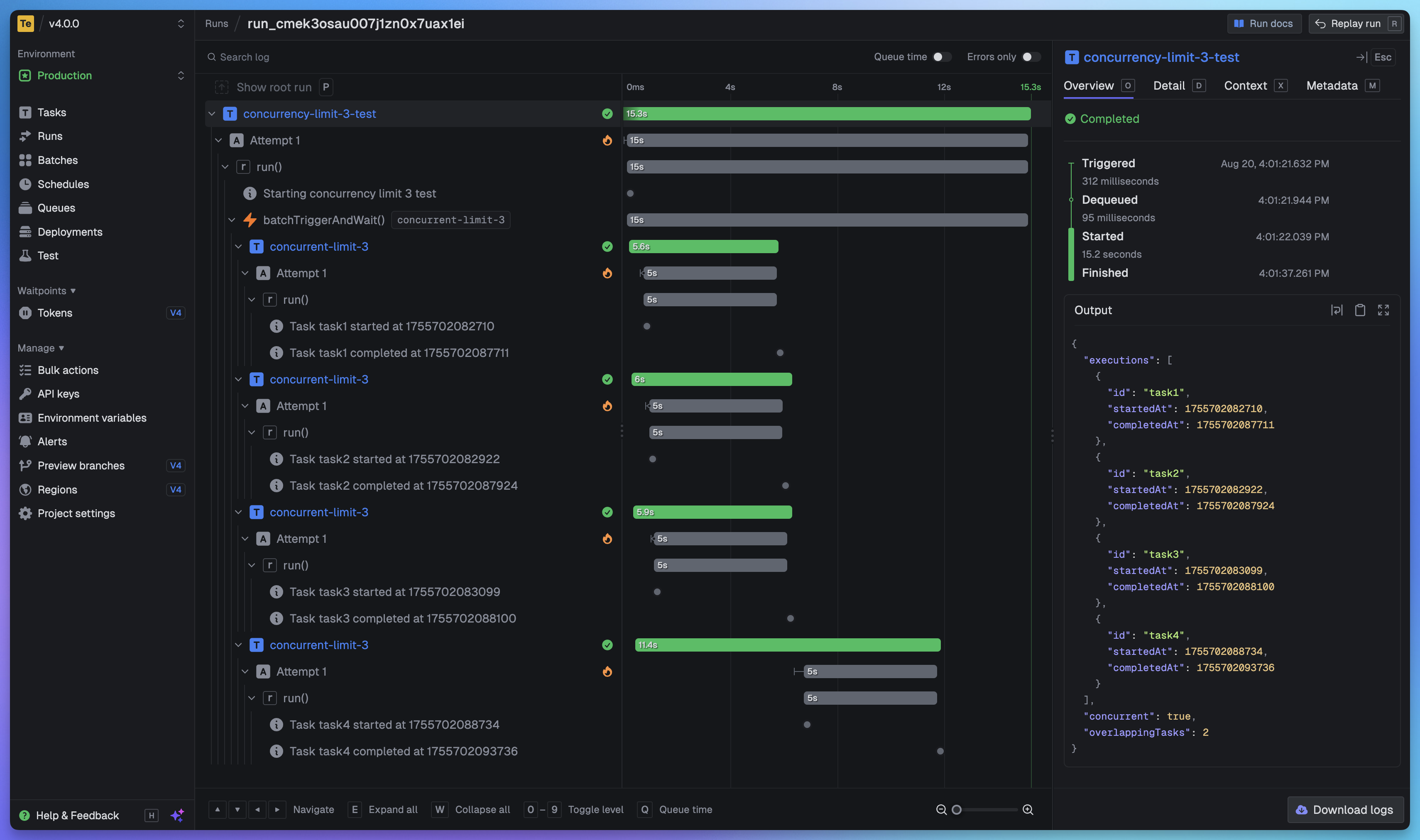
Full visibility of every job run
View every task in every run so you can tell exactly what happened. We provide a full trace view of every task run so you can see what happened at every step.
Getting started
The quickest way to get started is to create an account and project in our web app, and follow the instructions in the onboarding. Build and deploy your first task in minutes.
Useful links:
- Quick start - get up and running in minutes
- How it works - understand how Trigger.dev works under the hood
- Guides and examples - walk-through guides and code examples for popular frameworks and use cases
Self-hosting
If you prefer to self-host Trigger.dev, you can follow our self-hosting guides:
- Docker self-hosting guide - use Docker Compose to spin up a Trigger.dev instance
- Kubernetes self-hosting guide - use our official Helm chart to deploy Trigger.dev to your Kubernetes cluster
Support and community
We have a large active community in our official Discord server for support, including a dedicated channel for self-hosting.
Development
To setup and develop locally or contribute to the open source project, follow our development guide.