
webiny-js
Open-source, self-hosted CMS platform on AWS serverless (Lambda, DynamoDB, S3). TypeScript framework with multi-tenancy, lifecycle hooks, GraphQL API, and AI-assisted development via MCP server. Built for developers at large organizations.
 webiny
- 评测生成时间(北京时间)
- 本报告引擎
- v3.10.0
- 当前引擎
- v3.16.0
本报告与当前引擎使用不同规则;原分数不会自动更新,不同版本的分数不宜直接对比。
进入后确认来源与额度,提交才会创建任务。
综合采用结论
证据充分,整体质量与安全表现优秀
- 基础评测完成+25/25确定性评分与静态安全扫描已完成
- README 有效证据+22/258,927 个去重后的有效字符
- 独立证据来源+20/205 类非重复证据,重复文件不叠加
- 仓库元数据+10/10已取得仓库状态与采用数据
- 活跃记录+5/5已取得最近提交时间
- AI 复核+15/15已完成结构化 AI 证据复核
Webiny 架构与扩展流程
README 展示了 AWS 组件(Lambda、DynamoDB、S3、CloudFront)及扩展文件夹结构,无明确时间顺序,适合架构图。
左右滑动查看完整图示
- • Architecture 章节:Your AWS Account 包含 Lambda、DynamoDB、S3、CloudFront
- • Extending Webiny 章节:所有自定义在 extensions/ 文件夹
- • Quick Start 章节:yarn webiny deploy 部署到 AWS
- Quick Start 章节:npx create-webiny-project my-project
- Extending Webiny 章节:API/Admin/Infrastructure/CLI 扩展类型及示例
- When Not to Use Webiny 章节:明确列出不适用场景
- AI-Assisted Development 章节:提及 MCP server 但无具体配置
- Key Commands 章节:yarn webiny deploy 等命令
- 问题与用途描述
- 有效 README
- 安装或接入步骤
- 可执行示例
- 未发现已知高风险模式
- 缺少输出或结果说明
- 缺少错误处理或排障
- MCP 服务器配置与使用细节缺失,仅提及连接工具
- 缺少错误处理与排障指南
- 输出或结果说明不明确(如部署后具体产物)
需要自托管 CMS 且使用 AWS 的团队、需要多租户作为核心功能的项目、希望用 TypeScript 扩展 CMS 的开发者、需要将 CMS 嵌入自身产品的白标场景
简单网站或博客、非 AWS 环境(无 GCP/Azure/本地)、无 TypeScript/React 技能的团队、需要无代码即插即用 SaaS CMS 的用户
也有自己的公开项目?先看完证据,再用当前规则生成独立报告。
评测我的项目 →静态扫描不是安全保证,生产接入前仍应人工复核权限和数据边界。
- 01补充输出或结果说明
- 02补充错误处理或排障
方法、证据与局限展开收起
GitHub Repository API
25 个文件 · 275,541 字符
v3.10.0 · AI 复核已启用(deepseek-chat)
- 静态评测不会安装或执行项目代码
- 安全扫描基于高信号文件与已知模式,不能替代人工审计
- 流行度只反映采用程度,不代表安全或工程质量
30 天热度趋势
README

AI-programmable CMS for enterprises hosting on AWS




About Webiny
Open-source content platform. Self-hosted on AWS serverless. Built as a TypeScript framework you extend with code, not a closed product you configure through a UI.
Runs on Lambda, DynamoDB, S3, and CloudFront inside your own AWS account. Scales automatically. No servers to manage. Infrastructure provisioned via IaC (Pulumi) in a single deploy command.
Used in production by teams managing hundreds of millions of content records, petabytes of assets, and thousands of editors — including Amazon, Emirates, Fortune 500 companies, government agencies, and SaaS platforms that white-label Webiny inside their own products.
Documentation · Learn Webiny Course · Community Slack
What's Inside
.png%3Foriginal&w=3840&q=75)
Headless CMS — Custom content models, GraphQL API, field-level permissions, localization, versioning. Models can be defined through the admin UI or in code via the framework.

Website Builder — Visual drag-and-drop page editor with a Next.js SDK. Render pages through your own frontend (Vercel, CloudFront, wherever). Create custom page elements with React components.
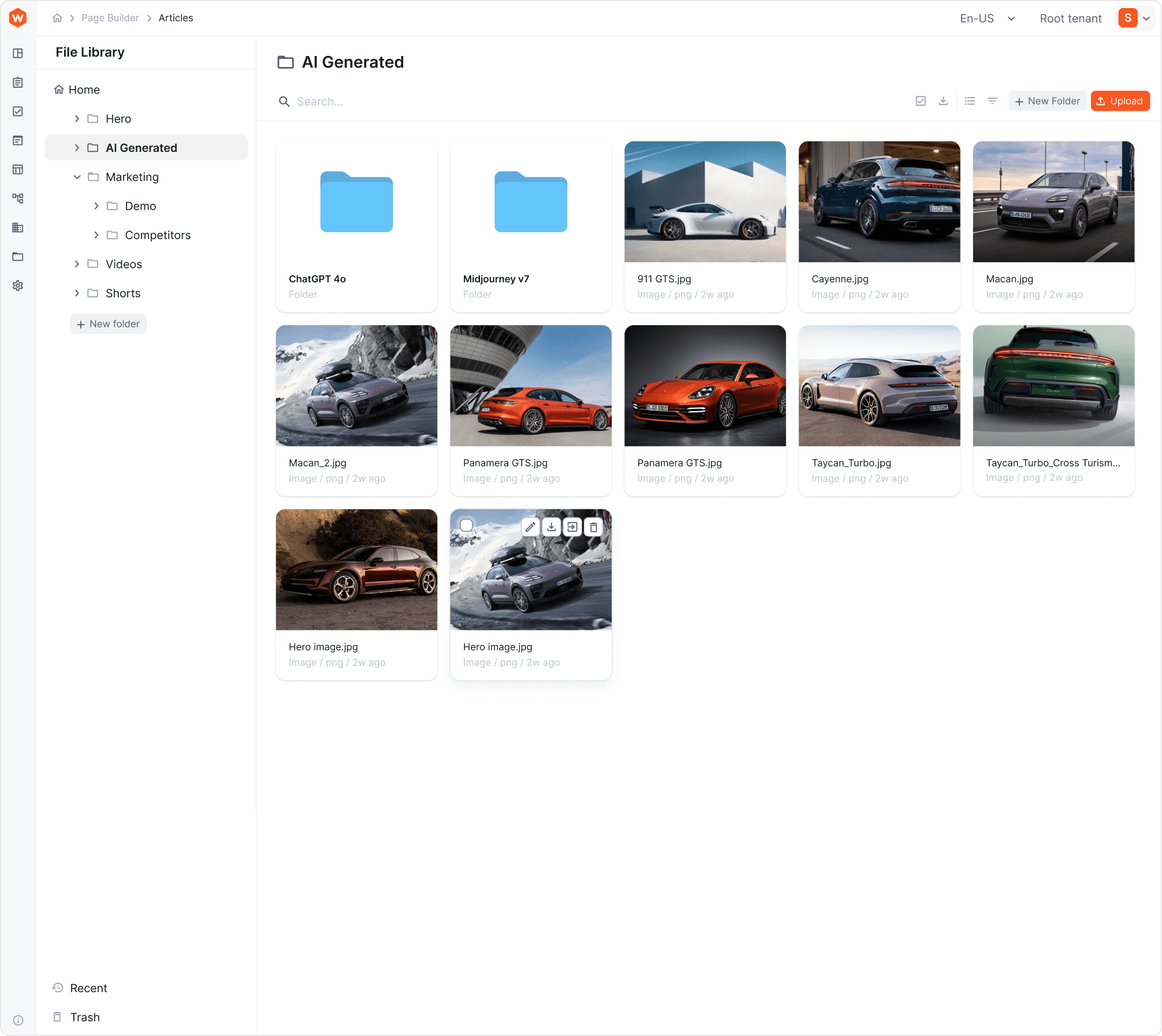 File Manager — Digital asset management with CDN delivery, folder structure, tagging, search. Integrated into CMS and Website Builder.
Publishing Workflows — Multi-step content approval with draft states, reviewer assignments, scheduled publishing, and audit trails.
Multi-Tenancy — Native tenant isolation (data, users, assets, permissions) from a single deployment. One instance can host thousands of tenants. Tenants are created and managed programmatically via GraphQL API. Supports hierarchical tenant structures (Root → Brand → Market, Root → Client → Site, etc.).
Webiny Framework — TypeScript framework with lifecycle hooks, dependency injection, GraphQL schema extensions, admin UI extension points, and infrastructure extensions. This is the core — it's what makes Webiny programmable rather than just configurable.
Architecture
┌─────────────────────────────────────────────────────┐
│                    Your AWS Account                  │
│                                                      │
│  ┌──────────┐  ┌──────────┐  ┌─────┐  ┌──────────┐ │
│  │  Lambda   │  │ DynamoDB │  │ S3  │  │CloudFront│ │
│  │ (API +   │  │ (Content │  │(Assets)│ │  (CDN)  │ │
│  │  business │  │  storage) │  │     │  │          │ │
│  │  logic)   │  │          │  │     │  │          │ │
│  └──────────┘  └──────────┘  └─────┘  └──────────┘ │
│                                                      │
│  Optional: OpenSearch (full-text search at scale)    │
│  Optional: VPC deployment, multi-AZ, custom config   │
│                                                      │
│  All provisioned automatically via Pulumi IaC         │
└─────────────────────────────────────────────────────┘
Stack: TypeScript, React, GraphQL, Node.js, Pulumi, AWS serverless services.
What you control: Everything. The IaC templates are open-source. Modify Lambda memory, add CloudWatch alarms, change VPC configuration, add custom AWS resources — it's your infrastructure.
What you don't manage: Servers. Patching. Scaling. Capacity planning. That's the point of serverless.
Quick Start
Prerequisites: Node.js 22+, Yarn, AWS account with programmatic access.
npx create-webiny-project my-project
cd my-project
yarn webiny deploy
First deploy takes 5–15 minutes (AWS provisioning). After that, you get an admin panel URL. Create your first admin account, and you're in.
Local development:
yarn webiny watch admin  # React dev server on localhost:3001
yarn webiny watch api    # Local Lambda execution environment
New team member onboarding:
git clone <your-repo>
yarn
# Ready to develop
AI-Assisted Development
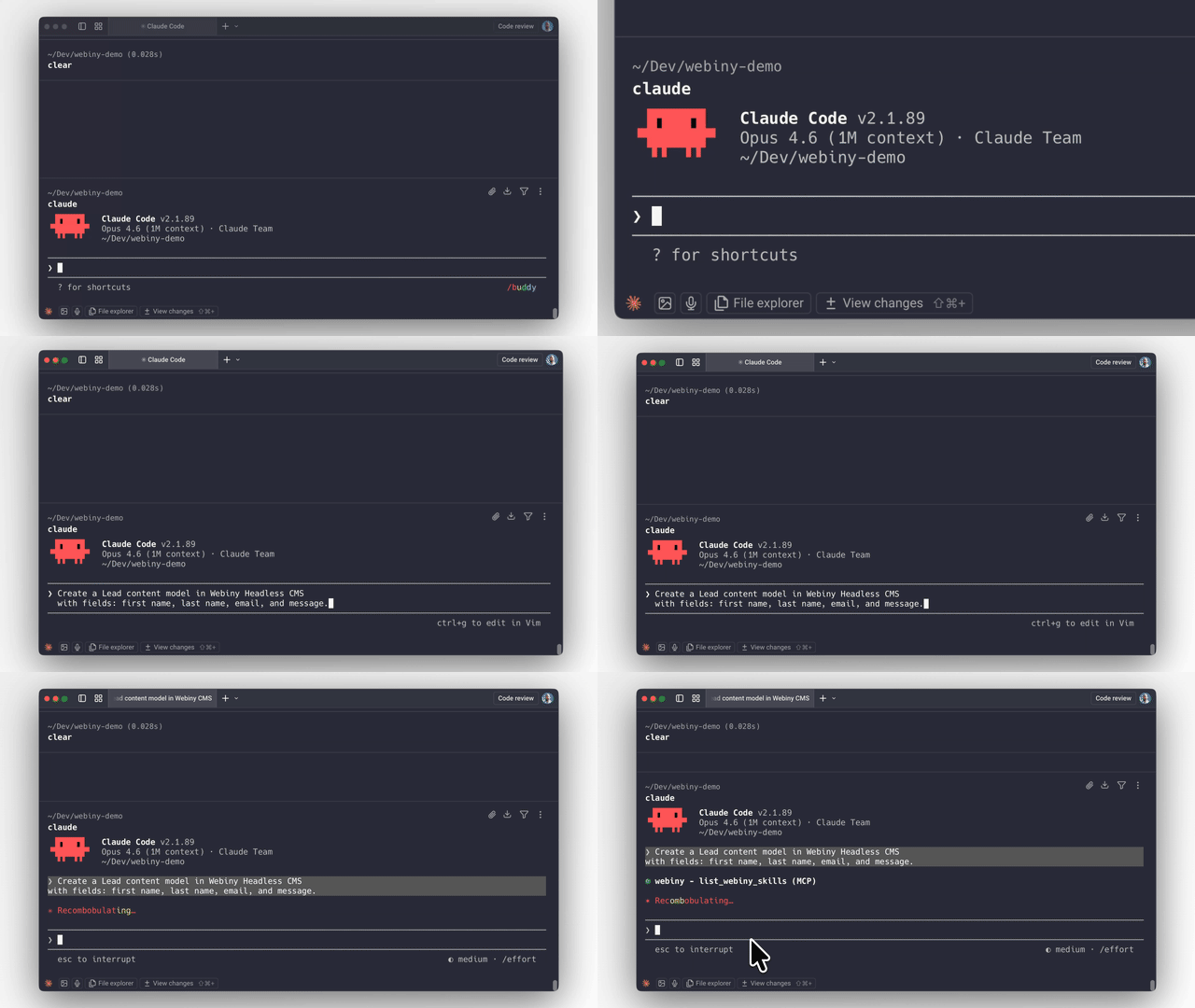
Webiny ships with an MCP server and AI skills that give AI coding agents (Claude Code, Cursor, Kiro, etc.) deep context about the platform's architecture, extension points, and patterns.
This means you can ask an AI agent to:
- Create content models with specific field types and validation
- Build lifecycle hooks that trigger on content events
- Extend the GraphQL API with custom queries and business logic
- Scaffold admin UI extensions with React components
- Wire integrations with external systems via lifecycle events
- Set up multi-tenant configurations programmatically
The AI produces code that follows Webiny's actual patterns because the MCP server gives it real knowledge of the framework — not generic guesses.
Why this works better on Webiny than most platforms: The framework is strongly typed with explicit extension points. AI-generated code either fits the type system or it doesn't compile. There's no ambiguous plugin API where the AI has to guess. Types enforce correctness.
Getting started with the MCP server:
# The MCP server runs locally inside your Webiny project
# Connect it to your AI coding tool of choice
# See docs for tool-specific setup instructions
→ AI-Assisted Development Guide
Extending Webiny
All customization happens in the extensions/ folder and is registered in webiny.config.tsx. Four extension types:
API Extensions — Custom GraphQL schemas, resolvers, lifecycle hooks, business logic.
// extensions/NotifyOnPublish.ts — Example: send Slack notification when content is published
class NotifyOnPublish implements CmsLifecycleHook.Interface {
  constructor(private slackService: SlackService.Interface) {}

  async afterPublish(params: AfterPublishParams): Promise<void> {
    await this.slackService.notify(`Content published: ${params.entry.title}`);
  }
}
Admin Extensions — Custom UI components, white-label branding, new views, tenant-specific themes. Standard React — use any patterns and libraries you already know.
Infrastructure Extensions — Modify AWS resources via Pulumi. Add Lambda functions, S3 buckets, CloudWatch alarms, or change existing resource configuration.
CLI Extensions — Custom commands for deployment workflows, data migrations, code generators.
When to Use Webiny
- You need a self-hosted CMS and don't want to run servers
- You need multi-tenancy as a first-class primitive, not a workaround
- You want to extend the CMS with real code (TypeScript), not just configuration
- You need to embed a CMS inside your own product (white-label)
- Data ownership and compliance requirements rule out SaaS CMS
- You want AI agents to be able to build on your content platform effectively
- You're on AWS (or planning to be)
When Not to Use Webiny
Be honest with yourself about these:
- Simple sites or blogs. Webiny is built for complex projects. If you need a blog with 10 pages, use something simpler.
- Not on AWS. Webiny only runs on AWS. No GCP, no Azure, no on-prem. If that's a dealbreaker, it's a dealbreaker.
- No TypeScript/React skills on the team. The entire extension model is TypeScript and React. If your team works in a different stack and doesn't want to adopt these, Webiny won't be a good fit.
- You want a no-code, plug-and-play SaaS CMS. Webiny is a platform for developers to build on. If you want zero development involvement, this isn't it.
Licensing
Community Edition — MIT license. Free forever. Includes Headless CMS, Website Builder, File Manager.
Business Edition — Commercial license starting at $79/mo. Adds RBAC, multi-tenancy, publishing workflows.
Enterprise Edition — Custom pricing. Adds SSO, audit logs, team management, priority support, managed hosting option.
All plans: unlimited content entries, pages, assets, API calls, roles, and workflows. No per-seat pricing traps. No API metering.
Project Structure
my-webiny-project/
  extensions/          # Your custom code lives here
  public/              # Admin app static assets
  webiny.config.tsx    # Project configuration (React components, type-safe)
  package.json
  tsconfig.json
Single package.json. Single tsconfig.json. Configuration in webiny.config.tsx uses React components for type safety and IDE auto-completion.
Key Commands
npx create-webiny-project <name>    # Create new project
yarn webiny deploy                   # Deploy to AWS
yarn webiny deploy core api          # Deploy specific apps
yarn webiny watch admin              # Local admin dev server
yarn webiny watch api                # Local Lambda dev environment
yarn webiny info                     # Show endpoints and URLs
yarn webiny destroy                  # Tear down all AWS resources
Resources
- Learn Webiny Course — Structured course covering architecture, extensions, deployment, and AI-assisted development
- Documentation — Full reference docs
- Community Slack — Community chat
- Website Builder Next.js Starter — Starter kit for rendering Webiny pages with Next.js
Contributing
We welcome contributions. See CONTRIBUTING.md for guidelines.
Before opening a PR, please check existing issues or start a discussion — it helps us give you better guidance and avoids duplicate work.